Security model
This page describes local sandboxes. For cloud behavior and limitations, see Compare local and cloud sandboxes.
Docker Sandboxes run AI agents in microVMs so they can execute code, install packages, and use tools without accessing host resources beyond those you share. Multiple isolation layers protect your host system.
Trust boundaries
The primary trust boundary is the microVM. The agent has full control inside the VM, including sudo access. The VM boundary prevents the agent from reaching anything on your host except what is explicitly shared.
What crosses the boundary into the VM:
- Host workspace directory: shared when you pass a workspace path or use
sbx run, which defaults to the current directory. A direct mount is read-write, so the agent edits your working tree in place. With--clone, your repository is mounted read-only and the agent works on a private clone. A mountless sandbox doesn't share a host workspace. - Credentials: the host-side proxy injects authentication headers into outbound HTTP requests. The raw credential values never enter the VM.
- Network access: outbound TCP connections to destinations allowed by network policy are proxied through the host.
- Shared agent skills: a persistent host-side store is mounted read-write at the agent's skills directory unless you opt out when creating the sandbox. Supported agents in other sandboxes mount the same store.
- MCP gateway traffic: supported agents connect to a host-side MCP gateway endpoint. The gateway brokers access to registered MCP servers.
What crosses the boundary back to the host:
- Workspace file changes: visible on your host in real time when you use a direct mount.
- Outbound TCP connections: sent to allowed destinations through the host proxy.
- Shared skill changes: written to the host-side store and visible to other sandboxes that share it.
Outside the workspace and shared skills store, the agent cannot access your host filesystem. It also cannot access your host Docker daemon, your host network directly, or any destination not allowed by network policy. Sandboxes cannot communicate directly over the network. Direct external UDP and ICMP are blocked at the network layer.
MCP servers are an explicit integration point. Remote MCP servers run outside Docker Sandboxes, and local stdio MCP servers run on the host, not inside the sandbox VM. An agent can invoke the tools those servers expose through the MCP gateway, subject to MCP policies when organization governance is active. Treat local MCP servers as trusted host integrations.
The following diagram shows a sandbox with a directly mounted workspace:
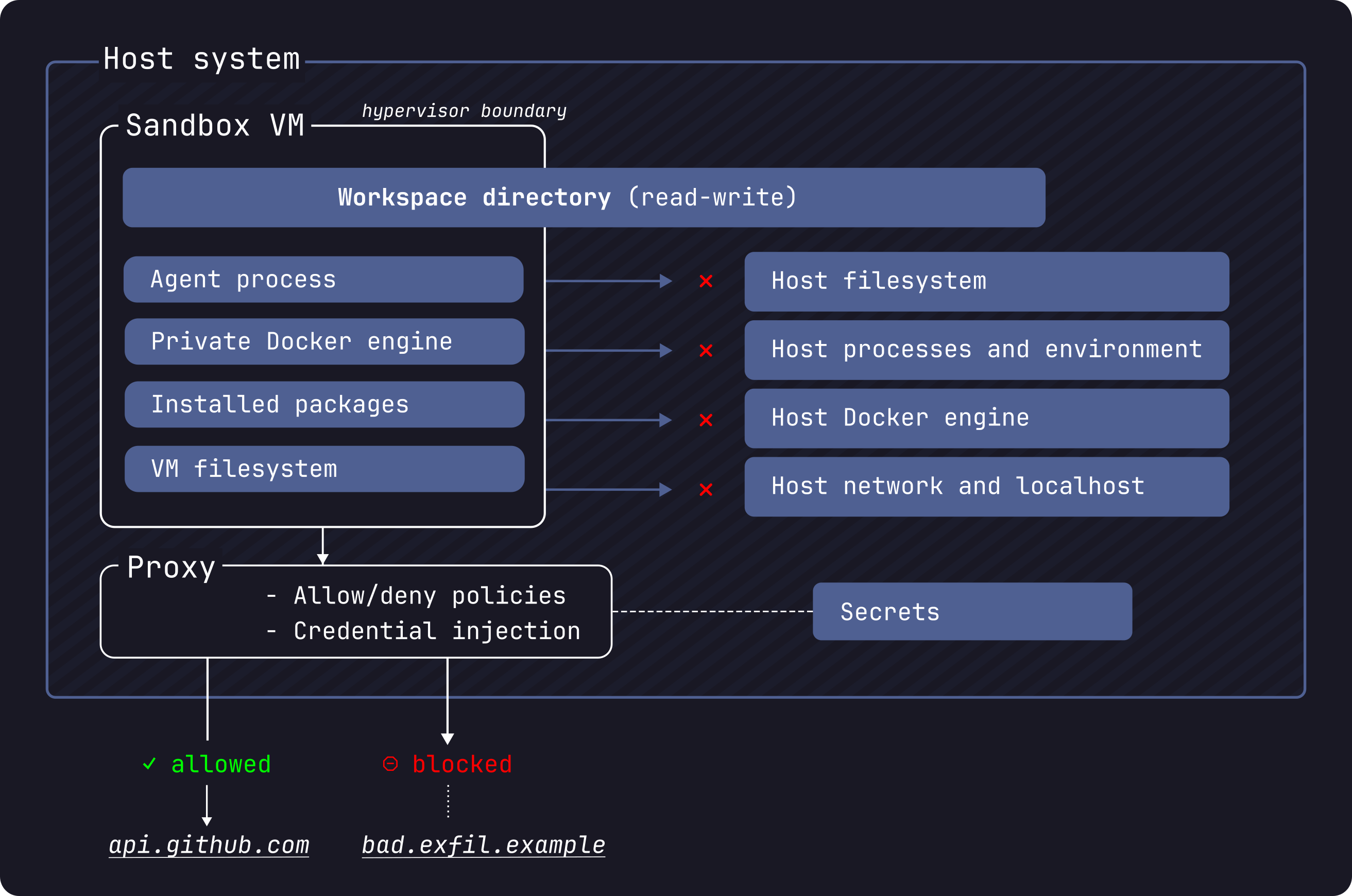
Isolation layers
The sandbox security model has five layers. See Isolation layers for technical details on each.
- Hypervisor isolation: separate kernel per sandbox. No shared memory or processes with the host.
- Network isolation: outbound TCP traffic is proxied through the host and governed by a deny-by-default policy. Direct external UDP and ICMP are blocked.
- Docker Engine isolation: each sandbox has its own Docker Engine with no path to the host daemon.
- Workspace isolation: a mountless sandbox has no host workspace mount. Clone mode gives the agent a private in-VM clone and mounts your repository read-only. Direct mode shares your working tree read-write.
- Credential isolation: API keys are injected into HTTP headers by the host-side proxy. Credential values never enter the VM.
What the agent can do inside the sandbox
Inside the VM, the agent has full privileges: sudo access, package installation, a private Docker Engine, and read-write access to its in-sandbox filesystem and configured workspace. Installed packages, Docker images, and other VM state persist across restarts. See Default security posture for the full breakdown of what is permitted and what is blocked.
Security considerations
The sandbox isolates the agent from your host system, but the agent's actions can still affect you through explicitly shared resources and allowed network channels.
In direct mode, workspace changes are live on your host. The agent edits the
same files you see on your host. This includes files that execute implicitly
during normal development: Git hooks, CI configuration, IDE task configs, AI
project configuration and settings, Makefile, package.json scripts, and
similar build files. Review changes before running any modified code. Note that
Git hooks live inside .git/ and do not appear in git diff output — check
them separately. See
Workspace isolation for the full list and
for the alternative clone-mode boundary.
The default allowed domains include broad wildcards. Some defaults like
*.googleapis.com cover many services beyond AI APIs. Run sbx policy ls to
see the full list of active rules, and remove entries you don't need. See
Default security posture.
Kits run install commands with root privileges inside the sandbox. To limit
supply-chain risk, sbx restricts kit installs to an allowlist of sources
that defaults to Docker Hub only. See
Restrict kit sources.
Shared agent skills create a narrow exception to cross-sandbox isolation. The store is mounted read-write, so one sandbox can modify instructions or scripts that an agent later uses in another sandbox. This doesn't expose the rest of the host filesystem or create a direct network path between sandboxes, but it does put participating sandboxes in the same trust boundary. See Share agent skills for details and the per-sandbox opt-out.
Local stdio MCP servers run outside the sandbox VM. If you register a local MCP server that starts a host process or host Docker container, that process or container uses host permissions and host isolation, not sandbox isolation. See MCP gateway.
Organization-wide control
On a single developer's machine, security and policy are configured locally —
for example, network and filesystem rules set with sbx policy. Admins can
move these controls to the organization level so that security, policy, and
access apply consistently across every developer's sandboxes, rather than
depending on local configuration.
See Governance for the controls available to organization admins.
Learn more
- Isolation layers: how hypervisor, network, Docker, workspace, and credential isolation work
- Default security posture: what a fresh sandbox permits and blocks
- Manage credentials: provide and manage API keys while keeping their values outside the sandbox
- Governance: configure network, filesystem, and MCP access controls locally or across your organization