Discover Trending Automotive Accessories and More
To see product details, add this item to your cart. You can always remove it later.
Shipper / Seller
Amazon.com
Amazon.com
Shipper / Seller
Amazon.com
Returns
30-day refund / replacement
This item can be returned in its original condition for a full refund or replacement within 30 days of receipt.
Read full return policy
Payment
Secure transaction
Your transaction is secure
We work hard to protect your security and privacy. Our payment security system encrypts your information during transmission. We don’t share your credit card details with third-party sellers, and we don’t sell your information to others. Learn more
Gift options
Available at checkout
Available at checkout This item is a gift. Change
At checkout, you can add a custom message, a gift receipt for easy returns and have the item gift-wrapped
Added to

Sorry, there was a problem.

There was an error retrieving your Wish Lists. Please try again.

Sorry, there was a problem.

List unavailable.
Kindle app logo image

Download the free Kindle app and start reading Kindle books instantly on your smartphone, tablet, or computer - no Kindle device required.

Read instantly on your browser with Kindle for Web.

Using your mobile phone camera - scan the code below and download the Kindle app.

QR code to download the Kindle App

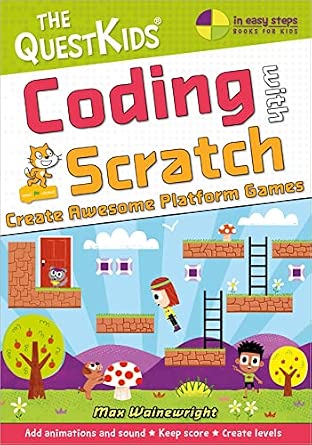
  • Coding with Scratch - Create Awesome Platform Games: A new title in The QuestKids children's series (In Easy Steps - The QuestKids)

Follow the author

Get new release updates & improved recommendations
Something went wrong. Please try your request again later.

Coding with Scratch - Create Awesome Platform Games: A new title in The QuestKids children's series (In Easy Steps - The QuestKids)

4.7 out of 5 stars (123)

Purchase options and add-ons

This is the second title in The QuestKids children’s series that was launched by In Easy Steps in 2018, designed to make learning fun for children.


Coding with Scratch – Create Awesome Platform Games shows kids how to create amazing platform games with Scratch. They will learn how to:


  • Use code to make a series of games where sprites leap from platform to platform.
  • Design different levels, draw graphics, and make simple animations.
  • Use variables to keep the score and to simulate gravity in games.
  • Make code blocks and functions.
  • Add sound to bring games to life.

Starting with an introduction about how Scratch works, this book is suitable for beginners but with lots of tips, challenges, and extensions for experienced Scratch coders.


To create the games in this book, children will need a desktop computer or a laptop. The games require a proper keyboard so will not work well on a tablet or iPad. It is recommended that children should be supervised when using the internet, especially when using a new website.


This edition is in UK English.

Discover teachers' picks. Discover%20teachers%27%20picks.

Frequently bought together

This item: Coding with Scratch - Create Awesome Platform Games: A new title in The QuestKids children's series (In Easy Steps - The QuestKids)
$14.99
Get it as soon as Thursday, Sep 17
In Stock
Ships from and sold by Amazon.com.
+
$9.99
Get it as soon as Thursday, Sep 17
Only 18 left in stock (more on the way).
Ships from and sold by Amazon.com.
+
$11.48
Get it as soon as Thursday, Sep 17
In Stock
Ships from and sold by Amazon.com.
Total price: $00
To see our price, add these items to your cart.
Details
Added to Cart
Some of these items ship sooner than the others.
Choose items to buy together.

Customers also bought or read

Loading...

From the Publisher

questkids standard in easy steps
questkids create platform games
questkids create platform games 2
questkids create platform games 3
Coding with Python - Create Amazing Graphics
Coding with HTML & JavaScript - Create Epic Computer Games
Create Your First Website in easy steps
Coding with the micro:bit - Create Cool Programming Projects
Coding with Scratch - Create Awesome Platform Games
Coding with Scratch - Create Fantastic Driving Games
Customer Reviews
4.2 out of 5 stars 27
4.5 out of 5 stars 22
4.4 out of 5 stars 34
4.5 out of 5 stars 58
4.7 out of 5 stars 123
4.6 out of 5 stars 28
Suggested Age Range: 7+ 7+ 7+ 7+ 7+ 7+
User Experience Level: Beginner Beginner Beginner Beginner Beginner Beginner
Description: Teaches children the basics of Python by creating exciting and colourful graphics Teaches children the basics of making games using HTML and JavaScript Unique storytelling style teaches children the basics of HTML and the key aspects of building a website Introduces children to the features of the BBC micro:bit, teaches them to code, and gives them 10 exciting projects to complete Children learn how to create simple platform games using Scratch Children learn how to create driving games using Scratch
Example Projects Include: Random Hoops, Drawing Emojis, and Recursive Spirals Dog 'n' Donuts, Snake, and Meteor Storm Temperature display, Trespasser alarm, and Radio communication Temperature display, Trespasser alarm, and Radio communication Banana Bonanza, Crazy Castle, and Pyramid Platform Parking Star, 3D Driver, and Snowmobile Slalom
About The Book: 80 pages, Full colour, A4 (21 cm x 30 cm) 80 pages, Full colour, A4 (21 cm x 30 cm) 72 pages, Full colour, 22 cm x 29 cm 96 pages, Full colour, A4 (21 cm x 30 cm) 80 pages, Full colour, A4 (21 cm x 30 cm) 80 pages, Full colour, A4 (21 cm x 30 cm)

Editorial Reviews

About the Author

Max Wainewright is an experienced computing teacher and has taught in the UK and in Singapore. Max has worked with national government agencies and local councils to support and inspect technology in schools. He teaches coding part-time in a London primary school, and runs an innovation group supporting other local schools. Max has a Computer Science degree and has significant experience of working in the EdTech industry. He co-founded one of the most successful small UK EdTech companies, and developed award-winning software that has been used by over 90% of UK primary schools. He has provided his expertise as an Educational Software consultant for major companies including Discovery and LEGO. Max has written dozens of books teaching kids to code. Many of these are top-sellers, reaching 100,000s of kids, and have been translated into over 20 languages.

Product details

  • Publisher ‏ : ‎ In Easy Steps Limited
  • Publication date ‏ : ‎ October 7, 2021
  • Edition ‏ : ‎ 1st
  • Language ‏ : ‎ English
  • Print length ‏ : ‎ 80 pages
  • ISBN-10 ‏ : ‎ 1840789549
  • ISBN-13 ‏ : ‎ 978-1840789546
  • Item Weight ‏ : ‎ 2.31 pounds
  • Reading age ‏ : ‎ 6 - 12 years
  • Dimensions ‏ : ‎ 8.27 x 0.2 x 11.69 inches
  • Part of series ‏ : ‎ The QuestKids
  • Grade level ‏ : ‎ 1 - 2
  • Best Sellers Rank: #311,101 in Books (See Top 100 in Books)
  • Customer Reviews:
    4.7 out of 5 stars (123)

About the author

Follow authors to get new release updates, plus improved recommendations.
Max Wainewright
Brief content visible, double tap to read full content.
Full content visible, double tap to read brief content.

After learning to code as a child I decided to study further and completed a Computer Science Degree at University in the UK. Following this I decided to train as a primary/elementary school teacher. I taught in the UK and in Singapore. After spending many years developing educational software for fun, I co-founded 2Simple Software in 2000. After many years of developing software, growing the company and working with some fabulous people I sold my part of the business in 2011.

Since then I've divided my working life in three ways. I teach, I write software and I write books.

At the moment I teach Coding in a London primary school and run a 'hub' for other local schools on ways to Teach Coding in the Classroom. I'm currently working on a few software projects of my own, but also do some work with Discovery Education and the London Grid for Learning. I've written quite a few books on Coding for kids. My most recent publication is "25 Scratch 3 Games for Kids", but I'm working on a couple of new ones too.

When I'm not working I like spending time with my wife and my two teenage kids, plus my friends and wider family. I also enjoy reading, cooking, playing the guitar and creating things.

If you have any queries about the activities in my books, or are getting a bit stuck then please get in touch! I do regularly get invited to speak at educational conferences, or to make author visits to schools - please let me know if you are interested in discussing either of these.