
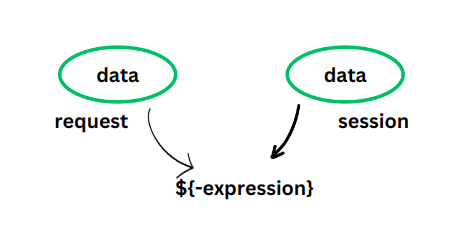
Expression Language (EL) is a feature introduced in JSP 2.0 to simplify accessing data in JSP pages. It allows developers to retrieve values from objects like request, session, and application without writing Java code. EL improves readability and reduces the use of scriptlets.
- Eliminates the need for Java scriptlets (<% %>)
- Provides simple syntax to access data from different scopes
Syntax:
${expression}
Why Use Expression Language (EL)?
- Expression Language makes the data access work much easier.
- The data stored in the objects can be directly retrieved with the help of the Expression Language
- The data is stored in the JavaBeans Component.
- It allows to access a bean by following a short syntax, It can also include literals.
Normally, to get data from these objects, we need to write extra code. For example:
1. To get data from a request, we write.
request.getParameter("name")
2. To get data from a session, we write.
session.getAttribute("user")
This makes the code longer and harder to read. But with Expression Language, we can do the same in a much simpler way:
${param.name}
${sessionScope.user}
Common Usage Patterns
1. Variable Access: Used to access the value of a variable
${variableName}
${xxxScope.variableName}
2. Property Access: Used to access the value of a property
${object.property}
3. Arithmetic and Logical Operators: Performs arithmetic or logical operations on numbers
${num1>num2}
${num1+num2}
4. Conditional Expressions: Evaluate a condition and return one of two values.
${condition ? value1 : value2 }
5. Collection Iterator : Iterates over a collection and prints each item
<c:forEach var="item" items = "${collection}" > ${item} </c:forEach >
6. Accessing Request Parameters: Accesses the value of a request parameter
${param. parametersName}
How to use Expression Language?
1. Request Object
This code snippet demonstrates how to access and display the value of a request attribute using Expression Language (EL). It sets the request attribute request_name to "GeeksforGeeks" and then displays its value using EL within an HTML element.
Before Expression Language:
<!DOCTYPE html>
<html>
  <head>
    <title>Expression Language</title>
  </head>
  <!--(jsp code)-->
  <body>
     <%
       request.setAttribute("request_name", "GeeksforGeeks");
       out.println(request.getAttribute("request_name"));
      %>
  </body>
  <!--(jsp code)-->
</html>
Output:
GeeksforGeeksAfter Expression Language:
<!DOCTYPE html>
<html>
  <head>
    <title>Expression Language</title>
  </head>

  <body>
    <% request.setAttribute("request_name", "GeeksforGeeks"); %>
    <h3>${requestScope.request_name}</h3>
  </body>
</html>
Output:
GeeksforGeeks2. Using the instanceof session as object
This code snippet showcases how to access and display the value of a session attribute using EL. It sets the session attribute request_name to "GeeksforGeeks" and then displays its value using EL within an HTML element.
Before Expression Language:
<!DOCTYPE html>
<html>
  <head>
    <title>Expression Language</title>
  </head>

  <body>
     <%
       session.setAttribute("request_name", "GeeksforGeeks");
       out.println(session.getAttribute("request_name"));
      %>
  </body>

</html>
Output:
GeeksforGeeksAfter Expression Language:
<!DOCTYPE html>
<html>
  <head>
    <title>Expression Language</title>
  </head>

  <body>
    <% request.setAttribute("request_name", "GeeksforGeeks"); %>
      <h3> ${requestScope.request_name} </h3>
  </body>

</html>
output:
GeeksforGeeksSome implicit objects in Expression Language are:
- requestScope: contains attributes that are specific to the current HTTP request.
- param: provides access to request parameters sent to the server.
- paramValues: provides access to request parameter values as an array.
- sessionScope: Contains attributes that are specific to the current user session.
- pageContent: Provides access to various objects and methods related to the JSP page content.
- pageScope: Contains attributes that are specific to the current JSP Page.
- applicationScope: Contains attributes that are specific to the entire web application, etc.
Expression Language also works for
- Arithmetic Operators: ( +, - , * , / , % )
- Logical Operators: ( &&, ||, ! )
- Relational Operators: (==, !=, >, <, <=, >= )
- Conditional Operator: ( ?, : )
- Empty Operator : (empty, used to check if a value is empty, such as null or an empty collection/string)
3. Using Expression Language in forms
Arithmetic Expression
This code snippet demonstrates the use of EL for performing arithmetic operations. It evaluates the expression10+90and displays the result inline within an HTML element.
<!DOCTYPE html>
<html>
  <head>
    <title>Page Title</title>
  </head>

  <body>
    ${10+90}
  </body>

</html>
output:
100Reserved words for Expression language:
These keywords cannot be used as variable names in Expression Language: ge, ne, lt, le, gt, eq, true, false, null, and, or, div, not, instanceof, mod, empty.
Conditional Expression Example
<%@ page language="java" contentType="text/html; charset=UTF-8" pageEncoding="UTF-8" %>
<!DOCTYPE html>
<html>
<head>
    <title>Expression Language</title>
</head>
<body>
    <h1>Hey, ${user.name}</h1>
    <p>Age, ${user.age}</p>

    <c:set var="vote" value="${user.age >= 18 ? "yes" : "no"}" />
    <p>${vote} You are eligible to vote.</p>
</body>
</html>
Output:
Hey, Shekhar
Age, 20
yes You are eligible to vote.