

Spring Data JPA simplifies database operations in Spring Boot applications by reducing boilerplate code and providing built-in methods for data access. In this article, we will learn how to retrieve records from a MySQL database using the findById() method, which fetches data based on the primary key and returns an Optional for safe null handling.
- findById() is a predefined method of JpaRepository
- No need to write custom SQL queries
Step-by-Step Implementation
Follow these steps to create, configure, and run a Spring Boot application that retrieves records from a MySQL database using findById() method in Spring Data Jpa.
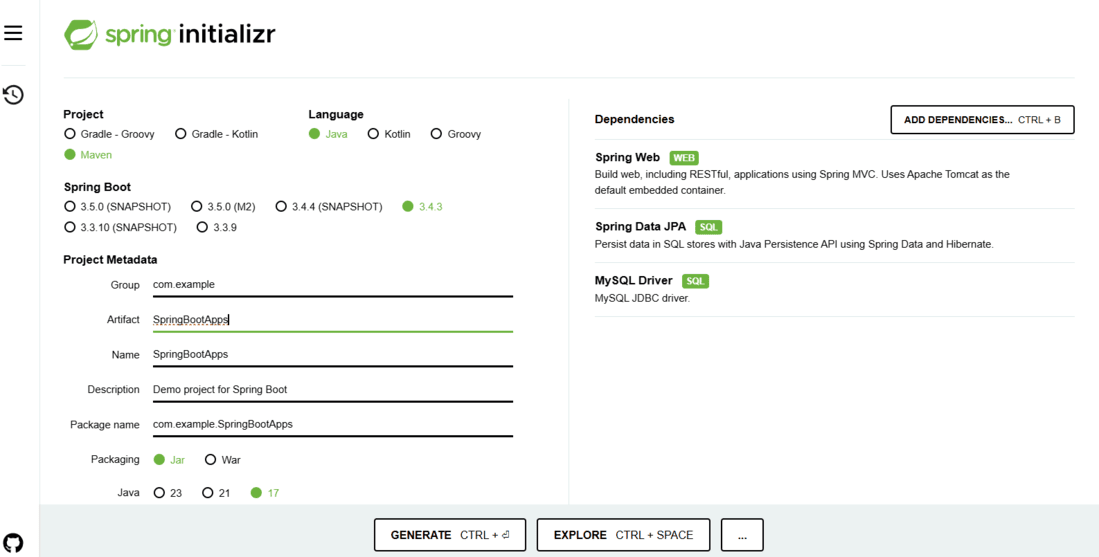
Step 1: Create a Spring Boot Project
Go to Spring Initializr and generate a Spring Boot project with the following dependencies:
- Spring Web
- Spring Data JPA
- MySQL Driver
Step 2: Open project on IDE
Extract the zip file. Now open a suitable IDE and then go to File -> New -> Project from Existing Sources and select pom.xml. Click on import changes on prompt and wait for the project to sync.

Note: Ensure the same JDK version is selected while importing the Maven project. Also, configure the database connection in application.properties before running the application.
Step 3: Add Required Dependencies
Modify the pom.xml file to include the necessary dependencies:
<dependencies>
    <!-- Spring Boot Data JPA -->
    <dependency>
        <groupId>org.springframework.boot</groupId>
        <artifactId>spring-boot-starter-data-jpa</artifactId>
    </dependency>

    <!-- Spring Boot Web Starter -->
    <dependency>
        <groupId>org.springframework.boot</groupId>
        <artifactId>spring-boot-starter-web</artifactId>
    </dependency>

    <!-- MySQL Connector -->
    <dependency>
    <groupId>com.mysql</groupId>
    <artifactId>mysql-connector-j</artifactId>
    <scope>runtime</scope>
</dependency>
</dependencies>
Step 4: Configure Database Connection
- All required configurations should be specified in the application.properties file of the Spring project.
- Add the following properties in src/main/resources/application.properties
spring.datasource.url=jdbc:mysql://localhost:3306/userdb
spring.datasource.username=root # replace with your MySQL username
spring.datasource.password=yourpassword # replace with your MySQL password
spring.jpa.hibernate.ddl-auto=update
Project Directory Structure:

Step 5: Create the Entity Class
Create a User entity in src/main/java/com/example/model/User.java:
import jakarta.persistence.*;

@Entity
public class User {
    @Id
    @GeneratedValue(strategy = GenerationType.IDENTITY)
    private int id;
    private String name;

    // Constructors
    public User() {}

    public User(String name) {
        this.name = name;
    }

    // Getters and Setters
    public int getId() {
        return id;

    }
    public String getName() {
        return name;

    }
    public void setName(String name) {
        this.name = name;

    }
}
Step 6: Create Repository Interface
Define a repository interface in src/main/java/com/example/repository/UserRepository.java:
import org.springframework.data.jpa.repository.JpaRepository;
import com.example.model.User;

public interface UserRepository extends JpaRepository<User, Integer> {}
Step 7: Implement Service Class
Create a service to interact with the database in src/main/java/com/example/service/UserService.java:
import org.springframework.beans.factory.annotation.Autowired;
import org.springframework.stereotype.Service;
import com.example.model.User;
import com.example.repository.UserRepository;
import java.util.Optional;

@Service
public class UserService {
    @Autowired
    private UserRepository userRepository;

    public Optional<User> findUserById(int id) {
        return userRepository.findById(id);
    }
}
Step 8: Create Controller for API
Implement a controller to handle HTTP requests in src/main/java/com/example/controller/UserController.java:
import org.springframework.beans.factory.annotation.Autowired;
import org.springframework.web.bind.annotation.*;
import com.example.model.User;
import com.example.service.UserService;
import java.util.Optional;

@RestController
@RequestMapping("/users")
public class UserController {
    @Autowired
    private UserService userService;

    @GetMapping("/{id}")
    public Optional<User> getUserById(@PathVariable int id) {
        return userService.findUserById(id);
    }
}
Step 9: Run the Application
Start the Spring Boot application using:
mvn spring-boot:run
Output:
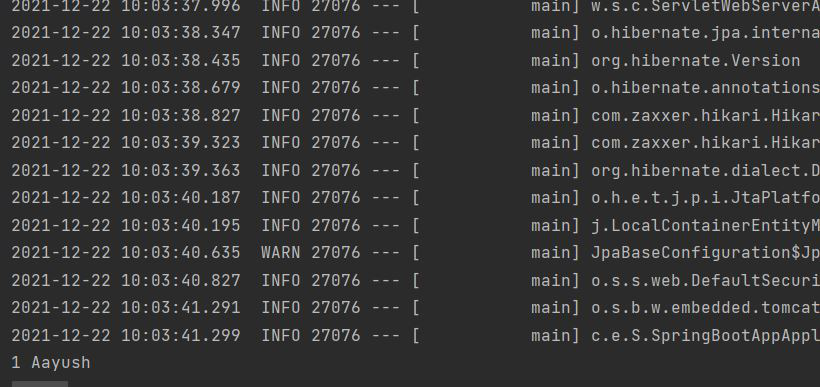
Once the application is running, test the API using Postman or a browser:
GET http://localhost:8080/users/1
Expected Output (JSON Response):
{
"id": 1,
"name": "Aayush"
}