

In computing, booting is starting up a computer or computer appliance until it can be used. It can be initiated by hardware such as a button press, or by software command. After the power is switched on the computer is relatively dumb, and can read only part of its storage called Read-only memory.
- There a small program is stored called firmware. It does power-on self-tests, and most importantly, allows accessing other types of memory, like hard disk and main memory.
- The firmware loads bigger programs into the computer's main memory and runs it.
- In general purpose computers, but as well in smart phones, tablets, optionally a boot manager is run.
Android Boot Process
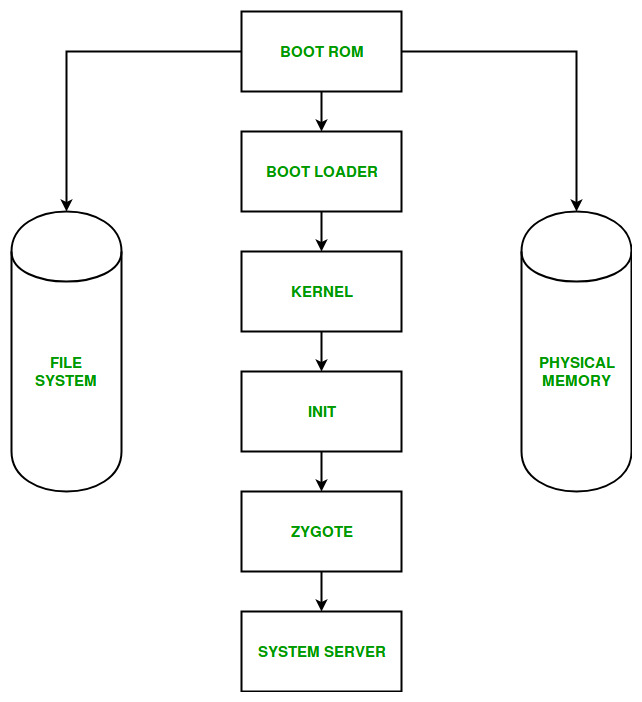
Android Boot Process includes the following six steps:
- Boot ROM: This is the first stage of the boot process. When the device is powered on, the Boot ROM code starts executing from a predefined location in read-only memory. It performs basic hardware initialization and loads the next-stage bootloader from the device's storage.
- Bootloader: The bootloader is low-level software that initializes essential hardware and prepares the device to start Android. It loads and verifies the Android kernel and other required boot components. Modern Android devices may also use Android Verified Boot (AVB) to verify the integrity and authenticity of the software before continuing the boot process.
- Kernel: The bootloader loads the Android Linux kernel into memory and starts its execution. The kernel initializes memory management, process scheduling, device drivers, security mechanisms, and other hardware-related components. It then starts the first userspace process,
init. - Init: The
initprocess is the first userspace process and is the parent of most other processes. It initializes the Android userspace environment, mounts required filesystems, sets up device nodes and properties, and processes initialization scripts such asinit.rcand other.rcfiles. It also starts essential native services and eventually launches Zygote. - Zygote and Android Runtime (ART): Zygote is a core Android process that serves as the starting point for application processes. It initializes ART, preloads commonly used classes and resources, and waits for requests to start applications. When an application needs to be launched, Zygote creates a new process using
fork(), allowing the new process to share preloaded resources efficiently. This reduces application startup time. - System Server: Zygote starts the System Server, which runs many of Android's core system services, including services responsible for activities, packages, windows, power, and other system functions. These services are initialized in a specific order. Once the essential system services and framework components are running, Android completes the boot process and becomes ready for normal use.