

Spinner is a widget that is used to select an item from a list of items. When the user tap on a spinner a drop-down menu is visible to the user. In this article, we will learn how to add custom spinner in the app.
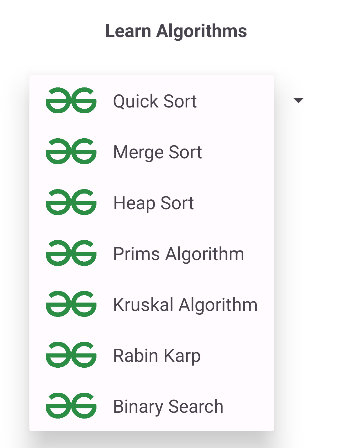
Steps of Implementing Custom Spinner
Step 1: Create a new layout for each item in Spinner
Create a new file item_spinner.xml and add the following code. Each item in spinner will have this layout, an image view and a textview.
item_spinner.xml:
<?xml version="1.0" encoding="utf-8"?>
<androidx.constraintlayout.widget.ConstraintLayout xmlns:android="http://schemas.android.com/apk/res/android"
    xmlns:app="http://schemas.android.com/apk/res-auto"
    android:layout_width="match_parent"
    android:layout_height="match_parent">

    <ImageView
        android:id="@+id/image_view"
        android:layout_width="100dp"
        android:layout_height="100dp"
        android:src="@drawable/gfg_logo"
        app:layout_constraintStart_toStartOf="parent"
        app:layout_constraintTop_toTopOf="parent" />

    <TextView
        android:id="@+id/text_view"
        android:layout_width="wrap_content"
        android:layout_height="wrap_content"
        android:layout_marginStart="24dp"
        android:gravity="center"
        android:text="Quick Sort"
        android:textSize="24sp"
        app:layout_constraintBottom_toBottomOf="@+id/image_view"
        app:layout_constraintStart_toEndOf="@+id/image_view"
        app:layout_constraintTop_toTopOf="@+id/image_view" />

</androidx.constraintlayout.widget.ConstraintLayout>
Design UI:

Step 2: Create a new model class for each item in Spinner
Create a new file Item.kt and add the below following code. This is the model class which is used to get the name when the user clicks on any item. Here we define a constructor and a getName method in case of java which returns the name of the object.
package org.geeksforgeeks.demo;

public class Item {
    private String name;

    public Item(String name)
    {
        this.name = name;
    }

    public String getName()
    {
        return name;
    }
}
package org.geeksforgeeks.demo

class Item (
    val name: String
)
Step 3: Create a new adapter class for Spinner
Create a new file Adapter and add the following code. Here we define our own Adapter class. It maps the item with its view, providing access to the item`s data in the list of spinner.
package org.geeksforgeeks.demo;

import android.content.Context;
import android.view.LayoutInflater;
import android.view.View;
import android.view.ViewGroup;
import android.widget.ArrayAdapter;
import android.widget.TextView;
import java.util.ArrayList;

public class Adapter extends ArrayAdapter<Item> {

    public Adapter(Context context, ArrayList<Item> list) {
        super(context, 0, list);
    }

    @Override
    public View getView(int position, View convertView, ViewGroup parent) {
        return initView(position, convertView, parent);
    }

    @Override
    public View getDropDownView(int position, View convertView, ViewGroup parent) {
        return initView(position, convertView, parent);
    }

    private View initView(int position, View convertView, ViewGroup parent) {
        // Inflate the view only if it's null to optimize performance
        if (convertView == null) {
            convertView = LayoutInflater.from(getContext()).inflate(R.layout.item_spinner, parent, false);
        }

        // Find TextView and set the item name
        TextView textViewName = convertView.findViewById(R.id.text_view);
        Item currentItem = getItem(position);

        if (currentItem != null) {
            textViewName.setText(currentItem.getName());
        }

        return convertView;
    }
}
package org.geeksforgeeks.demo

import android.content.Context
import android.view.LayoutInflater
import android.view.View
import android.view.ViewGroup
import android.widget.ArrayAdapter
import android.widget.TextView

class Adapter (
    context: Context,
    list: ArrayList<Item>
) :
    ArrayAdapter<Item?>(context, 0, list as List<Item>) {
    override fun getView(
        position: Int,
        convertView: View?,
        parent: ViewGroup
    ): View {
        return initView(position, convertView, parent)
    }


    override fun getDropDownView(
        position: Int,
        convertView: View?,
        parent: ViewGroup
    ): View {
        return initView(position, convertView, parent)
    }

    private fun initView(
        position: Int, convertView: View?,
        parent: ViewGroup
    ): View {
        val view = convertView ?: LayoutInflater.from(context).inflate(R.layout.item_spinner, parent, false)

        val textViewName = view.findViewById<TextView>(R.id.text_view)
        val currentItem: Item? = getItem(position)

        currentItem?.let {
            textViewName.text = it.name
        }
        return view
    }
}
Step 4: Working with activity_main.xml
Add the following code in activity_main.xml file. Here we add our spinner on the layout. This will add a textview and a spinner.
activity_main.xml:
<androidx.constraintlayout.widget.ConstraintLayout
    xmlns:android="http://schemas.android.com/apk/res/android"
    xmlns:app="http://schemas.android.com/apk/res-auto"
    xmlns:tools="http://schemas.android.com/tools"
    android:id="@+id/main"
    android:layout_width="match_parent"
    android:layout_height="match_parent"
    android:background="@color/white"
    android:orientation="vertical"
    tools:context=".MainActivity">

    <TextView
        android:layout_width="match_parent"
        android:layout_height="wrap_content"
        android:layout_marginBottom="32dp"
        android:text="Learn Algorithms"
        android:textAlignment="center"
        android:textSize="18sp"
        android:textStyle="bold"
        app:layout_constraintBottom_toTopOf="@+id/spinner_algorithm"
        app:layout_constraintEnd_toEndOf="parent"
        app:layout_constraintStart_toStartOf="parent" />

    <Spinner
        android:id="@+id/spinner_algorithm"
        android:layout_width="wrap_content"
        android:layout_height="wrap_content"
        app:layout_constraintBottom_toBottomOf="parent"
        app:layout_constraintEnd_toEndOf="parent"
        app:layout_constraintStart_toStartOf="parent"
        app:layout_constraintTop_toTopOf="parent" />

</androidx.constraintlayout.widget.ConstraintLayout>
Design UI:

Step 5: Working with MainActivity.kt
Now add the following code in the MainActivity.kt file. Here Adapter class object is made and it acts as an adapter for the spinner and add onItemSelectedListener to our spinner. When the user tap on any item of the spinner, it gets invoked. It shows a toast with the name of the item that user selected from the list.
package org.geeksforgeeks.gfgcustomspinner;

import android.os.Bundle;
import android.view.View;
import android.widget.AdapterView;
import android.widget.Spinner;
import android.widget.Toast;
import androidx.appcompat.app.AppCompatActivity;
import java.util.ArrayList;

public class MainActivity extends AppCompatActivity {

    ArrayList<AlgorithmItem> algorithmItems;
    AlgorithmAdapter adapter;

    @Override
    protected void onCreate(Bundle savedInstanceState)
    {
        super.onCreate(savedInstanceState);
        setContentView(R.layout.activity_main);

        initList();
        Spinner spinner = findViewById(R.id.spinner_algorithm);

        // we pass our item list and context to our Adapter.
        adapter = new AlgorithmAdapter(this, algorithmItems);
        spinner.setAdapter(adapter);

        spinner.setOnItemSelectedListener(
            new AdapterView.OnItemSelectedListener() {

        @Override
        public void onItemSelected(AdapterView<?> parent, View view,
            int position, long id)
        {
            // It returns the clicked item.
            AlgorithmItem clickedItem = (AlgorithmItem)parent.getItemAtPosition(position);

            String name = clickedItem.getAlgorithmName();

            Toast.makeText(MainActivity.this,name + " selected",
                            Toast.LENGTH_SHORT).show();
        }

        @Override
        public void onNothingSelected(AdapterView<?> parent)
        {}
        });
    }

    // It is used to set the algorithm names to our array
    // list.
    private void initList()
    {
        algorithmItems = new ArrayList<>();
        algorithmItems.add(new AlgorithmItem("Quick Sort"));
        algorithmItems.add(new AlgorithmItem("Merge Sort"));
        algorithmItems.add(new AlgorithmItem("Heap Sort"));
        algorithmItems.add(new AlgorithmItem("Prims Algorithm"));
        algorithmItems.add(new AlgorithmItem("Kruskal Algorithm"));
        algorithmItems.add(new AlgorithmItem("Rabin Karp"));
        algorithmItems.add(new AlgorithmItem("Binary Search"));
    }
}
package org.geeksforgeeks.demo;

import android.os.Bundle;
import android.view.View;
import android.widget.AdapterView;
import android.widget.Spinner;
import android.widget.Toast;
import androidx.appcompat.app.AppCompatActivity;
import java.util.ArrayList;

public class MainActivity extends AppCompatActivity {

    private ArrayList<Item> items;
    private Adapter adapter;

    @Override
    protected void onCreate(Bundle savedInstanceState) {
        super.onCreate(savedInstanceState);
        setContentView(R.layout.activity_main);

        // Initialize the item list
        items = new ArrayList<>();
        items.add(new Item("Quick Sort"));
        items.add(new Item("Merge Sort"));
        items.add(new Item("Heap Sort"));
        items.add(new Item("Prims Algorithm"));
        items.add(new Item("Kruskal Algorithm"));
        items.add(new Item("Rabin Karp"));
        items.add(new Item("Binary Search"));

        // Set up the spinner
        Spinner spinner = findViewById(R.id.spinner_algorithm);

        // Initialize and set the custom adapter
        adapter = new Adapter(this, items);
        spinner.setAdapter(adapter);

        // Set item selected listener for spinner
        spinner.setOnItemSelectedListener(new AdapterView.OnItemSelectedListener() {
            @Override
            public void onItemSelected(AdapterView<?> parent, View view, int position, long id) {
                // Get the selected item and display a Toast
                Item clickedItem = (Item) parent.getItemAtPosition(position);
                String name = clickedItem.getName();
                Toast.makeText(MainActivity.this, name + " selected", Toast.LENGTH_SHORT).show();
            }

            @Override
            public void onNothingSelected(AdapterView<?> parent) {
                // Do nothing if no item is selected
            }
        });
    }
}