

A code editor is an application used to write, modify, and organize source code. Modern code editors may also provide features such as code completion, syntax highlighting, debugging, and extensions.
- Editing features: Help developers write and navigate code efficiently.
- Extensions: Add language support, formatting tools, and other development features.
- Development tools: Some editors integrate debugging and version control, while others rely on external tools or extensions.
Coding Tools for a Seamless Developer Experience
1. Visual Studio Code
Visual Studio Code also known as VS Code is an open source code editor by Microsoft with provided support for Windows, Mac and Linux OS. It is a powerful code editing software and provides extension which further assistance in programming. VS Code supports popular programming languages like C, C++, HTML, CSS, JAVA, Python and much more.

- IntelliSense: Provides code completion, parameter information, and suggestions for supported languages.
- Debugging: Supports breakpoints, variable inspection, and step-by-step debugging when the required language tools are configured.
- Extensions: Adds language support, themes, formatters, and development tools.
- Source control: Integrates with Git to help manage code changes.
- Integrated terminal: Allows developers to run commands without leaving the editor.
2. Zed
Zed is an open-source code editor designed for performance and collaborative development. It supports Windows, macOS, and Linux and includes tools for code navigation, collaboration, and AI-assisted workflows.

- Code navigation: Helps developers move through project files and locate code definitions.
- Real-time collaboration: Allows multiple developers to work on a shared project.
- Language support: Uses language-server integrations to provide features such as code completion and diagnostics.
- AI tools: Supports AI-assisted editing and development workflows.
- Multi-pane editing: Allows developers to work with several files or views at once.
3. Sublime Text
Sublime Text Editor is a famous cross-platform code editing software with support for programming in multiple language by means of plug-ins. It is available for Window, Mac and Linux as well.
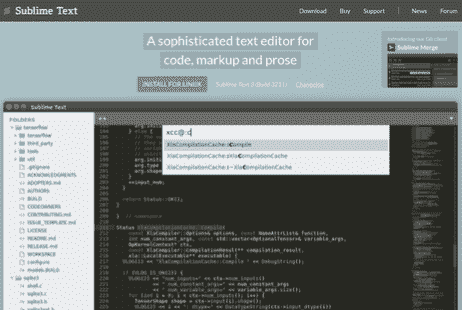
- Multiple selections: Allows several parts of a file to be edited simultaneously.
- Command palette: Provides quick access to editor commands and actions.
- Navigation: Helps locate files, lines, and symbols in a project.
- Customization: Supports themes, settings, and packages for additional functionality.
- Split editing: Allows multiple files or sections to be viewed side by side.
4. Notepad++
Notepad++ is a very light-weight code editing software. If you are looking for saving computer resources for RAM hungry code editors, then Notepad++ is a must try. It supports Windows and Linux.

- Syntax highlighting: Makes supported programming languages easier to read.
- Auto-completion: Suggests text and other supported completions while editing.
- Multiple tabs: Allows several files to be opened in the same window.
- Search and replace: Helps locate and update text across files.
- Plugins: Adds selected features through its plugin system.
Choosing the Right Code Editor
The best code editor depends on your project, preferred programming language, computer resources, and development workflow.
- Project requirements: Choose an editor that supports the language, extensions, and tools required for your project.
- System resources: If your computer has limited resources, compare editors using your actual workload. Extensions and large projects can affect memory use and performance.
- Language support: Check whether the editor provides suitable syntax highlighting, code completion, debugging, and language-server integration.
- Collaboration: If you work in a team, consider built-in collaboration or compatible extensions.
- Customization: Look for themes, keyboard shortcuts, formatting tools, and extensions that match your workflow.
Also read: