
The event has now concluded, and the results will be announced by 26th March 2026 - but we have more surprises for you. Keep posting on GfG Connect and continue sharing valuable insights.
- ₹200 Zomato Voucher (Daily Bonus): The top 3 contributors every day will receive a INR 200 Zomato voucher each, selected based on the highest engagement on their posts along with meaningful interaction on fellow participants posts.
- Internship Opportunity: Consistent contributors who regularly post high-quality content and generate strong engagement can get a chance for an in-office internship.
Note: Posts published on or before 20th March 2026 will be considered for the rewards and internship opportunity.
GeeksforGeeks brings back Technical Scripter - GfG Connect Edition 2026, a one-month content creation challenge on GfG Connect that encourages learners, developers, and professionals to share meaningful experiences, insights, and ideas with the tech community. Following the success of previous editions, the 2026 edition is bigger, longer, and more rewarding, with a focus on consistency, quality, and real-world learning.
From work and interview experiences to campus stories, competitive exam journeys, puzzles, tech news, and innovative ideas, creators are encouraged to post regularly and engage with the community. Participate actively on GfG Connect and stand a chance to win daily rewards, streak-based incentives, editor’s picks, and major cash prizes from a total rewards pool of ₹10 Lakh+.
Liking and commenting on fellow technical writers' posts will be a key factor and will carry significant weight in the daily winner selection. We recommend you like and comment on other technical writers' posts during the event. This builds community interaction, impresses algorithms to increase your post's visibility, and also counts toward the winner criteria. You may find recent posts here.
Event Details
The Technical Scripter - Connect Edition focuses on short, crisp, high-value posts, similar to professional social media updates.
Event Duration - 27th Jan to 27th Feb 2026
Result Announcement - 26th March 2026
Rewards
Rewards will be given only to participants who have completed their GfG profile.
1. Daily Winners: Each day, the most engaging post from each category(refer below) will be rewarded.
- 10 Categories – 10 Daily Winners
- Reward: INR 500 per winner
- Criteria: Highest Engagement (Likes + Comments)
2. Posting Streak Rewards: Participants maintaining consistent posting streaks will be rewarded as follows:
- 15-Day Posting Streak: GfG T-Shirt + INR 500
- 30-Day Posting Streak: GfG T-Shirt + INR 1500
3. Editor's Choice: Exceptional content may be selected by the editorial team.
- Reward: INR 1000
- Bonus: Opportunity to get the article published on GeeksforGeeks
4. Mega Engagement Rewards: At the end of the event, top performers will be rewarded based on overall engagement and consistency.
- 1st Prize: INR 20000
- 2nd Prize: INR 15000
- 3rd Prize: INR 10000
- 4th–10th Prize: INR 7500
- 11th–25th Prize: INR 5000
- 26th–50th Prize: INR 2500
Freelancing Opportunities at GeeksforGeeks
Top contributors can earn paid freelancing opportunities with earnings of up to ₹40,000 per month by creating high-quality content on selected domains and trending topics. Consistent, impactful contributions and active engagement on GfG Connect will significantly increase the chances of selection. Contributors can refer to the following domains while creating content:
- MLOps & LLMOps
- AI Tools
- AI Agent Systems
- Generative AI
- Platform Engineering
- System Design
- Engineering Productivity & Tooling
- Tech + Product Strategy
- AI + Product Engineering
- Distributed Systems
How to Post on GfG Connect?
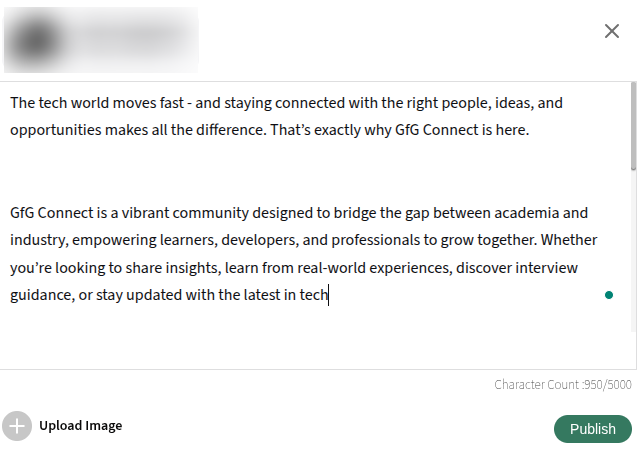
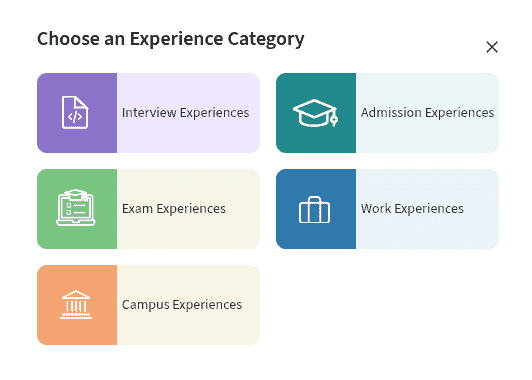
Now, there are 2 ways to create a post on GfG Connect, as shown in the image. Don't forget to mention the category wise hashtag (mentioned-below).
1. Share Your Thoughts – For short posts like opinions, updates, or quick thoughts.
2. Share Experience – For interview experiences, internship journeys, or personal learning stories.
Steps to Post:
Step 1: Visit the link – GfG Connect
Step 2: Click on the Share your thoughts box or the pencil icon at the bottom-right corner.
Step 3: Choose one option:
- Share your thoughts
- Share Experience
Step 4: After finishing your content, click Publish. Your post will go live on the feed.
Step 5: Share your post link in your groups to get more reach and engagement.
Points to Remember:
- Only posts published between 27th Janurary 2026 to 27th Feb 2026 will be counted.
- Winners are chosen based on engagement and consistency.
- Complete your profile to unlock the rewards!
- No spam, self-promotion, or misleading content.
- Maximum 3 eligible posts per day per user.
- Posts violating community guidelines will be removed.
- Winners are chosen based on engagement and consistency.
- Make sure to include the relevant theme hashtag in every post to be eligible for rewards.
The Technical Scripter – GfG Connect Edition 2026 is more than a challenge it's a step towards building a stronger, knowledge-driven tech community.
- Your ideas.
- Your experiences.
- Your creativity.
- Your impact.
Let’s make this one month of learning and sharing unforgettable.
What Can You Post? (Themes)
You can create posts on any of the following themes. While posting on GfG Connect, make sure to add the relevant theme hashtag.
Theme | Hashtags |
|---|---|
Work Experience | #workexperiences |
Interview Experience | #interviewexperiences |
Campus Experience (with Pictures) | #campusexperiences |
Admission Experience | #admissionexperiences |
Competitive Exam Preparation Experience | #examexperiences |
Interview Questions (Company Name Mandatory) | #interviewquestions |
Interesting Fact | #interestingfacts |
Job Openings | #jobopenings |
Tech News | #technews |
Any helpful, meaningful, or insightful content is welcome - your voice matters.
GeeksforGeeks reserves the right to accept or reject any changes at any time and at any stage, without assigning any reason or incurring any liability to the participants. No claim whatsoever will be entertained/paid by the GeeksforGeeks to the participants.
Guidelines for Writing a Quality Content for GfG Connect Posts
To help you create high-quality, engaging posts that have a better chance of winning daily rewards, editor’s picks, or mega prizes, here are the recommended guidelines for each type of content:
1. Short Post (using “Share Your Thoughts”)
- Ideal for quick opinions, updates, tips, or 3–4 line insights.
- Keep it crisp, conversational, and to the point (50–150 words max).
- Use simple language, and a clear call-to-action if you want engagement.
- Perfect for #interestingfacts, #technews, #puzzles, or quick #projectideas.
Example: “Just solved a tricky sliding window problem after 3 weeks of practice! Realized the key is recognizing the pattern early. What’s your go-to tip for sliding window questions? #interviewquestions”
2. Share Your Experience
- Use short paragraphs, bullet points, numbered lists, and bold headings for easy readability.
- Provide accurate, valuable information with real examples or personal insights.
- Avoid making it too long or dense, focus on quality over quantity.
- Great for #workexperiences, #interviewexperiences, #examexperiences
Example structure:
My Google Summer of Code Journey I applied for the first time this year…
Key lessons I learned:
- Start early with proposal writing
- Be specific about contributions
- Communicate daily with mentors
Would you recommend GSoC to beginners? Share your experience! #workexperiences
3. Guidelines for Image (with or without carousel)
- Images should be clean, visually appealing, and not overcrowded with text.
- Avoid packing too much information into a single image, use minimal text, large fonts, and plenty of white space.
- For multi-step explanations or lists, use a carousel (multiple images in one post) so each slide is easy to read.
- Always add a short caption explaining the image(s) and include the relevant theme hashtag.
- Recommended image dimensions are 800 x 400