

The Queue class in C# is a non-generic collection that follows the First In, First Out (FIFO) principle. It is defined in the System.Collections namespace and is used to manage elements in a sequential manner, where elements are processed based on their insertion order.
- Dynamically grow or shrink as elements are added or removed.
- Provides methods to access and modify elements at the front or rear of the collection.
- Supports operations such as adding, removing, and inspecting elements.
Example: The following example demonstrates how to create a Queue, add elements, and remove them in FIFO order.
using System;
using System.Collections;

public class Geeks
{
    public static void Main()
    {
        // Create a new Queue
        Queue queue = new Queue();

        // Add elements to the Queue
        queue.Enqueue(10);
        queue.Enqueue(20);
        queue.Enqueue(30);
        queue.Enqueue(40);

        // Remove elements from the Queue
        while (queue.Count > 0)
        {
            Console.WriteLine(queue.Dequeue());
        }
    }
}
Output
10
20
30
40
Explanation
- Elements are added to the
Queueusing theEnqueue()method. - The
Dequeue()method removes and returns the element at the front of theQueue. - Since
Queuefollows FIFO,10is removed first, followed by20,30, and40.
Declaration
The Queue class can be declared by creating an instance of the Queue class.
Syntax
Queue queueName = new Queue();
Here, int specifies that the queue can store only integer values.
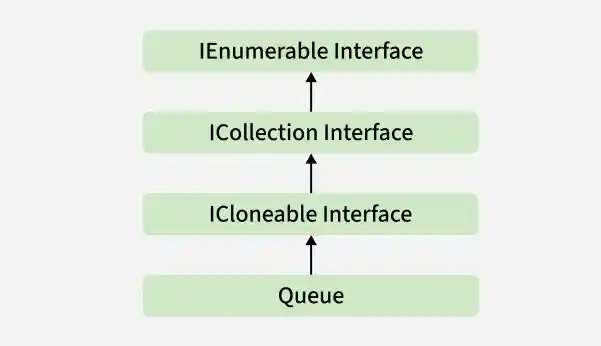
Hierarchy of Queue
The Queue class belongs to the System.Collections namespace and implements the IEnumerable, ICollection, and ICloneable interfaces.
Constructors of Queue
The Queue class provides constructors for creating an empty queue, specifying its initial capacity, or initializing it with elements from another collection.
1. Queue()
Creates an empty Queue with the default initial capacity.
Queue queue = new Queue();
2. Queue(Int32)
Creates an empty Queue with the specified initial capacity.
Queue queue = new Queue(10);
3. Queue(Int32, Single)
Creates an empty Queue with the specified initial capacity and growth factor.
Queue queue = new Queue(10, 2.0f);
4. Queue(ICollection)
Creates a Queue containing elements copied from the specified collection.
ArrayList numbers = new ArrayList() { 10, 20, 30 };
Queue queue = new Queue(numbers);
Example: The following example demonstrates different ways to initialize a Queue.
using System;
using System.Collections;

public class Geeks
{
    public static void Main()
    {
        // Create an empty Queue
        Queue queue1 = new Queue();

        // Create a Queue with initial capacity
        Queue queue2 = new Queue(5);

        // Create a Queue from another collection
        ArrayList numbers = new ArrayList() { 10, 20, 30 };
        Queue queue3 = new Queue(numbers);

        Console.WriteLine("Queue 1 Count: " + queue1.Count);
        Console.WriteLine("Queue 2 Count: " + queue2.Count);
        Console.WriteLine("Queue 3 Count: " + queue3.Count);
    }
}
Output
Queue 1 Count: 0
Queue 2 Count: 0
Queue 3 Count: 3
Properties of Queue
The Queue class provides properties to get information about the number of elements and synchronization status
| Property | Description |
|---|---|
Count | Gets the number of elements contained in the Queue. |
IsSynchronized | Gets a value indicating whether access to the Queue is synchronized (thread safe). |
SyncRoot | Gets an object that can be used to synchronize access to the Queue. |
Example: The following example demonstrates the Count, IsSynchronized, and SyncRoot properties of the Queue class.
using System;
using System.Collections;

class Geeks
{
    static void Main()
    {
        // Create a Queue
        Queue queue = new Queue();

        // Add elements
        queue.Enqueue("Apple");
        queue.Enqueue("Banana");
        queue.Enqueue("Mango");

        // Display properties
        Console.WriteLine("Count: " + queue.Count);
        Console.WriteLine("IsSynchronized: " + queue.IsSynchronized);
        Console.WriteLine("SyncRoot is null: " + (queue.SyncRoot == null));
    }
}
Output
Count: 3
IsSynchronized: False
SyncRoot is null: False
Performing Different Operations on Queue
The Queue class supports operations for adding, accessing, searching, and removing elements.
1. Adding Elements
The Enqueue() method adds an element to the end of the Queue.
using System;
using System.Collections;

class Geeks
{
    public static void Main()
    {
        // Create a Queue
        Queue queue = new Queue();

        // Add elements to the Queue
        queue.Enqueue("Geeks");
        queue.Enqueue("For");
        queue.Enqueue("Geeks");

        // Display the Queue
        foreach (object item in queue)
        {
            Console.WriteLine(item);
        }
    }
}
Output
Geeks
For
Geeks
2. Accessing the Element
The Peek() method returns the element at the beginning of the Queue without removing it.
using System;
using System.Collections;

class Geeks
{
    public static void Main()
    {
        // Create a Queue
        Queue queue = new Queue();

        // Add elements to the Queue
        queue.Enqueue("Welcome");
        queue.Enqueue("To");
        queue.Enqueue("Geeks");
        queue.Enqueue("For");
        queue.Enqueue("Geeks");

        // Access the front element
        Console.WriteLine(
            "The element at the front of the Queue is: "
            + queue.Peek());

        // Display the Queue after Peek()
        Console.WriteLine("Queue after Peek():");

        foreach (object item in queue)
        {
            Console.WriteLine(item);
        }
    }
}
Output
The element at the front of the Queue is: Welcome
Queue after Peek():
Welcome
To
Geeks
For
Geeks
3. Removing Elements
The Dequeue() method removes and returns the element at the beginning of the Queue.
using System;
using System.Collections;

class Geeks
{
    public static void Main()
    {
        // Create a Queue
        Queue queue = new Queue();

        // Add elements to the Queue
        queue.Enqueue(10);
        queue.Enqueue(15);
        queue.Enqueue(30);
        queue.Enqueue(20);
        queue.Enqueue(5);

        // Remove elements using Dequeue()
        Console.WriteLine("Dequeued element: " + queue.Dequeue());
        Console.WriteLine("Dequeued element: " + queue.Dequeue());

        // Display the Queue after Dequeue()
        Console.WriteLine("Queue after Dequeue():");

        foreach (object item in queue)
        {
            Console.WriteLine(item);
        }

        // Check whether the Queue is empty
        Console.WriteLine("Is Queue empty? " + (queue.Count == 0));
    }
}
Output
Initial Queue:
10
15
30
20
5
Dequeued element: 10
Dequeued element: 15
Queue after Dequeue operation:
30
20
5
Is queue empty? False
4. Checking the Number of Elements
The Count property is used to determine the number of elements currently present in the Queue.
using System;
using System.Collections;

class Geeks
{
    public static void Main()
    {
        // Create a Queue
        Queue queue = new Queue();

        // Add elements
        queue.Enqueue(10);
        queue.Enqueue(20);
        queue.Enqueue(30);
        queue.Enqueue(40);
        queue.Enqueue(50);

        // Display the number of elements
        Console.WriteLine("Number of elements: " + queue.Count);
    }
}
Output
Number of elements: 5
5. Removing All Elements
The Clear() method removes all elements from the Queue.
using System;
using System.Collections;

class Geeks
{
    public static void Main()
    {
        // Create a Queue
        Queue queue = new Queue();

        // Add elements
        queue.Enqueue(10);
        queue.Enqueue(20);
        queue.Enqueue(30);
        queue.Enqueue(40);

        Console.WriteLine(
            "Elements before Clear: " + queue.Count);

        // Remove all elements
        queue.Clear();

        Console.WriteLine(
            "Elements after Clear: " + queue.Count);
    }
}
Output
Elements before Clear: 4
Elements after Clear: 0
Applications of Queue
The Queue class is useful when elements need to be processed in the same order in which they are added.
- Task Scheduling: Manages tasks that need to be processed sequentially.
- Print Queue: Stores print jobs and processes them in the order they are received.
- Breadth-First Search (BFS): Stores vertices that need to be visited level by level.
- Request Processing: Manages incoming requests in the order they are received.
- Data Buffering: Temporarily stores data that needs to be processed sequentially.
Methods of Queue
The important methods of the Queue class are:
| Method | Description |
|---|---|
| Clear() | Removes all elements from the Queue. |
| Clone() | Creates a shallow copy of the Queue. |
| Contains(Object) | Determines whether an element exists in the Queue. |
| CopyTo(Array, Int32) | Copies the elements of the Queue to an existing one-dimensional array, starting at the specified array index. |
| Dequeue() | Removes and returns the object at the beginning of the Queue. |
| Enqueue(Object) | Adds an object to the end of the Queue. |
| GetEnumerator() | Returns an enumerator that iterates through the Queue. |
| Peek() | Returns the object at the beginning of the Queue without removing it. |
| Synchronized(Queue) | Returns a synchronized wrapper for the Queue. |
| ToArray() | Copies the elements of the Queue to a new array. |
| TrimToSize() | Sets the capacity to the actual number of elements in the Queue. |