

Data types specify the type of data that a variable can store. Whenever a variable is declared in C#, the compiler allocates memory based on the data type.
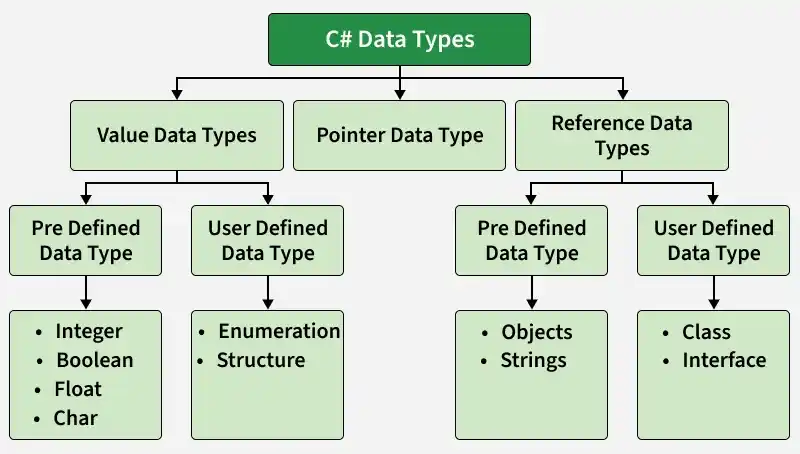
Below is an example of integer data type.
using System;

class Program
{
    static void Main()
    {
        int var = 10;
        Console.WriteLine(var);
    }
}
Output
10
In the above code, the keyword int specifies that the variable will store integer type data.
Types of Data Types in C#
C# data types are mainly divided into three categories:
1. Value Data Types
These store the actual value directly in memory. The value is stored in the variable itself, so each variable has its own copy of the data. Changes made to one variable do not affect another variable.
int: Used to store integer (whole number) values. It is one of the most commonly used data types in C#. It typically stores values within the range of -2³¹ to 2³¹ - 1.
using System;
class Program {
    static void Main() {
        int x = 10;
        Console.WriteLine(x);
    }
}
Output
10
float: Used to store decimal numbers with single precision. It requires the suffix f or F during initialization. It is useful when memory usage needs to be optimized.
using System;
class Program {
    static void Main() {
        float f = 3.5f;
        Console.WriteLine(f);
    }
}
Output
3.5
double: Used to store decimal numbers with higher precision than float. It is the default type for decimal values in C#. It provides better accuracy for calculations.
using System;
class Program {
    static void Main() {
        double d = 5.6;
        Console.WriteLine(d);
    }
}
Output
5.6
char: Used to store a single Unicode character. The value is enclosed in single quotes (' '). It occupies 2 bytes in memory.
using System;
class Program {
    static void Main() {
        char c = 'A';
        Console.WriteLine(c);
    }
}
Output
A
bool: Used to store logical values such as true or false. It is mainly used in conditional statements. It helps in decision-making within programs.
using System;
class Program {
    static void Main() {
        bool b = true;
        Console.WriteLine(b);
    }
}
Output
True
2. Reference Data Types
These store the reference (memory address) of the data instead of the actual value. Multiple variables can refer to the same data in memory. Any changes made through one variable will affect the other variables referring to the same object.
string: Used to store a sequence of characters (text). It is a reference data type in C#. Strings are immutable, meaning the contents of an existing string object cannot be changed after it is created. However, a string variable can be reassigned to reference a different string object.
using System;
class Program {
    static void Main() {
        string s = "Hello";
        Console.WriteLine(s);
    }
}
Output
Hello
object: The base type of all data types in C#. It can store values of any type using boxing. It provides flexibility when working with different data types.
using System;
class Program {
    static void Main() {
        object obj = 10;   // boxing
        Console.WriteLine(obj);
    }
}
Output
10
array: Used to store multiple values of the same data type. Elements are stored in contiguous memory locations. It allows efficient access using index.
using System;
class Program {
    static void Main() {
        int[] arr = {1, 2, 3};
        Console.WriteLine(arr[0]);
    }
}
Output
1
3. Pointer Data Type
These store the memory address of variables instead of actual values. They are mainly used in advanced scenarios such as low-level memory manipulation.
pointer (int* p): Used to store the memory address of a variable.
using System;
class Program {
    static void Main() {
        unsafe {
            int n = 10;
            int* p = &n;
            Console.WriteLine(n);
        }
    }
}
Note: Pointer types require the use of
unsafecode to access and modify memory directly.