C# Deque means double-ended queue. It is a linear data structure that allows us to add or remove elements from both the front and the end. A deque is more flexible than the normal queue where we can only add elements from the back and remove them from the front.
- Elements can be added or removed from both the front and end.
- The deque can grow and shrink dynamically.
- We can use deque as a Stack or Queue depending upon the use cases.
Example: This example demonstrates how to add elements to both the front and the back of the deque
// demonstrating Dequeue
using System;
using System.Collections.Generic;

class Geeks
{
    static void Main()
    {
        // Create a LinkedList to simulate a Deque
        LinkedList<int> d = new LinkedList<int>();

        // Add elements to the front
        d.AddFirst(10);
        d.AddFirst(20);
        d.AddFirst(30);

        // Add elements to the back
        d.AddLast(50);
        // Iterate over the deque and print each element
        Console.WriteLine("Elements in the Deque:");
        foreach (var i in d)
        {
            Console.WriteLine(i);
        }
    }
}
Output
Elements in the Deque:
30
20
10
50
Why use a Deque?
Deque is very useful in scenarios where we need to manage the data from both the ends. Some of the common applications of deque are listed below:
- Job Scheduling: Managing tasks with varying priorities.
- Sliding Window Algorithms: Solving problems like finding the maximum in a subarray.
- Breadth-First Search (BFS): Traversing graphs or trees.
Types of Deque
The below diagram demonstrates the types of deque in C#.

- Input-Restricted deque: In this, insertion is allowed only at one end, but deletion can be done from both ends.
- Output-Restricted deque: In this, deletion is allowed only at one end, but insertion can be done from both ends.
- Double-Ended deque: In this, insertion and deletion are allowed at both ends.
Declaration of Deque
In C#, there is no built-in deque class. We can create deque with the help of LinkedList<T> class or by using Queue<T> class.
Note: Queue<T> can also create a deque, but it is not ideal for operation at both the ends due to limitations.
Using LinkedList<T> (Recommended Approach)
A LinkedList<T> is a good choice for a deque because it lets us add or remove items quickly from both the front and back.
Declaration of deque using LinkedList<T>
LinkedList<int> deque = new LinkedList<int>();
Example: This example, demonstrates how to add elements to both the front and back and then iterating through the list
// demonstrates using LinkedList<T> class
using System;
using System.Collections.Generic;
class Geeks
{
    static void Main()
    {
        // Declare a LinkedList as a Deque
        LinkedList<int> d = new LinkedList<int>();

        // Add elements to the front (AddFirst)
        d.AddFirst(10);
        d.AddFirst(20);
        d.AddFirst(30);

        // Add elements to the back (AddLast)
        d.AddLast(40);
        d.AddLast(50);

        // Iterate over the deque and print elements
        Console.WriteLine("Deque Elements:");
        foreach (var i in d)
        {
            Console.WriteLine(i);
        }
    }
}
Output
Deque Elements:
30
20
10
40
50
Implementing Deque in C#
C# provides Three approaches to implement deque in C#, we are going to discuss about each approach one by one
1. Implementing Deque using Arrays
An Array-based deque can be implemented by managing a fixed-size array and keeping track of front and rear pointers.
Implementation:
// demonstrating how to implement dequeue
// using array
using System;

public class SimpleDequeue
{
    private int[] arr;
    private int front;
    private int rear;
    private int size;

    public SimpleDequeue(int capacity)
    {
        arr = new int[capacity];
        front = -1;
        rear = -1;
        size = 0;
    }

    // Add to the front of the deque
    public void EnqueueFront(int value)
    {
        if (size == arr.Length)
        {
            Console.WriteLine("Queue is full");
            return;
        }

        if (front == -1) // If it's the first element
        {
            front = 0;
            rear = 0;
        }
        else if (front == 0) // Wrap around if front is at 0
        {
            front = arr.Length - 1;
        }
        else
        {
            front--;
        }
        arr[front] = value;
        size++;
    }

    // Add to the rear of the deque
    public void EnqueueRear(int value)
    {
        if (size == arr.Length)
        {
            Console.WriteLine("Queue is full");
            return;
        }
        // If it's the first element
        if (front == -1)
        {
            front = 0;
            rear = 0;
        }
        else
        {
            // Wrap around if rear is at the end
            rear = (rear + 1) % arr.Length;
        }
        arr[rear] = value;
        size++;
    }

    // Remove from the front of the deque
    public int DequeueFront()
    {
        if (size == 0)
        {
            Console.WriteLine("Queue is empty");
            return -1;
        }

        int removedValue = arr[front];
        // Only one element in the queue
        if (front == rear)
        {
            front = -1;
            rear = -1;
        }
        else
        {
             // Move the front pointer
            front = (front + 1) % arr.Length;
        }
        size--;
        return removedValue;
    }

    // Remove from the rear of the deque
    public int DequeueRear()
    {
        if (size == 0)
        {
            Console.WriteLine("Queue is empty");
            return -1;
        }

        int removedValue = arr[rear];
        // Only one element in the queue
        if (front == rear)
        {
            front = -1;
            rear = -1;
        }
        else
        {
            // Move the rear pointer
            rear = (rear - 1 + arr.Length) % arr.Length;
        }
        size--;
        return removedValue;
    }

    // Display the current elements in the deque
    public void Display()
    {
        if (size == 0)
        {
            Console.WriteLine("Queue is empty");
            return;
        }

        int i = front;
        for (int count = 0; count < size; count++)
        {
            Console.Write(arr[i] + " ");
            i = (i + 1) % arr.Length;
        }
        Console.WriteLine();
    }
}

class Geeks
{
    static void Main()
    {
        SimpleDequeue dq = new SimpleDequeue(5);

        // Adding elements to both ends
        dq.EnqueueRear(10);
        dq.EnqueueRear(20);
        dq.EnqueueFront(30);
        dq.EnqueueFront(40);
        dq.Display();

        // Removing elements from both ends
        Console.WriteLine("Dequeue from front: " + dq.DequeueFront());
        Console.WriteLine("Dequeue from rear: " + dq.DequeueRear());
        dq.Display();
    }
}
Output
40 30 10 20
Dequeue from front: 40
Dequeue from rear: 20
30 10
2. Implementing Deque using LinkedList
LinkedList<T> class is an ideal choice for deque because it allows fast insertion and deletion operations from both ends. The LinkedList<T> stores elements in a doubly-linked list, both ends can be accessed and modified in constant time O(1).
Implementation:
// demonstrating how to implement dequeue
// using LinkedList

using System;
using System.Collections.Generic;

class Geeks {
  static void Main() {
    LinkedList<int> d = new LinkedList<int>();

    // Adding element to the front of the dequeue
    d.AddFirst(10);
    d.AddFirst(20);

    // Adding element to the back of the dequeue
    d.AddLast(30);
    d.AddLast(40);

    // Removing element from the front of the dequeue
    int front = d.First.Value;
    d.RemoveFirst();

    // Removing element from the back of the dequeue
    int back = d.Last.Value;
    d.RemoveLast();

    // Display the remaining elements of the dequeue
    foreach (int i in d) {
      Console.WriteLine(i);
    }
  }
}
Output:

3. Implementing Deque Using List<T>
A list<T> is dynamic array, it can efficiently access elements by index. This approach is less efficient for the front operations (add/remove) compared to the LinkedList<T> approach but can still be useful for small lists.
Implementation:
// demonstrating how to implement dequeue
// using List
using System;
using System.Collections.Generic;

class Geeks{
  static void Main() {
    List<int> d = new List<int>();

    // Adding elements to the front of the dequeue
    d.Insert(0, 10);
    d.Insert(0, 20);

    // Adding elements to the back of the dequeue
    d.Add(30);
    d.Add(40);

    // Removing element from the front of the dequeue
    int front = d[0];
    d.RemoveAt(0);

    // Removing element from the back of the dequeue
    int back = d[d.Count - 1];
    d.RemoveAt(d.Count - 1);

    // Display the remaining elements of the dequeue
    foreach (int value in d) {
      Console.WriteLine(value);
    }
  }
}
Output
10
30
Performing Various Operations on Deque
1. Adding Elements to the Front
We can use the EnqueueFront() to add elements to the front of the deque.
Example: This example demonstrates how to insert elements to the front of the deque.
// demonstrating the working of EnqueueFront()

using System;
public class SimpleDequeue
{
    private int[] arr;
    private int front;
    private int rear;
    private int size;

    public SimpleDequeue(int capacity)
    {
        arr = new int[capacity];
        front = -1;
        rear = -1;
        size = 0;
    }

    // Add to the front of the deque
    public void EnqueueFront(int value)
    {
        if (size == arr.Length)
        {
            Console.WriteLine("Deque is full!");
            return;
        }
        // If it's the first element
        if (front == -1)
        {
            front = 0;
            rear = 0;
        }
         // Wrap around if front is at 0
        else if (front == 0)
        {
            front = arr.Length - 1;
        }
        else
        {
            front--;
        }
        arr[front] = value;
        size++;
    }

    // Display the current elements in the deque
    public void Display()
    {
        if (size == 0)
        {
            Console.WriteLine("Deque is empty!");
            return;
        }

        int i = front;
        for (int count = 0; count < size; count++)
        {
            Console.Write(arr[i] + " ");
            i = (i + 1) % arr.Length;
        }
        Console.WriteLine();
    }
}

class Geeks
{
    static void Main()
    {
        SimpleDequeue dq = new SimpleDequeue(5);

        // Add elements to the front
        dq.EnqueueFront(10);
        dq.EnqueueFront(20);
        dq.EnqueueFront(30);

        // Display the deque after adding to the front
        dq.Display();
    }
}
Output:

2. Adding Element to the Rear
We can use the EnqueueRear() to add elements to the end of the deque.
Example:
using System;

public class SimpleDequeue
{
    private int[] arr;
    private int front;
    private int rear;
    private int size;

    public SimpleDequeue(int capacity)
    {
        arr = new int[capacity];
        front = -1;
        rear = -1;
        size = 0;
    }

    // Adding element to the rear of the dequeue
    public void EnqueueRear(int value)
    {
        if (size == arr.Length)
        {
            Console.WriteLine("Deque is full!");
            return;
        }
        // If it's the first element
        if (front == -1)
        {
            front = 0;
            rear = 0;
        }
        else
        {
            // Wrap around if rear is at the end
            rear = (rear + 1) % arr.Length;
        }
        arr[rear] = value;
        size++;
    }

    // Displaying the current elements in the dequeue
    public void Display()
    {
        if (size == 0)
        {
            Console.WriteLine("Deque is empty!");
            return;
        }

        int i = front;
        for (int count = 0; count < size; count++)
        {
            Console.Write(arr[i] + " ");
            i = (i + 1) % arr.Length;
        }
        Console.WriteLine();
    }
}

class Geeks
{
    static void Main()
    {
        SimpleDequeue dq = new SimpleDequeue(5);

        // Adding elements to the rear
        dq.EnqueueRear(10);
        dq.EnqueueRear(20);
        dq.EnqueueRear(30);

        // Displaying the deque after adding to the rear
        dq.Display();
    }
}
Output:

3. Removing Elements from the Front
We can use the dequeFront() method to remove elements from the front of the deque.
Example:
using System;

public class SimpleDequeue
{
    private int[] arr;
    private int front;
    private int rear;
    private int size;

    public SimpleDequeue(int capacity)
    {
        arr = new int[capacity];
        front = -1;
        rear = -1;
        size = 0;
    }

    // Add to the rear of the deque
    public void EnqueueRear(int value)
    {
        if (size == arr.Length)
        {
            Console.WriteLine("Deque is full!");
            return;
        }

        // If it's the first element
        if (front == -1)
        {
            front = 0;
            rear = 0;
        }
        else
        {
            rear = (rear + 1) % arr.Length;
        }

        arr[rear] = value;
        size++;
    }

    // Remove from the front of the deque
    public int DequeueFront()
    {
        if (size == 0)
        {
            Console.WriteLine("Deque is empty!");
            return -1;
        }

        int removedValue = arr[front];
        if (front == rear) // Only one element in the deque
        {
            front = -1;
            rear = -1;
        }
        else
        {
            // Move the front pointer
            front = (front + 1) % arr.Length;
        }
        size--;
        return removedValue;
    }

    // Display the current elements in the deque
    public void Display()
    {
        if (size == 0)
        {
            Console.WriteLine("Deque is empty!");
            return;
        }

        int i = front;
        for (int count = 0; count < size; count++)
        {
            Console.Write(arr[i] + " ");
            i = (i + 1) % arr.Length;
        }
        Console.WriteLine();
    }
}

class Geeks
{
    static void Main()
    {
        SimpleDequeue dq = new SimpleDequeue(5);

        // Add elements to the rear
        dq.EnqueueRear(10);
        dq.EnqueueRear(20);
        dq.EnqueueRear(30);

        // Remove elements from the front
        Console.WriteLine($"Removed from front: {dq.DequeueFront()}");
        dq.Display();
    }
}
Output:

4. Removing Elements from the Rear
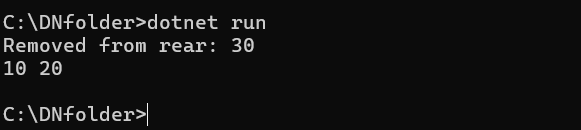
We can use the dequeRear() method to remove elements from the end of the deque.
Example:
using System;

public class SimpleDequeue
{
    private int[] arr;
    private int front;
    private int rear;
    private int size;

    public SimpleDequeue(int capacity)
    {
        arr = new int[capacity];
        front = -1;
        rear = -1;
        size = 0;
    }

    // Add to the rear of the deque
    public void EnqueueRear(int value)
    {
        if (size == arr.Length)
        {
            Console.WriteLine("Deque is full!");
            return;
        }

        // If it's the first element
        if (front == -1)
        {
            front = 0;
            rear = 0;
        }
        else
        {
            rear = (rear + 1) % arr.Length;
        }

        arr[rear] = value;
        size++;
    }

    // Remove from the rear of the deque
    public int DequeueRear()
    {
        if (size == 0)
        {
            Console.WriteLine("Deque is empty!");
            return -1;
        }

        int removedValue = arr[rear];
        // Only one element in the deque
        if (front == rear)
        {
            front = -1;
            rear = -1;
        }
        else
        {
            // Move the rear pointer
            rear = (rear - 1 + arr.Length) % arr.Length;
        }
        size--;
        return removedValue;
    }

    // Display the current elements in the deque
    public void Display()
    {
        if (size == 0)
        {
            Console.WriteLine("Deque is empty!");
            return;
        }

        int i = front;
        for (int count = 0; count < size; count++)
        {
            Console.Write(arr[i] + " ");
            i = (i + 1) % arr.Length;
        }
        Console.WriteLine();
    }
}

class Geeks
{
    static void Main()
    {
        SimpleDequeue dq = new SimpleDequeue(5);

        // Add elements to the rear
        dq.EnqueueRear(10);
        dq.EnqueueRear(20);
        dq.EnqueueRear(30);

        // Remove elements from the rear
        Console.WriteLine($"Removed from rear: {dq.DequeueRear()}");
        dq.Display();
    }
}
Output: