

Storage devices play a crucial role in determining a computer’s speed, performance, and data access efficiency. Among them, Hard Disk Drives (HDD) and Solid State Drives (SSD) are widely used storage technologies that differ in their working mechanisms, with HDDs using mechanical parts and SSDs relying on flash memory. These differences impact their speed, durability, cost, and overall performance.
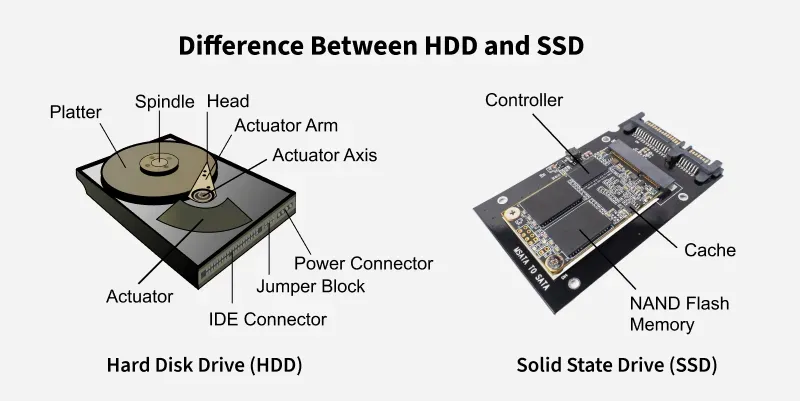
Hard Disk Drive(HDD)
Data storage devices that use mechanical components provide reliable and large-capacity storage for computer systems. One such technology is the Hard Disk Drive (HDD), which stores data on spinning magnetic platters and uses a read/write head to access information. It is widely used in desktops, laptops, and servers due to its ability to handle large amounts of data efficiently. Although slower than modern alternatives, it remains popular for cost-effective storage. Its features include:
- Offers large storage capacity at a lower cost
- Suitable for storing bulk data like videos, backups, and files
- Widely available and compatible with most systems
- Reliable for long-term data storage
Solid State Drive(SSD)
Modern storage devices use electronic memory to deliver faster and more efficient data access. One such technology is the Solid State Drive (SSD), which stores data using flash memory instead of moving parts. This allows quicker read/write operations and improved system performance. SSDs are commonly used in laptops and high-performance systems due to their speed and reliability. Its features include:
- Much faster data access and boot time
- More durable (no moving parts)
- Consumes less power
- Operates silently and generates less heat
Hard Disk Drive (HDD) vs Solid State Drive (SSD)
| Feature | HDD (Hard Disk Drive) | SSD (Solid State Drive) |
|---|---|---|
Definition | Uses spinning disks and mechanical parts | Uses electronic components (no moving parts) |
| Storage Technology | Uses spinning magnetic disks for storage. | Uses NAND flash memory with no moving parts. |
| Speed | Slower boot times and file access. | Much faster boot times and file access. |
| Durability | Has moving parts, making it prone to damage. | More durable and shock-resistant. |
| Noise | Produces noise due to spinning disks. | Operates silently. |
| Power Consumption | Consumes more power. | Uses less power, improving battery life. |
| Lifespan | Wears out over time due to mechanical movement. | Lasts longer but has limited write cycles. |
| Cost | More affordable per GB, cost-effective for large storage. | More expensive per GB but offers better performance. |
| Best Use Case | Ideal for budget-friendly, high-capacity storage. | Best for high-speed computing, gaming, and fast system performance. |
Reliability | Less reliable due to moving parts (e.g., head crash) | More reliable (no moving parts, less risk of failure) |
Data Fragmentation | Performance can suffer from fragmentation | No fragmentation; performance remains consistent |