

A Join in SQL is used to combine rows from two or more tables based on a related column between them. It allows you to fetch meaningful information by linking data stored across multiple tables in a relational database. The two types of joins are Inner Join and Outer Join.
Student Table
| EnrollNo | StudentName | Address |
|---|---|---|
| 1001 | geek1 | geeksquiz1 |
| 1002 | geek2 | geeksquiz2 |
| 1003 | geek3 | geeksquiz3 |
| 1004 | geek4 | geeksquiz4 |
Student Course Table
| CourseID | EnrollNo |
|---|---|
| 1 | 1001 |
| 2 | 1001 |
| 3 | 1001 |
| 1 | 1002 |
| 2 | 1003 |
Inner Join/Simple Join
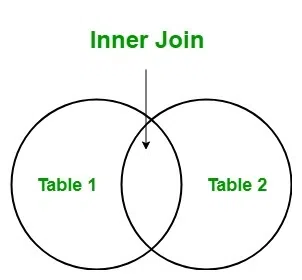
An Inner Join returns only the matching rows between the two tables based on a specified condition. It combines data from two tables based on a common column between them, which is specified using the ON keyword in SQL. If a row in one table does not have a matching row in the other table, that row will not be included in the result set. In an Inner join, it allows retrieving data from two tables with the same ID.
Syntax:
SELECT COLUMN1, COLUMN2 FROM
[TABLE 1] INNER JOIN [TABLE 2]
ON Condition;
The following is a join query that shows the names of students enrolled in different courses.
Query:
SELECT StudentCourse.CourseID,Student.StudentName
FROM Student
INNER JOIN StudentCourse
ON StudentCourse.EnrollNo = Student.EnrollNo
ORDER BY StudentCourse.CourseID;
Note: Inner is optional above. Simple JOIN is also considered as INNER JOIN The above query would produce the following result.
| CourseID | StudentName |
|---|---|
| 1 | geek1 |
| 1 | geek2 |
| 2 | geek1 |
| 2 | geek3 |
| 3 | geek1 |
Example:
For example, let's say we have two tables, Table1 and Table2, with the following data:
Table 1
| ID | Name |
|---|---|
| 1 | John |
| 2 | Sarah |
| 3 | David |
Table 2
| ID | Address |
|---|---|
| 1 | 123 Main St. |
| 2 | 456 Elm St. |
| 4 | 789 Oak St. |
If we perform an Inner Join on these tables using the ID column, the result set would only include the matching rows from both tables, which are the rows with ID values of 1 and 2:
Query:
SELECT Table1.ID,
Table 1. Name, Table 2.Address
FROM Table1
INNER JOIN Table2
ON Table1.ID = Table2.ID
Output:
| ID | Name | Address |
|---|---|---|
| 1 | John | 123 Main St. |
| 2 | Sarah | 456 Elm St. |
How To Use Inner Join
Inner Join is basically performed by just selecting the records having the common values or the matching values in both tables. In case of no common values, no data is shown in the output.
Syntax:
Select Table1.Col_Name, Table2.Col_Name....
From Table1
Inner Join Table2
on Table1.Common_Col = Table2.Common_Col;
If there are 3 Tables present in the database, then the Inner Join works as follows:
Select Table1.Col_Name, Table2.Col_Name, Table3.Col_Name....
From ((Table1
Inner Join Table2
on Table1.Common_Col = Table2.Common_Col)
Inner Join Table3
on Table1.Common_Col = Table3.Common_Col);
Advantage | Disadvantage |
|---|---|
Less Duplicate Data: Returns only matching rows, reducing redundancy. | Possible Data Loss: Ignores rows without matches. |
Faster Execution: Works on matched rows only, so it's quicker. | Complex Queries: Can be hard to write with many tables. |
More Accurate Results: Excludes unmatched or irrelevant data. | Overlapping Data: May return repeated or similar data. |
Outer Join
An Outer Join returns all the rows from one table and matching rows from the other table based on a specified condition. It combines data from two tables based on a common column between them, which is also specified using the ON keyword in SQL. In addition to the matching rows, it also includes rows from one table that do not have matching rows in the other table.
Outer Join is of three types:
- Left outer join
- Right outer join
- Full Join
1. Left Outer join
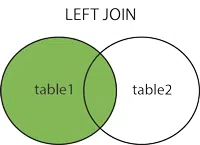
Left Outer Join returns all rows of a table on the left side of the join. For the rows for which there is no matching row on the right side, the result contains NULL on the right side.
Left Outer Join returns all the rows from the left table and matching rows from the right table. If a row in the left table does not have a matching row in the right table, the result set will include NULL values for the columns in the right table.
Syntax:
SELECT T1.C1, T2.C2
FROM TABLE T1
LEFT JOIN TABLE T2
ON T1.C1= T2.C1;
Query:
SELECT Student.StudentName,StudentCourse.CourseID
FROM Student
LEFT OUTER JOIN StudentCourse
ON StudentCourse.EnrollNo = Student.EnrollNo
ORDER BY StudentCourse.CourseID;
Note: OUTER is optional above. Simple LEFT JOIN is also considered as LEFT OUTER JOIN
| StudentName | CourseID |
|---|---|
| geek4 | NULL |
| geek2 | 1 |
| geek1 | 1 |
| geek1 | 2 |
| geek3 | 2 |
| geek1 | 3 |
2. Right Outer Join
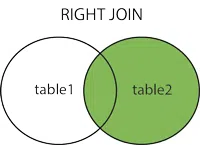
Right Outer Join is similar to Left Outer Join (Right replaces Left everywhere). Right Outer Join returns all the rows from the right table and matching rows from the left table. If a row in the right table does not have a matching row in the left table, the result set will include NULL values for the columns in the left table.
Syntax:
SELECT T1.C1, T2.C2
FROM TABLE T1RIGHT JOIN TABLE T2
ON T1.C1= T2.C1;
Example:
Table Record
| Roll_Number | Name | Age |
|---|---|---|
| 1 | James | 18 |
| 2 | Michael | 19 |
| 3 | Robert | 18 |
| 4 | William | 15 |
| 5 | David | 13 |
| 6 | Richard | 15 |
| 7 | Joseph | 19 |
| 8 | Thomas | 18 |
Table Course
| Course_ID | Roll_Number |
|---|---|
| 1 | 1 |
| 2 | 2 |
| 2 | 3 |
| 3 | 4 |
| 1 | 5 |
| 4 | 9 |
| 5 | 10 |
| 4 | 11 |
Query:
SELECT Record.NAME,Course.COURSE_ID
FROM Record
RIGHT JOIN Course
ON Course.Roll_Number = Record.Roll_Number;
Output:
| Name | Course_ID |
|---|---|
| James | 1 |
| Michael | 2 |
| Robert | 2 |
| William | 3 |
| David | 1 |
| NULL | 4 |
| NULL | 5 |
| NULL | 4 |
3. Full Outer Join
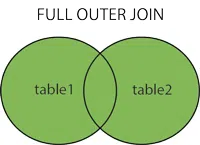
Full Outer Join contains the results of both the Left and Right outer joins. It will provide a mixture of two tables. Full Outer Join returns all the rows from both tables, including matching and non-matching rows. If a row in one table does not have a matching row in the other table, the result set will include NULL values for the columns in the table that do not have a match.
Syntax:
SELECT * FROM T1
FULL JOIN T2
ON condition;
Query:
SELECT Record.NAME,Course.COURSE_ID
FROM Record
FULL JOIN Course
ON Course.Roll_Number = Record.Roll_Number;
Output:
| Name | Course_ID |
|---|---|
| James | 1 |
| Michael | 2 |
| Robert | 2 |
| William | 3 |
| David | 1 |
| Richard | NULL |
| Joseph | NULL |
| Thomas | NULL |
| NULL | 4 |
| NULL | 5 |
| NULL | 4 |
How To Use Outer Join
Outer Join is performed by the selection of the records from all the tables given there. Left Outer Join works by selecting all records from the left table and matching records from the right table. Similarly, Right Outer Join works by selecting all records from the right table and matching records from the left table and the Full Outer Join returns all records if a match occurs in the left or the right table.
Advantages
- Increased Data Retrieval: Outer joins can retrieve more data than inner joins since they include non-matching rows in the result set.
- Data Integrity: Outer joins can help maintain data integrity by ensuring that all records in the primary table are returned, even if there are no corresponding records in the secondary table.
- Data Analysis: Outer joins can be useful for data analysis, especially when exploring relationships between data sets and identifying trends and patterns.
Disadvantages
- Slow Query Execution: Outer joins can be slower to execute than inner joins, especially when dealing with large data sets.
- Data Duplication: Outer joins can return duplicate data when the secondary table has multiple matching records.
- Data Quality: Outer joins may return inaccurate or incomplete data if the tables being joined have incomplete or inconsistent data.
Inner Join vs Outer Join
Inner Join | Outer Join |
|---|---|
Returns rows with matching values in both tables by filtering out. | It is directly opposite of Inner join returns rows but return all of them including the unmatched also. |
Used when we want matching data. | when we need all data without concerning about match and unmatched. |
Single Type. | Three different Types: Left Outer Join, Right Outer Join, Full Outer Join. |
Only the common data between one or more tables. | All data from one or both tables, with giving NULLs for non-matching rows or the unmatched ones. |