
Relational Online Analytical Processing (ROLAP) is an OLAP approach that performs multidimensional analysis directly on top of relational databases. Instead of storing data in specialized multidimensional cubes, ROLAP uses relational tables-typically organized in star or snowflake schemas-to answer analytical queries.
Working of ROLAP
ROLAP does not pre-compute or store aggregated data in a cube. Instead:
- Data is stored in relational tables (fact and dimension tables).
- When an analytical query is issued, ROLAP generates SQL queries dynamically.
- The RDBMS executes these queries and returns the aggregated results.
- ROLAP tools may use caching and indexing to speed up repeated analysis.
This approach allows real-time queries on fresh data because no cube refresh is required.
Example: Suppose a retail company with billions of daily sales transactions wants:
- Hourly sales reporting
- Store-level and product-level drilldowns
- Real-time dashboards
MOLAP cubes would take too long to rebuild, so ROLAP directly queries the relational warehouse, providing fresh, detailed analytics.
Key Features of ROLAP
- Scalability: Capable of handling very large database sizes, even in terabytes or petabytes.
- SQL-Based Analysis: Uses standard SQL for querying, making it compatible with most RDBMS systems.
- Flexible Schema Support: Works naturally with star, snowflake, and galaxy schemas.
- Near Real-Time Data: No cube processing step; data is queried directly from relational tables.
- High Detail Level: Supports drill-down to the lowest level of data stored in the DB.
ROLAP Architecture
The architecture of ROLAP involves multiple components that work together to enable dynamic data analysis from relational databases. A typical ROLAP system consists of:
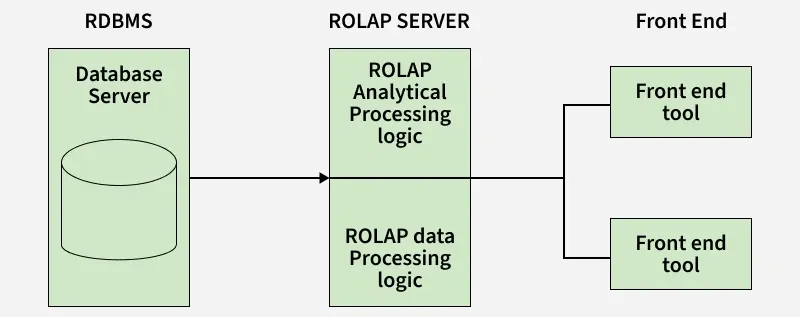
1. Relational Data Warehouse (fact & dimension tables)
2. ROLAP Server
- Translates OLAP operations (slice, dice, roll-up, drill-down) into SQL
- Optimizes queries
3. Presentation Layer / Client Tools: Dashboards, reports, visualization tools
4. DB Optimization Layer
- Indexing (bitmap indexes, B-tree)
- Partitioning
- Materialized views (optional)
5. Front-End Tools: After the ROLAP server processes the query, the results are sent to the front-end tools to provide an interface for users to interact with the data.
ROLAP Tools
- Oracle OLAP: ROLAP tool integrated with Oracle databases, offering high performance and advanced multidimensional analytics.
- IBM Cognos: BI platform with ROLAP support, real-time queries, reporting, and dashboards.
- Microsoft SSAS: Part of Microsoft BI stack, enables complex multidimensional queries and detailed reporting.
- SAP BusinessObjects: Provides ROLAP for analyzing large datasets with strong reporting and visualization.
- MicroStrategy: BI tool with ROLAP support, advanced analytics, and visualization.
- Pentaho BI Suite: Open-source BI suite with ROLAP, data integration, reporting, and analytics.
Advantages and Disadvantages
| Advantages | Disadvantages |
|---|---|
| Highly scalable for large fact tables | Slower query response due to on-the-fly computation |
| Uses existing RDBMS infrastructure | Heavy SQL load increases database resource usage |
| No need for pre-computed cubes | High dependence on database indexing and tuning |
| Supports complex queries using SQL | Performance varies with schema design (star/snowflake) |
| Better handling of non-summarizable and detailed data | May require additional optimization techniques like partitioning |
| Easily integrates with ETL and data warehouse systems | Not ideal for real-time OLAP due to query execution overhead |