The docker buildx build command provides added enhancement to the traditional build functionality of Docker. It allows building with the BuildKit engine, which allows an efficient build making things faster. It also enables additional features, including multi-platform builds, better caching mechanisms, and greater flexibility regarding the output options. This makes it a very important command to have when working with modern Docker workflows, which are usually the case when developing complicated cross-platform applications.
Important Docker Buildx Build Commands
Here are some of the most important docker buildx build commands, explained with examples:
1. docker buildx bake: This command is used to Initiate builds based on a specified file.
docker buildx bake [OPTIONS] [TARGET...]
- Options:
-f, --file (specify the bake file), --push, --load, etc. - Targets: Names of specific targets defined in the bake file.
2. docker buildx build: This command begins build process for creating images
docker buildx build [OPTIONS] PATH | URL | -
- Options:
--platform, --tag, --push, --load, etc. - PATH: Path to the Dockerfile context.
3. docker buildx create: This command is used to generate a new instance of a builder.
docker buildx create [OPTIONS]
- Options:
--name, --driver, --use, etc.
4. docker buildx debug: This command is used to launch a debugging session for build issues.
docker buildx debug [OPTIONS]
- Options:
--builder, --help, etc.
5. docker buildx du: To display the disk space used by build artifacts.
docker buildx du [OPTIONS]
6. docker buildx imagetools: This command is used to execute various operations on images stored in a registry.
docker buildx imagetools COMMAND [OPTIONS]
- Options: Specific to the command being executed (e.g.,
inspect, create). - Command: Subcommand for operations on images.
7. docker buildx inspect: This command is used to examine details of the current builder instance.
docker buildx inspect [OPTIONS] [BUILDER]
- Options:
--bootstrap, --pretty, etc. - BUILDER: The name of the builder instance to inspect.
8. docker buildx ls: This command is used to list all available builder instances.
docker buildx ls [OPTIONS]
- Options:
--quiet, --help, etc.
9. docker buildx prune: Clear out unused build cache to free up space.
docker buildx prune [OPTIONS]
- Options:
-f, --filter, --all, etc.
10. docker buildx rm: To delete one or more builder instances.
docker buildx rm [OPTIONS] BUILDER [BUILDER...]
- Options:
-f, --help, etc. - BUILDER: Name(s) of the builder instance(s) to remove.
11. docker buildx stop: Halt a currently running builder instance.
docker buildx stop [OPTIONS] BUILDER [BUILDER...]
- Options:
--help, etc. - BUILDER: Name(s) of the builder instance(s) to stop.
12. docker buildx use: Set a specific builder instance as the current one.
docker buildx use [OPTIONS] BUILDER
- Options:
--help, etc. - BUILDER: The name of the builder instance to set as current.
13. docker buildx version: To display information about the version of Buildx.
docker buildx version [OPTIONS]
Key Options with docker buildx build
Here are some of the most commonly used options when building images with docker buildx build:
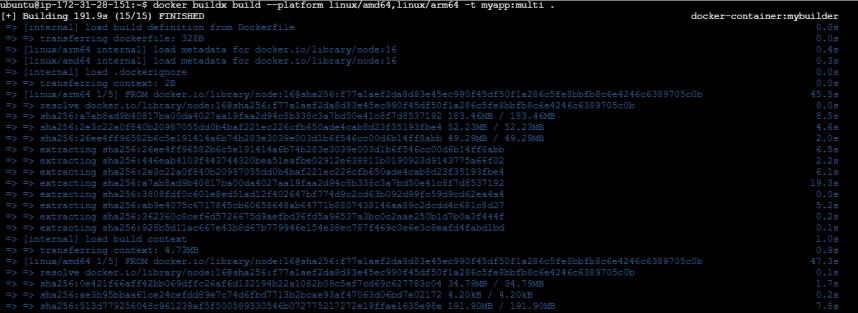
1. --platform: The --platform flag allows you to specify which platforms you want to build images for. This is particularly useful for creating multi-platform images that can run on different architectures.
Example:
docker buildx build --platform linux/amd64,linux/arm64 -t myapp:multi .
2. --push: If you want your built image to be automatically uploaded to a Docker registry (like Docker Hub), use the --push flag.
Example:
docker buildx build --push -t myusername/myapp:latest .

3. --load: The --load option lets you load the built image directly into your local Docker daemon instead of pushing it to a registry. This is useful if you want to test the image locally first.
Example:
docker buildx build --load -t myapp:latest .

4. --tag (-t) : The --tag option assigns a name and an optional tag to your image. You can add multiple tags to a single image.
Example:
docker buildx build --tag myapp:latest --tag myapp:v1 .

5. --file (-f): Use the --file option if you want to specify a different Dockerfile. This is helpful if you have multiple Dockerfiles for different environments.
Example:
docker buildx build -f Dockerfile.prod --push -t deeksha123456789/myapp:prod .

6. --cache-from: The --cache-from option enables the use of external caches, which can speed up the build process by reusing layers from previously built images.
Example:
docker buildx build --cache-from=deeksha123456789/myapp:cache --push -t deeksha123456789/myapp:latest .

7. --no-cache: If you want to force Docker to ignore all cached layers and rebuild everything from scratch, you can use the --no-cache flag.
Example:
docker buildx build --no-cache -t myapp:latest .

8. --build-arg: The --build-arg flag allows you to pass build-time arguments that can be used in your Dockerfile. These are similar to environment variables, but they are available only during the build process.
Example:
docker buildx build --build-arg VERSION=1.0 --tag myapp:v1 .

Features of docker buildx build Command
- Support for Multiple Platforms
: docker buildx build makes it easy to create images that work on multiple platforms. You can build images for different system architectures, such as linux/amd64 and linux/arm64, all in one go. This is especially helpful when you want your application to run on various devices and systems. - Improved Caching: One of the key benefits of
docker buildx build is its advanced caching system. It saves previously built layers and reuses them during future builds. This speeds up the process and saves computing resources, making your builds faster and more efficient. - External Build Contexts: With this command, you can specify external sources for your Docker builds, like a GitHub repository or a remote folder. This means you don’t always need the files locally; you can pull them from anywhere.
- Optimized Image Creation: BuildKit, which powers
docker buildx build, optimizes the image creation process. This helps reduce the number of layers in your images, making them smaller and quicker to deploy. - Control Over Build Stages: If you're using a multi-stage Dockerfile, you can choose which specific stage to build, giving you more control over the process and enabling optimized builds tailored to your needs.
Benefits of docker buildx build Command
- Faster Builds: With caching and layer reuse,
docker buildx build makes your builds much quicker. The process skips rebuilding parts of the image that haven’t changed, which can save significant time, especially for large projects. - Cross-Platform Builds: Instead of creating separate builds for different platforms, you can now build everything in one step. This ensures that your application will work across various environments, from local development to production.
- Less Resource Usage: By optimizing the build process,
docker buildx build reduces the strain on your system. The improved caching and layer handling ensure that your builds are resource-efficient, making the entire process smoother. - Flexibility for Customization: Whether you’re building from a remote repository or targeting a specific build stage, this command gives you the flexibility to customize your build process. You can easily adapt it to fit the needs of different projects.
- Smaller, More Efficient Images: Because BuildKit optimizes the image creation process, your images will be leaner and faster. This is particularly useful for production, where smaller images lead to quicker deployment times.
Troubleshooting Common Issues
- Platform Compatibility: Ensure the platform you're building for is supported. Use the
--platform flag and check supported platforms with docker buildx ls. - Cache Not Found: If
--cache-from fails, verify that the cache image exists and is accessible. Use docker login for registry access and ensure the tag is correct. - Authentication Issues: Resolve authentication failures by logging into the registry with
docker login. Ensure correct credentials and permission to push images.
Best Practices
- Effective Cache Management: Optimize layer caching by separating stable operations (e.g., installing dependencies) from frequent changes (e.g., copying source code). Use
--cache-from for remote cache. - Optimizing Multi-Platform Builds: Minimize layers and use smaller base images for faster builds. Group similar operations and use multi-stage builds for platform-specific optimizations.
- Clean Builds: Avoid using cache when troubleshooting or making significant changes. Use
--no-cache for a fresh build to ensure up-to-date layers.
Conclusion
The docker buildx build command is has become a necessity for each and every person who works with Docker, especially with modern application development. It adds more dimensions to Docker builds, such as building for multiple platforms, improving build process by caching, and even allowing external build contexts to be used. Focused on these capabilities, these are very advanced features that you can help improve your Docker workflows to shorten the build time and ensure that your images can be used across different types of environments. Especially if images are being tested locally or pushed to a registry, docker buildx build is the command that provides one with a lot of versatility when performing very complex builds.
Explore
DevOps Basics
Version Control
CI & CD
Containerization
Orchestration
Infrastructure as Code (IaC)
Monitoring and Logging
Security in DevOps