

A Kubernetes Secret is an object used to store sensitive information. Secrets help applications access sensitive data without storing it directly in Application code, Container images and Pod configuration.
- Secrets can be created separately from Pods.
- Pods can reference Secrets when they need sensitive data.
- Secrets can be exposed to containers through environment variables or volume mounts.
- Secrets are similar to ConfigMaps, but they are intended for storing confidential data.
Use of Secrets
Kubernetes Secrets help manage sensitive information separately from application configuration. Their main benefits include:
- Separation of sensitive data helps keep credentials separate from application code and container images.
- Flexible access allows user to make sensitive data available to specific containers through environment variables or mounted volumes.
- Access control supports restricting access to Secrets through Kubernetes Role-Based Access Control (RBAC).
- Reusability allows multiple Pods to reference the same Secret.
- Simplified management supports updating credentials without rebuilding application images.
Working
Kubernetes Secrets are API objects that store sensitive data as key-value pairs. A Secret can be referenced by a Pod and exposed to its containers when needed. The basic workflow is:
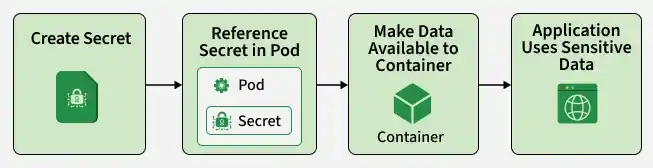
Kubernetes supports the following methods of making Secret data available to containers:
- Environment variables: Expose Secret values as environment variables.
- Volume mounts: Make Secret data available as files inside a container.
- Image pull credentials: Use Secrets to authenticate with private container registries.
- Application configuration: Allow applications to read credentials from mounted files.
Secrets are stored in the Kubernetes cluster's data store, etcd. By default, Secret data is Base64-encoded in the API representation, but Base64 encoding does not provide encryption.
YAML Syntax
A Kubernetes Secret can be defined using a YAML manifest. The manifest specifies the API version, resource kind, metadata, Secret type, and sensitive data.
The general syntax is:
apiVersion: v1kind: Secretmetadata:name: my-secrettype: Opaquedata:username: YWRtaW4=password: cGFzc3dvcmQ=
The fields used in this manifest are:
- apiVersion: Specifies the Kubernetes API version. Secrets use
v1. - kind: Identifies the resource as a Secret.
- metadata.name: Specifies the name of the Secret.
- type: Defines the type of Secret.
Opaqueis the default type for general-purpose data. - data: Contains key-value pairs whose values are Base64-encoded.
In this example, the values represent the strings admin and password, respectively.
data and stringData
Kubernetes supports two fields for specifying Secret data: data and stringData.
| Field | Description |
|---|---|
data | Stores values as Base64-encoded strings. |
stringData | Accepts plain-text strings that Kubernetes converts into the Secret's stored data representation. |
The following example uses stringData:
apiVersion: v1kind: Secretmetadata:name: app-secrettype: OpaquestringData:username: adminpassword: my-password
The stringData field makes it easier to define Secret values without manually encoding them. It is a write-only convenience field and is not returned when a Secret is retrieved from the API.
Note: Base64 is an encoding mechanism, not encryption. Anyone who obtains a Base64-encoded Secret value can decode it.
Types of Secrets
Kubernetes provides several built-in Secret types for storing different kinds of sensitive information. The type determines the intended purpose and, in some cases, the required data fields.
1. Opaque Secrets
Opaque is the default Secret type in Kubernetes. It is used to store arbitrary user-defined data, such as database passwords, API keys, and application credentials.
An Opaque Secret can contain multiple key-value pairs.
Example:
apiVersion: v1kind: Secretmetadata:name: database-secrettype: OpaquestringData:username: dbuserpassword: dbpassword
2. ServiceAccount Token Secrets
The kubernetes.io/service-account-token type stores a token associated with a Kubernetes ServiceAccount. These tokens can be used to authenticate with the Kubernetes API server.
Example:
apiVersion: v1kind: Secretmetadata:name: service-account-secretannotations:kubernetes.io/service-account.name: my-service-accounttype: kubernetes.io/service-account-token
Kubernetes can populate this Secret with the associated ServiceAccount token and other relevant information.
Note: Manually created ServiceAccount token Secrets are generally not recommended for new applications. Short-lived, automatically projected ServiceAccount tokens are preferred for most Pod authentication use cases.
3. Docker Config Secrets
Docker Config Secrets store credentials used to authenticate with private container registries. Kubernetes can reference these Secrets through the imagePullSecrets field when pulling container images.
The kubernetes.io/dockerconfigjson type stores registry authentication information in the .dockerconfigjson key.
Example:
apiVersion: v1kind: Secretmetadata:name: registry-secrettype: kubernetes.io/dockerconfigjsonstringData:.dockerconfigjson: |{"auths": {"https://index.docker.io/v1/": {"username": "my-username","password": "my-password"}}}
The Secret can be referenced by a Pod as follows:
apiVersion: v1kind: Podmetadata:name: private-image-podspec:imagePullSecrets:- name: registry-secretcontainers:- name: appimage: private-registry.example.com/my-app:1.0
The registry credentials are used by Kubernetes when it needs to pull the private image.
4. Basic Authentication Secrets
The kubernetes.io/basic-auth type stores credentials used for HTTP Basic Authentication. It typically contains a username and password.
Example:
apiVersion: v1kind: Secretmetadata:name: basic-auth-secrettype: kubernetes.io/basic-authstringData:username: myuserpassword: mypassword
The expected keys are username and password. These credentials can be consumed by applications that require basic authentication.
5. SSH Authentication Secrets
The kubernetes.io/ssh-auth type stores SSH authentication information, typically an SSH private key.
Example:
apiVersion: v1kind: Secretmetadata:name: ssh-auth-secrettype: kubernetes.io/ssh-authstringData:ssh-privatekey: |-----BEGIN OPENSSH PRIVATE KEY-----REPLACE_WITH_PRIVATE_KEY_CONTENT-----END OPENSSH PRIVATE KEY-----
The expected key is ssh-privatekey. Applications can use this Secret when they need SSH-based authentication.
The private key should be protected and made accessible only to the workloads that require it.
6. TLS Secrets
The kubernetes.io/tls type stores a TLS certificate and its associated private key. These Secrets are commonly used to configure HTTPS endpoints and secure communication.
Example:
apiVersion: v1kind: Secretmetadata:name: tls-secrettype: kubernetes.io/tlsstringData:tls.crt: |REPLACE_WITH_TLS_CERTIFICATEtls.key: |REPLACE_WITH_TLS_PRIVATE_KEY
The required keys are:
- tls.crt: Contains the TLS certificate.
- tls.key: Contains the corresponding private key.
Kubernetes requires these keys for a TLS Secret, but applications and controllers are responsible for using the certificate and key appropriately.
7. Bootstrap Token Secrets
The bootstrap.kubernetes.io/token type stores bootstrap token information used during the process of registering nodes with a Kubernetes cluster.
These Secrets are commonly stored in the kube-system namespace.
Example:
apiVersion: v1kind: Secretmetadata:name: bootstrap-token-abcdefnamespace: kube-systemtype: bootstrap.kubernetes.io/tokenstringData:description: "Bootstrap token"token-id: abcdeftoken-secret: 0123456789abcdefusage-bootstrap-authentication: "true"usage-bootstrap-signing: "true"
Bootstrap tokens are sensitive credentials and should be given a limited lifetime and appropriate permissions.
Using Secrets in Kubernetes Pods
A Pod can reference a Secret to make its data available to containers. The two common approaches are environment variables and volume mounts.
1. Using Secrets as Environment Variables
Secret values can be exposed as environment variables using the secretKeyRef field.
Example:
apiVersion: v1kind: Podmetadata:name: secret-env-podspec:containers:- name: appimage: nginxenv:- name: DB_USERNAMEvalueFrom:secretKeyRef:name: database-secretkey: username- name: DB_PASSWORDvalueFrom:secretKeyRef:name: database-secretkey: password
In this example, the username and password values from database-secret are exposed as the DB_USERNAME and DB_PASSWORD environment variables.
A Secret can also be exposed through envFrom, which makes all its key-value pairs available as environment variables.
envFrom:- secretRef:name: database-secret
Environment variables are convenient, but they may be exposed through application diagnostics, logs, or process inspection. They should be handled carefully.
2. Using Secrets as Volume Mounts
Secret data can be mounted as files inside a container. Each key in the Secret becomes a file in the mounted directory.
Example:
apiVersion: v1kind: Podmetadata:name: secret-volume-podspec:containers:- name: appimage: nginxvolumeMounts:- name: secret-volumemountPath: /etc/app-secretsreadOnly: truevolumes:- name: secret-volumesecret:secretName: database-secret
In this example, the Secret is mounted at /etc/app-secrets. The container can read the Secret values from files named after the corresponding keys.
Secret volumes are read-only. When the Secret is updated, Kubernetes can update the mounted files eventually. However, applications must be able to detect and reload the updated values.
Secrets mounted using subPath do not receive automatic updates.
Restricting Secret Access to Specific Containers
A Pod can contain multiple containers, but not every container needs access to the same sensitive data.
Kubernetes allows a Secret volume to be mounted only in the container that requires it. This follows the principle of least privilege.
For example, a Pod may contain:
- Frontend container: Handles user requests and application logic.
- Signer container: Requires a private key to sign messages.
The Secret volume can be mounted only in the signer container. The frontend container will not have the Secret mounted through that volume.
This reduces unnecessary exposure of sensitive data within the Pod. However, containers in the same Pod share a security boundary in several important ways, so container-specific mounts should not be treated as complete isolation.
Security Considerations for Kubernetes Secrets
Kubernetes Secrets provide a way to manage sensitive data, but additional security controls are necessary to protect them.
- Values stored in the
datafield are Base64-encoded. Base64 only changes the representation of the data and does not prevent unauthorized users from reading it. - By default, Kubernetes Secret data may be stored unencrypted in etcd. Encryption at rest should be configured to protect Secret data stored in the cluster's data store.
- RBAC should be used to restrict which users and ServiceAccounts can read, create, update, or delete Secrets. Access should be granted only when necessary.
- Secrets are namespaced resources. Applications should use appropriate namespaces to separate workloads and their associated credentials. However, namespaces alone do not provide sufficient protection without suitable access controls.
- Sensitive values should not be committed to Git repositories, even when they are stored in Kubernetes YAML manifests. Base64-encoded values are still readable by anyone who can decode them.
- Credentials should be rotated periodically and whenever they may have been exposed. Applications must be able to use the updated credentials.
- Secrets should be made available only to the containers and applications that need them. Avoid unnecessarily exposing credentials through environment variables, logs, or application output.
Kubernetes Secrets vs ConfigMaps
Kubernetes Secrets and ConfigMaps both store configuration data as key-value pairs. The main difference is their intended use.
| Feature | Secrets | ConfigMaps |
|---|---|---|
| Purpose | Store sensitive information | Store non-sensitive configuration |
| Typical data | Passwords, tokens, keys | Application settings, URLs, feature flags |
| Data representation | Base64-encoded through the data field | Plain-text values through the data field |
| Confidentiality | Intended for sensitive data, but requires additional security controls | Not intended for confidential data |
| Consumption | Environment variables or mounted volumes | Environment variables or mounted volumes |
Secrets should be used for confidential information, while ConfigMaps should be used for non-sensitive application configuration.
Neither resource automatically provides complete protection against unauthorized access. Appropriate permissions and cluster security settings are required.
Best Practices
The following practices help improve the security of Kubernetes Secrets:
- Protect Secret data stored in etcd.
- Use RBAC to restrict access to Secrets.
- Do not store plaintext or Base64-encoded Secrets in source control.
- Use short-lived tokens wherever supported.
- Replace exposed or outdated credentials regularly.
- Make Secrets available only to the containers that require them.
- Consider dedicated secret management solutions for centralized storage and rotation.
- Audit access to sensitive Kubernetes resources.
Alternatives
Kubernetes Secrets are useful for managing application credentials, but other solutions may be appropriate depending on security and operational requirements.
1. External Secret Management Tools
- Tools such as HashiCorp Vault and cloud-provider secret management services can store and manage sensitive information outside the Kubernetes cluster.
- They can provide features such as centralized access control, auditing, and credential rotation.
2. External Secrets Operator
- The External Secrets Operator integrates external secret management systems with Kubernetes.
- It can retrieve sensitive values from supported external providers and synchronize them into Kubernetes Secret objects.
3. Secrets Store CSI Driver
- The Secrets Store CSI Driver allows a Pod to mount secrets from supported external secret management systems through a CSI volume.
- Depending on the provider and configuration, sensitive data can be made available without storing it as a conventional Kubernetes Secret.
- The appropriate solution depends on the application's requirements, security policies, and infrastructure.