Microsoft Azure - Setting up a Auto Shutdown For Azure Virtual Machine
Last Updated :
23 Jul, 2025
Setting up an Auto-shutdown will help in reducing the cost of azure virtual machines. This setup is very useful during non-working hours as it saves cost and is a good practice for working with VMs in Azure.
Implementation:
Follow the below steps to set up auto-shutdown of Azure Virtual Machines:
Step 1: Login to Azure Portal at https://portal.azure.com/Error/UE_404?aspxerrorpath=/
Step 2: Go to Virtual Machines or you can search Virtual Machines in the page search bar.
Step 3: Now, Select your VM which you want to set up an Auto Shutdown. Here I have a "VM1" Virtual Machine which I'm going to configure Auto Shutdown.

Step 4: After selecting your preferred VM from left menu scroll to Operations >> select Auto-shutdown
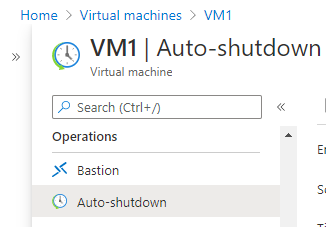
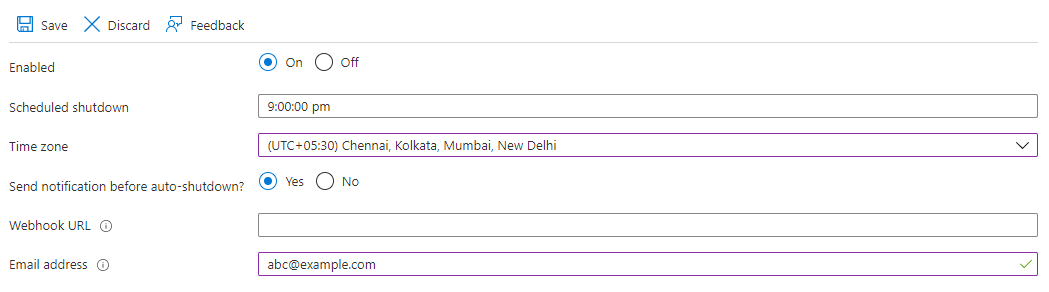
Step 5: In this step, we are going to enable auto-shutdown and we will schedule a time for a select time zone.

- You can also set up an alert notification by setting up an email address. For that, you have to choose to send notification before auto-shutdown? >> yes
- Webhook URL : leave blank (optional)
- Email address: Add your mail address to which you want to get notified.

Step 6: After setup, the auto-shutdown configuration, Click on "Save" to save the config changes.
That's it you are done.
Explore
DevOps Basics
Version Control
CI & CD
Containerization
Orchestration
Infrastructure as Code (IaC)
Monitoring and Logging
Security in DevOps