

CI/CD (Continuous Integration and Continuous Delivery/Deployment) is a modern software development practice that automates the process of building, testing, and releasing applications. It plays a key role in DevOps by improving collaboration between development and operations teams.
- Automates code integration, testing, and deployment workflows.
- Reduces manual effort while improving software quality.
- Enables faster and more reliable software releases.
CI/CD Before Adoption
Before the adoption of CI/CD, software development and delivery were slow, manual, and prone to errors. Processes lacked automation, making releases time-consuming and risky.

- Code was merged infrequently, often causing integration conflicts and unstable builds.
- Testing and building were performed manually, resulting in late bug detection and costly fixes.
- Deployments were lengthy and risky because changes were released together in large batches.
- Development, testing, and operations teams worked separately with limited collaboration.
CI/CD After Adoption
With CI/CD, the development process becomes automated, faster, and more reliable.

- Developers commit code frequently to a shared repository.
- CI automatically builds and tests the application.
- Bugs are detected early and fixed quickly.
- Continuous Delivery ensures code is always release-ready.
- Continuous Deployment enables automatic production releases.
- Smaller, frequent updates replace large risky releases.
- Improves collaboration and transparency across teams.
Three Pillars of CI/CD
To effectively implement CI/CD, it is important to understand its three core concepts: Continuous Integration, Continuous Delivery, and Continuous Deployment.
Continuous Integration (CI)
Continuous Integration focuses on integrating code changes frequently to avoid conflicts and ensure code stability.
- Goal: Prevent integration issues caused by delayed code merging.
- Process: Developers merge code changes into the main branch frequently.
- Automation: Each commit triggers automated builds and unit tests.
- Outcome: Failed builds are rejected and developers are notified immediately.
Note: Both Continuous Delivery and Continuous Deployment are abbreviated as "CD," but they differ in release automation. Continuous Delivery requires manual approval before production release, whereas Continuous Deployment automates the release process completely.
Continuous Delivery (CD)
Continuous Delivery ensures that the application is always ready for release with minimal manual effort.
- Goal: Keep the application in a release-ready state at all times.
- Process: Code is deployed to staging or testing environments after CI succeeds.
- Automation: Integration, system, and performance tests run automatically.
- Release: Deployment to production requires manual approval.
Continuous Deployment (CD)
Continuous Deployment extends automation by automatically releasing changes to production.
- Goal: Enable fully automated and faster software releases.
- Process: Code is automatically deployed to production after all tests pass.
- Automation: The entire release pipeline runs without human intervention.
- Requirement: Requires comprehensive automated testing and effective monitoring.
CI Workflow
The CI workflow represents the automated process that starts when developers commit code and ends with build validation.

- Developer Writes Code: The developer creates or modifies application code and commits the changes to the repository.
- CI Tool: The CI tool automatically builds the application and runs automated tests to verify code quality.
- Problem Detected: If the build or tests fail, the CI tool reports the issue and sends feedback to the developer.
- Changes Needed: The developer fixes the identified issues and recommits the updated code for validation.
- Everything OK: If the build and tests pass successfully, the code is approved for integration.
- Maintainer or Developer Merges Changes: The validated code is merged into the main branch or shared repository.
- Application is Ready for Deployment: After successful integration, the application becomes ready for deployment to the next environment.
CI/CD Workflow
This workflow shows how Continuous Integration combined with Continuous Delivery/Deployment enables faster, safer, and more reliable software releases.

- CI performs build and test automatically.
- Code moves to Acceptance Testing.
- Deployed to Staging Environment.
- Further validation is done.
- Continuous Delivery: Manual deployment to production.
- Continuous Deployment: Automatic deployment to production.
- Smoke tests validate production release.
Common CI/CD Tools
Various tools are used to implement CI/CD pipelines effectively.
- Jenkins: Open-source automation server widely used for building CI/CD pipelines.
- GitHub Actions: CI/CD tool integrated with GitHub repositories.
- GitLab CI/CD: Built-in CI/CD solution within GitLab.
- Concourse: Open-source tool focused on pipeline automation.
- GoCD: Provides visualization and management of complex pipelines.
- Spinnaker: Continuous delivery platform for multi-cloud deployments.
- Screwdriver: Platform designed for scalable CI/CD workflows.
CI/CD Pipeline
A CI/CD pipeline is an automated workflow that enables teams to build, test, and deploy software efficiently and reliably. It helps deliver high-quality applications faster while reducing manual effort and deployment risks.
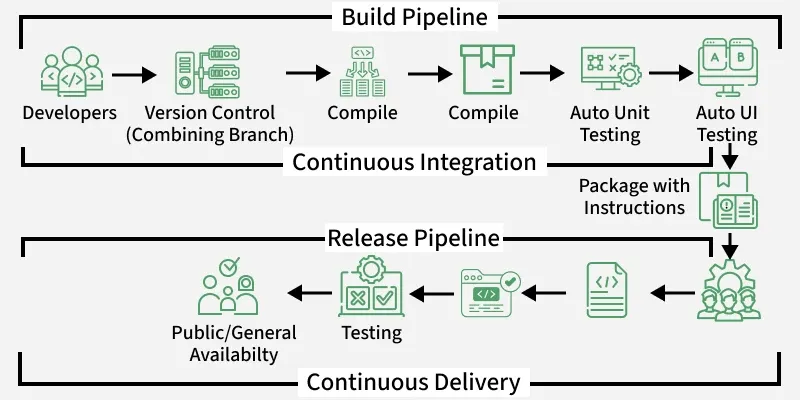
- Developers commit code changes to a version control repository.
- Code is integrated, compiled, and built automatically.
- Automated unit and UI tests are executed to verify quality.
- The application is packaged with deployment instructions.
- The release pipeline performs additional testing and validation.
- The validated application is deployed and made available to end users.
Components of a CI/CD Pipeline
These components define how code moves from development to production.

- Commit Change: Developers commit code changes to a version control repository such as Git. This ensures changes are tracked and managed efficiently.
- Build Trigger: The system automatically detects new code commits and initiates the CI/CD pipeline. This removes the need for manual execution.
- Build: The application is compiled and packaged into a deployable artifact. Required dependencies are resolved during this stage.
- Build Outcome Notification: The system notifies developers whether the build succeeded or failed. This helps identify and fix issues early.
- Test Execution: Automated tests are executed to verify the application's functionality and quality. This ensures the code meets defined standards.
- Test Outcome Notification: Developers receive the results of test execution, including any failures. This supports quick debugging and issue resolution.
- Deliver Build to Staging: The application is deployed to a staging environment for final validation. This helps identify issues before production release.
- Deploy to Production: The validated application is deployed to the production environment. New features and updates become available to end users.
Best Practices for a Healthy Pipeline
Following best practices ensures efficient and reliable CI/CD pipelines.
- Use version control for application code and pipeline configurations.
- Add code quality and security checks to the pipeline.
- Monitor pipeline performance and fix flaky tests promptly.
- Use caching to reduce repeated dependency downloads and build times.
- Keep logs and reports available for troubleshooting and auditing.
- Use deployment approvals or automated rollback for safer production releases.