Delete a Git Branch Locally and Remotely
Last Updated :
03 Oct, 2025
Branches in Git are an essential part of the workflow, allowing developers to work on features, bug fixes, or experiments without disturbing the main codebase. However, once a branch has served its purpose, it’s a good practice to delete it to keep the repository clean and organized.
This guide will walk you through the steps to delete a Git branch both locally and remotely.
Delete a Git Branch Locally
Git won't allow you to delete a Git branch you are currently working on. So you must make sure to checkout to a branch that you are NOT deleting. For this use the command:
Syntax
git checkout <branch-name>
Here we will check out our main branch from my test branch.

Delete the test branch locally:
Syntax
git branch -d <branch-name>
We will delete my test branch as an example.

Note: The -d option will delete the branch only if it has already been pushed and merged with the remote branch. If you want to forcefully delete a branch you will have to use the -D option instead. The -D flag is synonymous with --delete --force. This will forcefully delete the branch even if it hasn't been pushed or merged with the remote. the full command is:
Syntax
git branch -D <branch-name>
With this, we can successfully delete a local branch.
Delete a Git Branch Remotely
You can’t use the git branch command to delete a remote branch. Instead, you have to use the git push command with the --delete flag, followed by the name of the branch that you want to delete. You also need to specify the remote name (origin in this case) after "git push". The command is as follows:
Syntax
git push <remote-name> --delete <branch-name>
Here I will delete my test branch in my remote repository as shown below.

This command will delete the branch remotely. You can also use the shorthand:
Syntax
git push <remote-name> :<branch-name>
As you can see my remote branch is no more in my GitHub repo:
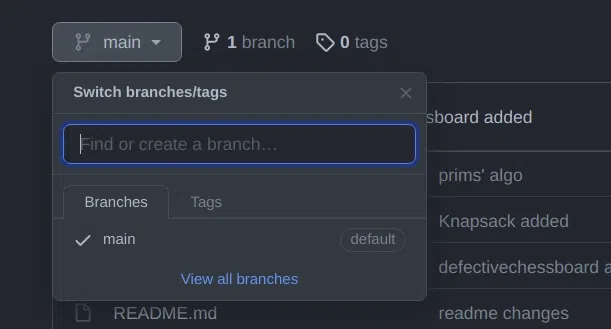
With this, we have successfully deleted our remote branch. A common error faced by many in this step is:
error: unable to push to unqualified destination: remoteBranchName The destination refspec neither matches an existing ref on the remote nor begins with refs/, and we are unable to guess a prefix based on the source ref. error: failed to push some refs to 'git@repository_name'
This means that someone has already deleted the branch that you want to delete. If this happens you can use the following command to synchronize your branch list in the local environment:
Syntax
git fetch -p
The -p flag here means "prune". After fetching the branches which no longer exist remotely will be deleted in your local working environment.
Local Deletion vs Remote Deletion
| Action | Local Deletion | Remote Deletion |
|---|
| Command | git branch -d branch-name | git push origin --delete branch-name |
| Force Deletion | git branch -D branch-name | git push origin :branch-name |
| Purpose | Removes branch from local repository | Removes branch from remote repository |
| Safety | -d flag is safer, prevents unintentional deletion | Must ensure the branch is not needed anymore. |
Which command is used to delete a branch locally only if it is already merged?
-
-
git push origin --delete <branch>
-
-
Explanation:
git branch -d safely deletes a local branch only after it has been merged. It prevents accidental data loss.
What should you do before deleting a local branch?
-
-
Switch to another branch using git checkout
-
-
Explanation:
Git does not allow deleting the branch you are currently on, so you must first checkout a different branch.
Which command is used to forcefully delete a Git branch locally, even if unmerged?
Explanation:
git branch -D <branch> (or --delete --force) force-deletes a branch even if not merged.
How do you delete a branch from a remote repository?
-
git branch --delete origin <branch-name>
-
git push origin --delete <branch-name>
-
git delete remote <branch-name>
-
Explanation:
Remote branch deletion uses git push with --delete option:
git push origin --delete <branch-name>
If a branch was already deleted remotely elsewhere and causes an error during deletion, which command helps sync your local branch list?
Explanation:
git fetch -p prunes references to branches that no longer exist remotely, updating local branch list.
Quiz Completed Successfully
Your Score : 2/5
Accuracy : 0%
Login to View Explanation
1/5
1/5
< Previous
Next >
Explore
Git Introduction
Git Installation and Setup
All Git Commands
Most Used Git Commands
Git Branch
Git Merge
Git Tools and Integration
Git Remote Repositories
Collaborating with Git
Advanced Git Commands