Difference between "add -A", "add -u", "add ." , and "add *"
Last Updated :
21 Nov, 2025
In Git, different variations of the git add command (add -A, add -u, add ., and add *) control which file changes are staged before a commit.
git add -A or git add --all :
What it does is it's going to stage all the changes, all the modified, deleted, and new files, and the dot file in the entire working tree.
 git add -A
 So, you can say it does the entire working tree it means that if you are in my subdirectory and you can execute
git add -A
It will stage all the changes no matter what subdirectory you are in.
 git add -A
 We can also use
git add -A
to stage all the changes in a particular directory.
Note -
git add -A
It is the default behavior of git add. so, I can leave off the
-A
then also it is going to do the exact same thing for all the above 3 cases. Now this behavior is actually new to git version 2. In git version 1 if you left off
-A
it would ignore the deleted files. Now, if you still want that git version 1 functionality just do
git add --no-all
or
git add --ignore-removal
.
git add -u or git add --update :
It add all the modified and deleted files but not any untracked files and it does this for the entire tree.
 git add -u
 So, if you specify a directory then it would stage all the modified and deleted files in that subdirectory but will not stage any untracked files without affecting the changes in its parent directory.
 git add -u newdir
git add .
This specific command will stage all the changes no matter what type it is whether it be untracked files or deleted files or modified files.
 git add
 Now, it might seem like it does the exact same as
git add -A
but it looks the same as long as you are in the top directory. So let's see how this is different. If you are in your top directory then
git add -A
and
git add .
are the exact same.
 git add
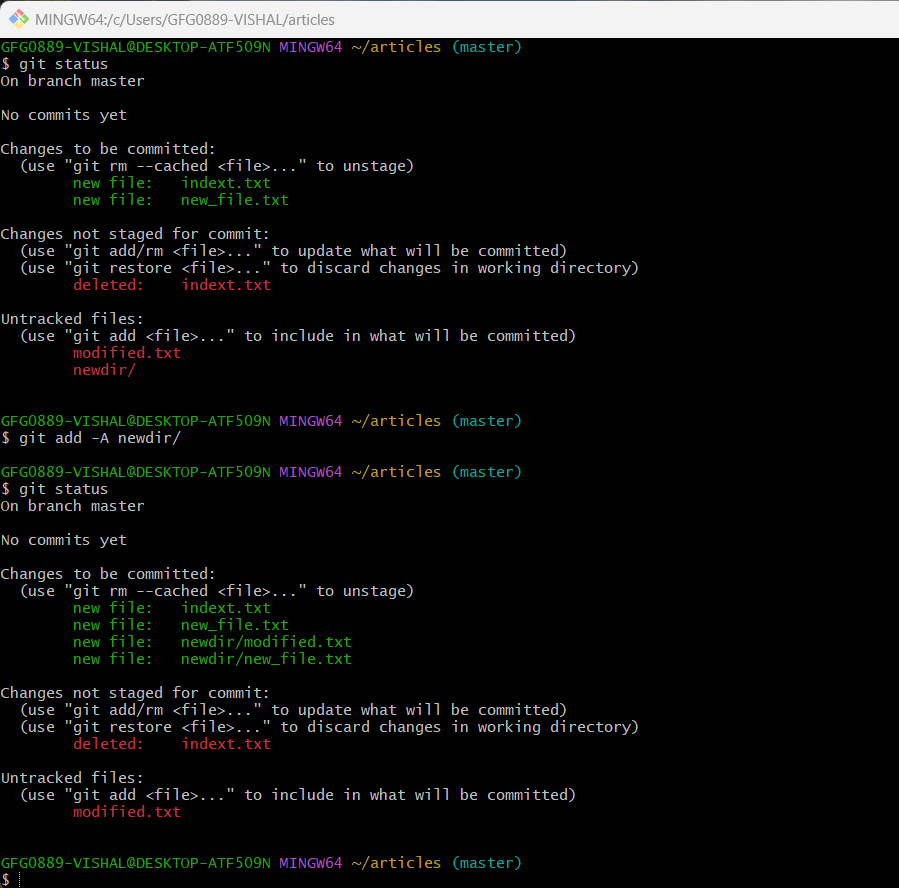
 So, you can see in the above image doing
git add .
in the subdirectory will stage all changes in that subdirectory but will not affect its parent directory. So the main difference between
git add .
and
git add -A
is that in
git add -A
no matter from where you execute this command it will stage everything whether it be the subdirectory or the parent directory but
git add .
stages only the changes in the current directory and not it's parent directory.
git add *
Now, you can see many students using this command and you can personally avoid this command and advice you the same, this is because
*
is a shell command and it's not something that git specifically knows how to use it will just take everything that's aster.
 ls *
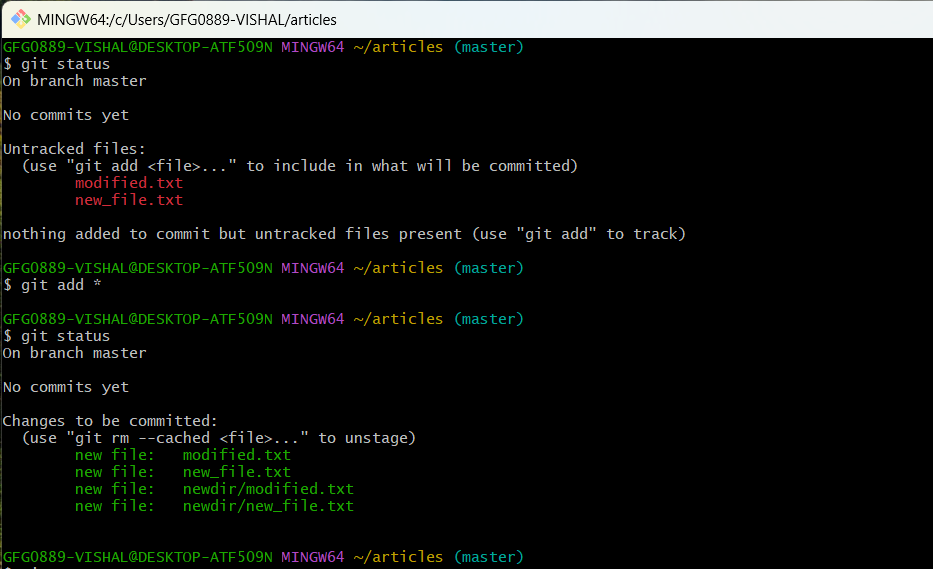
ls * As shown below when you will execute the command
git add *
gives a very unexpected result because it couldn't see the deleted files but one deleted file got added to the staging area and this deleted file didn't and the hidden file didn't get at it.
Which command stages all changes (tracked, untracked, modified, deleted) across the entire working tree, regardless of current directory?
Explanation:
git add -A (or default git add in Git 2+) stages all file modifications, deletions, and new files from the entire repository.
Which command stages only modified and deleted files, but not untracked files?
Explanation:
git add -u updates the staging area with tracked modified + deleted files but ignores untracked files.
What is the key difference between git add -A and git add . when executed inside a subdirectory?
-
-
git add . only stages current folder, git add -A stages entire repo
-
git add . stages deleted files globally
-
git add -A ignores parent directories
Explanation:
git add . stages only current directory changesgit add -A stages everything from the entire working tree
Why is git add * not recommended?
-
It stages too many directories
-
* is handled by the shell and may miss hidden/deleted files
-
It is slower than other commands
-
It only works on Windows systems
Explanation:
git add * is a shell wildcard expansion and may skip hidden files, miss deletions, and behave unpredictably.
Which command replicates Git version 1 behavior, where deleted files are ignored?
Explanation:
git add --no-all or git add --ignore-removal restores old behavior where deletions aren't staged automatically.
Quiz Completed Successfully
Your Score : 2/5
Accuracy : 0%
Login to View Explanation
1/5
1/5
< Previous
Next >
Explore
Git Introduction
Git Installation and Setup
All Git Commands
Most Used Git Commands
Git Branch
Git Merge
Git Tools and Integration
Git Remote Repositories
Collaborating with Git
Advanced Git Commands