
The Git index (staging area) is an intermediate area where you prepare and organize changes before committing them to the repository.
- Stores modified and added changes temporarily before committing to the repository.
- Allows selective staging of specific files or parts of changes, giving better control.
- Helps create clean, meaningful, and atomic commits by organizing related changes.
Git Workflow Areas
There are 4 main places where a file can exist:

1. Workspace (Working Directory)
The workspace is where you create and modify files on your local system.
- Contains new, modified, or untracked files.
- Reflects the current state of your project.
- Changes are not yet staged or committed.
git status Example: An untracked file named new_program.cpp, then using the above command the produced output would be: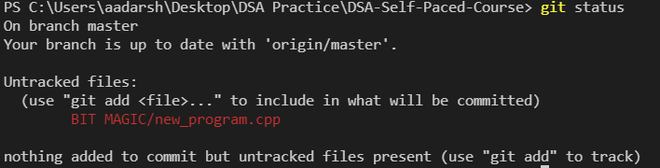
2. Staging Area (Index)
The staging area is where you prepare changes before committing.
- Stores changes temporarily before committing.
- Allows selective staging of files or changes .
- Prepares changes to be included in the next commit.
git add -A
git add .
git add <file>
This command will add all the untracked changes from the code to the staging area. You can also specify particular changes using the command
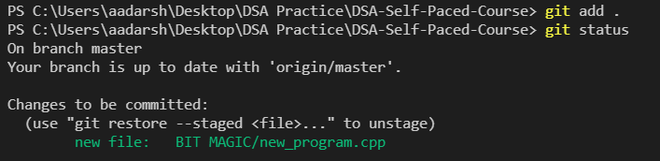
The staged file means it is in the staging area, i.e., in the index. you can also unstaged your changes using the command:
git restore --staged <file> 3. Local Repository
The local repository stores committed changes and maintains the complete history of your project.
- Tracks and preserves the history of commits.
- Allows switching between previous versions.
- Safely stores project changes locally.
git commit -m [message]Saves staged changes into the local repository as a new commit.
4. Remote Repository
The remote repository is a version of your project hosted online for sharing and collaboration.
- Accessible from anywhere with proper credentials.
- Enables collaboration with other developers.
- Stores code on platforms like GitHub.
git pushUploads local commits to the remote repository
Importance of the Git Index
The Git index provides control over how changes are prepared and organized before committing.
- Selective staging: Stage only required files or changes while leaving others uncommitted.
- Review & organization: Inspect and organize changes before committing for better accuracy.
- Atomic commits: Combine related changes into meaningful, self-contained commits.
- Partial staging: Commit specific portions of a file, useful for handling mixed changes.
- Better commit control: Provides flexibility to manage what goes into each commit.