Git is a distributed version control system (VCS) used to track changes in source code during software development. It helps developers collaborate, manage different versions of code, and roll back to previous states if needed.
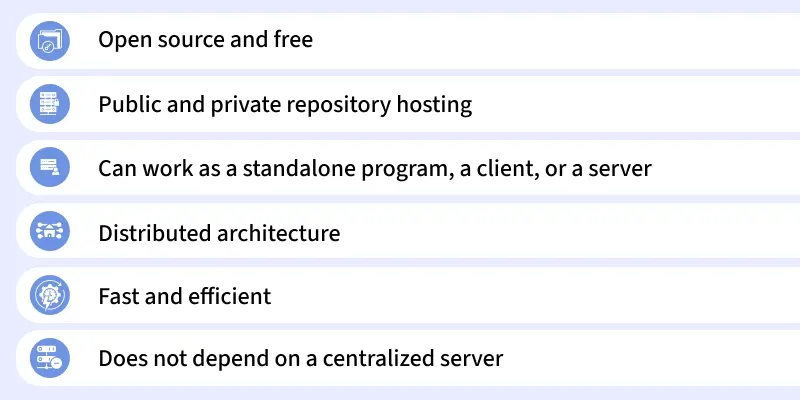
- Collaboration: Multiple developers can work together and merge changes easily.
- History Tracking: Revert to previous versions whenever needed.
- Branching & Merging: Develop features separately and merge them safely.
- Distributed Development: Each developer has a full copy of the repo.
- Incremental Changes: Only differences are stored, saving space and simplifying updates.
Core Concepts of Git
Before using Git, it is important to understand some of its core concepts. These concepts will help you get started and make it easier to work with Git in real-world scenarios.
1. Repositories
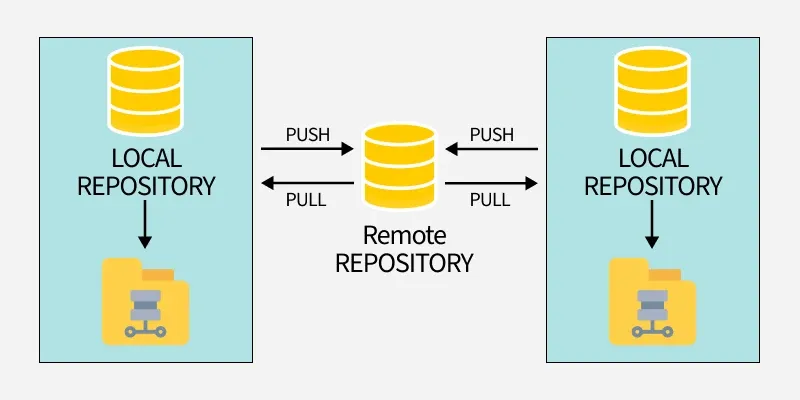
A repository (or repo) is a storage space where your project files and their history are kept. There are two types of repositories in Git:
- Local Repository: A copy of the project on your local machine.
- Remote Repository: A version of the project hosted on a server, often on platforms like GitHub, GitLab, or Bitbucket.
2. Commits
A commit is a snapshot of your project at a specific point in time. Each commit has a unique identifier (hash) and includes a message describing the changes made. Commits allow you to track and review the history of your project.

3. Branches
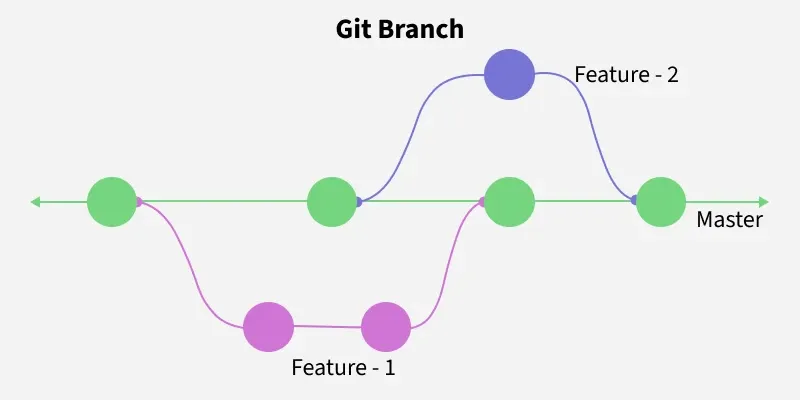
Branches allow developers to work on separate tasks without affecting the main codebase. Common branch types include:
- Main (or Master) Branch: The stable version of the project, usually production-ready.
- Feature Branch: Used for developing new features or bug fixes.
4. Merging
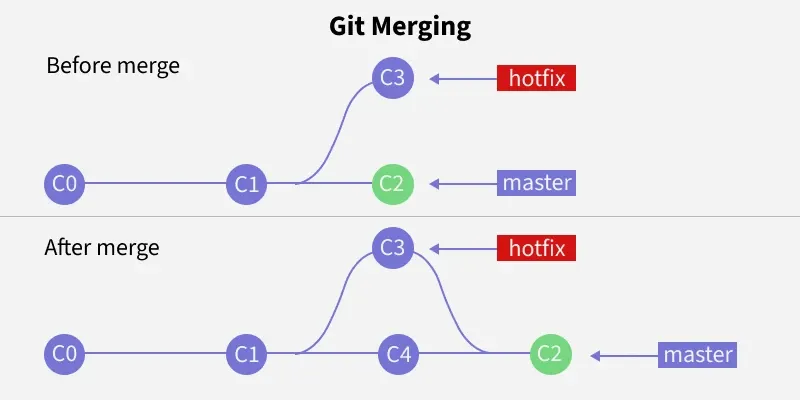
Merging is the process of integrating changes from one branch into another. It allows you to combine the work done in different branches and resolve any conflicts that arise.
5. Cloning
Cloning a repository means creating a local copy of a remote repository. This copy includes all files, branches, and commit history.

6. Pull and Push
- Pull: Fetches updates from the remote repository and integrates them into your local repository.
- Push: Sends your local changes to the remote repository, making them available to others.
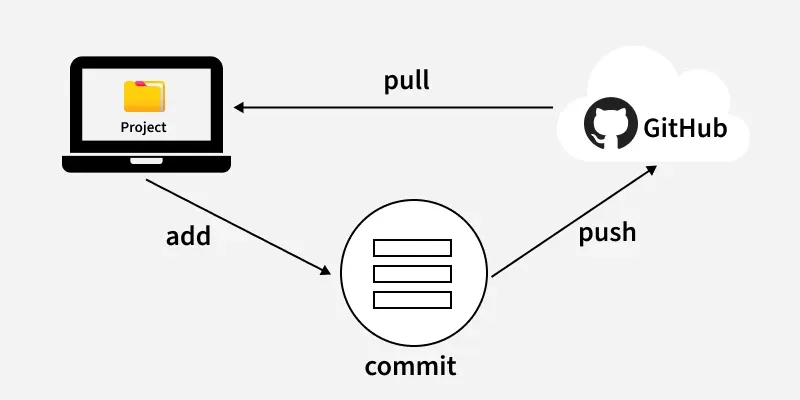
The Three States (The Staging Area)
In Git, your files can be in one of three main states. Understanding this is key to understanding how Git works:
- Working Directory: This is your project folder with all the files you are currently working on. Any changes you make here are not yet tracked by Git.
- Staging Area (or Index): This is an intermediate area where you list the specific changes you want to include in your next "snapshot" or commit. You use the
git add command to move changes from your working directory to the staging area. - Repository (.git directory): This is where Git permanently stores the snapshots (commits) of your project. You use the
git commit command to save the staged changes into the repository.
This three-step process (modify -> add -> commit) gives you precise control over what gets saved in your project's history.
Basic Git Commands
Git commands are important for navigating and controlling your project repository. These commands help you manage files, track changes, and collaborate with others.
| Command | Description |
|---|
git status | Shows the current status of the repository — staged, unstaged, and untracked files. |
git add <file-name> | Stages a specific file for commit. Use git add . to stage all changes. |
git commit -m "message" | Commits the staged changes with a descriptive commit message. |
git branch <branch-name> | Creates a new branch with the given name. |
git checkout <branch-name> | Switches to the specified branch. |
git merge <branch-name> | Merges changes from the given branch into the current branch. |
git push origin <branch-name> | Pushes the local branch changes to the remote repository. |
git pull origin <branch-name> | Fetches and merges changes from the remote repository into the local branch. |
git log | Displays the commit history for the current branch. |
Git Workflow
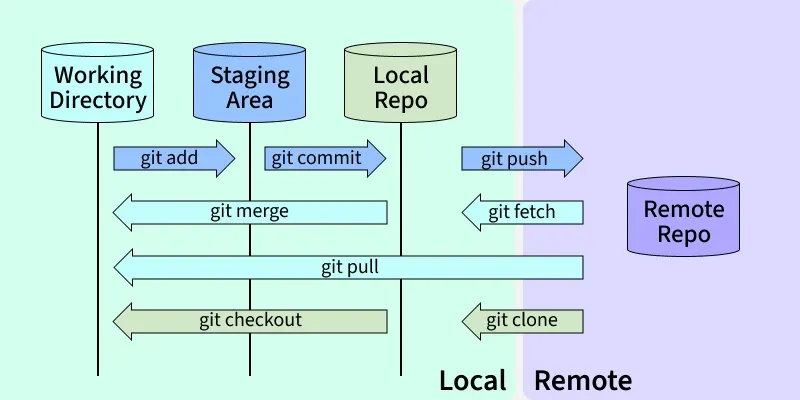
Git workflows define how developers should use Git in a structured and efficient manner.
1. Clone the Repository
git clone [email protected]:username/repository.git
2. Create and Switch to a New Branch
git checkout -b feature-branch
3. Make Changes and Stage Them
git add <file-name>
4. Commit the Changes
git commit -m "Add new feature"
5. Push the Changes
git push origin feature-branch
6. Create a Pull Request: After pushing your changes, create a pull request on GitHub to merge the feature branch into the main branch.
7. Update your Local Repository
git checkout main
git pull origin main
8. Delete Feature Branch:
git branch -d feature-branch
git push origin --delete feature-branch
Git is a crucial tool for modern software development and DevOps. Mastering Git setting up repos, using branches, and managing code enables efficient collaboration and a streamlined, scalable workflow.
Git Hosting stores your Git repositories on a remote server, enabling collaboration, backup, pull requests, CI/CD, and even website hosting, while Git manages changes locally.
1. GitHub:
GitHub is a cloud-based Git hosting platform owned by Microsoft, popular for open-source projects and beginner developers. It provides a complete environment for version control, collaboration, and deployment.
- Unlimited public and private repositories
- Pull requests and code reviews for team collaboration
- GitHub Pages for hosting static websites
- Automation and CI/CD with GitHub Actions
2. GitLab:
GitLab is a complete DevOps platform offering Git repository hosting along with built-in CI/CD, issue tracking, and project management tools. It is ideal for teams and enterprises looking to automate workflows and manage code efficiently.
- Public and private repositories
- Built-in CI/CD pipelines for automation
- Issue tracking and project management
- Option for self-hosting for full control and privacy.
3. Bitbucket:
Bitbucket is a Git hosting platform by Atlassian, designed for private repositories and team collaboration. It is ideal for small teams or companies seeking a secure environment with tight integration to project management tools.
- Private and public repositories
- Bitbucket Pipelines for CI/CD automation
- Integration with Jira and Trello
- Secure and collaborative environment for teams.
Which of the following best describes a Git repository?
-
A temporary folder for storing untracked files
-
A storage space containing project files and their entire history
-
A remote server used only for backups
-
A folder used only for staging changes
Explanation:
A Git repository stores both project files and full version history. Git maintains this history locally in the .git directory and remotely on platforms like GitHub or GitLab. This allows developers to track changes, revert versions, and collaborate effectively.
What is the primary purpose of a Git commit?
-
To transfer files to the remote server
-
To delete old versions of the project
-
To capture a snapshot of the project at a specific point in time
-
To create a new repository
Explanation:
A commit in Git is essentially a snapshot of the project. Each commit includes a unique hash and message describing the change. This allows Git to maintain a complete history and enables rollback, review, and collaboration.
Which Git branch typically represents the stable, production-ready version of the code?
Explanation:
The main/master branch acts as the stable codebase used in production. Developers create feature branches to work on enhancements without disturbing the main version, ensuring controlled and safe updates.
Which of the following correctly explains the purpose of the Git staging area?
-
It stores the final version of the project
-
It holds remote updates before pulling
-
It temporarily stores selected changes before committing
-
It keeps deleted files for recovery
Explanation:
The staging area (index) allows you to choose which changes will be included in your next commit. This gives precise control over project history, enabling the “modify → add → commit” workflow that Git relies on.
What does the git clone command do?
-
Creates a new remote repository
-
Creates a local copy of a remote repository with full history
-
Copies only the latest version of a project
-
Creates only a blank repository
Explanation:
git clone downloads the entire repository, including files, branches, and commit history, enabling a developer to start working independently while still contributing to the project.
What is the purpose of the git push command?
-
To fetch updates from the remote repository
-
-
To send local commits to the remote repository
-
Explanation:
git push uploads your local commits to the remote repository (like GitHub). This makes your changes available to other collaborators and allows integration into the main codebase.
Which Git hosting platform provides built-in CI/CD pipelines and can be self-hosted for full control?
Explanation:
GitLab includes built-in CI/CD, issue tracking, project management, and the option for self-hosting. This makes it a popular choice for enterprises needing both automation and security.
In Git, which of the following correctly represents the three-file states in the workflow?
-
-
-
Working Directory → Staging Area → Repository
-
Explanation:
Git’s workflow revolves around these three states:
- Working Directory: Where you modify files
- Staging Area: Where you prepare selected changes
- Repository: Where commits are permanently stored
This structured process ensures clean, well-maintained project history.
Quiz Completed Successfully
Your Score : 2/8
Accuracy : 0%
Login to View Explanation
1/8
1/8
< Previous
Next >
Explore
Git Introduction
Git Installation and Setup
All Git Commands
Most Used Git Commands
Git Branch
Git Merge
Git Tools and Integration
Git Remote Repositories
Collaborating with Git
Advanced Git Commands