
This attribute defines the space between the table and the frame. This attribute is accepted by <mtable> tag only.
Syntax:
<element framespacing="number">
Attributes Value:
- number: This attribute defines the space between the table and the frame.
Below example illustrate the framespacing attribute in HTML5 MathML:
Example:
<!DOCTYPE html>
<html>

<head>
    <title>
        HTML5 MathML framespacing Attribute
    </title>
</head>

<body>
    <center>
        <h1 style="color:green">
            GeeksforGeeks
        </h1>

        <h3>HTML5 MathML framespacing Attribute</h3>

        <math>
            <mi>GeeksforGeeks</mi>
            <mo>=</mo>
            <mtable frame="solid" columnlines="dashed"
                framespacing="2" align="axis 1">

                <mtr mathbackground="green;">
                    <mtd>Course</mtd>
                    <mtd>Fee</mtd>
                </mtr>
                <mtr>
                    <mtd>
                        <mi>C++ STL</mi>
                    </mtd>
                    <mtd>
                        <mi> 1499</mi>
                    </mtd>
                </mtr>
                <mtr>
                    <mtd>
                        <mi>Placement 100 </mi>
                    </mtd>
                    <mtd>
                        <mi>9999 </mi>
                    </mtd>
                </mtr>
                <mtr>
                    <mtd>
                        <mi>DSA Foundation </mi>
                    </mtd>
                    <mtd>
                        <mi>7999</mi>
                    </mtd>
                </mtr>
            </mtable>
        </math>
    </center>
</body>

</html>
Output:
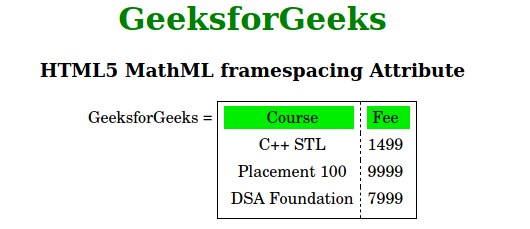
Supported Browsers: The browsers supported by HTML5 MathML framespacing attribute are listed below:
- Firefox