
This attribute holds the value of the thickness of the fraction. Possible values are thick, medium and thin. This attribute is accepted by <mfrac> tag only.
Syntax:
<element linethickness=="thin | medium | thick">
Attribute Values:
- thin: This attribute sets the line thickness thin.
- medium: This attribute sets the line thickness medium.
- thick: This attribute sets the line thickness thick.
Below example illustrate the linethickness attribute in HRML5 MathML:
Example:
<!DOCTYPE html>
<html>

<head>
    <title>HTML5 MathML linethickness Attribute</title>
</head>

<body>
    <center>
        <h1 style="color:green">
            GeeksforGeeks
        </h1>

        <h3>HTML5 MathML linethickness Attribute</h3>

        <math>
            <mfrac bevelled="true"
                   linethickness="thick">
                <mfrac>
                    <msup>
                        <mi>x</mi>
                        <mn>2</mn>
                    </msup>
                    <msup>
                        <mi>y</mi>
                        <mn>2</mn>
                    </msup>
                </mfrac>
                <mfrac>
                    <msup>
                        <mi>a</mi>
                        <mn>2</mn>
                    </msup>
                    <msup>
                        <mi>b</mi>
                        <mn>2</mn>
                    </msup>
                </mfrac>
            </mfrac>
        </math>
    </center>
</body>

</html>
Output:
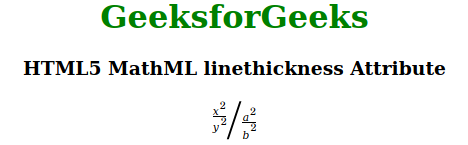
Supported Browsers: The browsers supported by HTML5 MathML linethickness attribute are listed below:
- Firefox