

Chained Exceptions in Java allow associating one exception with another, i.e. one exception describes the cause of another exception.
- For example, consider a situation in which a method throws an ArithmeticException because of an attempt to divide by zero.
- But the root cause of the error was an I/O failure that caused the divisor to be zero.
- In such cases, chained exceptions help propagate both the primary and underlying causes of the error.
Example: The following example demonstrates how to use chained exceptions in Java.
public class Geeks {
    public static void main(String[] args) {
        try {

            // Creating an exception
            NumberFormatException ex = new NumberFormatException("Primary Exception");

            // Setting the cause of the exception
            ex.initCause(new NullPointerException("Root cause of the exception"));

            // Throwing the exception with a cause
            throw ex;
        }
        catch (NumberFormatException ex) {

            // Displaying the primary exception
            System.out.println("Caught Exception: " + ex);

            // Displaying the root cause of the exception
            System.out.println("Cause of Exception: " + ex.getCause());
        }
    }
}
Output
Caught Exception: java.lang.NumberFormatException: Primary Exception
Cause of Exception: java.lang.NullPointerException: Root cause of the exception
Explanation:
- Creates a
NumberFormatExceptionas the primary exception. - Sets a
NullPointerExceptionas its cause usinginitCause(). - Throws and catches the
NumberFormatException. getCause()retrieves the originalNullPointerException.- Demonstrates how one exception can be linked to another as its cause.
Note: Chained exceptions, also known as nested exceptions, allow us to associate a cause with an exception in Java. This is useful when we want to propagate information about the original cause of an exception.
Constructors
- Throwable(Throwable cause): Where cause is the exception that causes the current exception.
- Throwable(String msg, Throwable cause): Where msg is the exception message and cause is the exception that causes the current exception.
Methods of Throwable Supporting Chained Exceptions
- getCause(): This method returns actual cause of an exception.
- initCause(Throwable cause): This method sets the cause for the calling exception.
Example: Using a Custom Message with Chained Exceptions In Java, we can chain exceptions using the constructor of the Throwable class.
public class Geeks {
    public static void main(String[] args) {
        try {

            // Code that might throw an exception
            int[] n = new int[5];
            int divisor = 0;

            for (int i = 0; i < n.length; i++) {
                int res = n[i] / divisor;
                System.out.println(res);
            }
        }
        catch (ArithmeticException e) {

            // Creating a new exception with
            // the original as the cause
            throw new RuntimeException
              ("Error: Division by zero occurred", e);
        }
    }
}
Output:
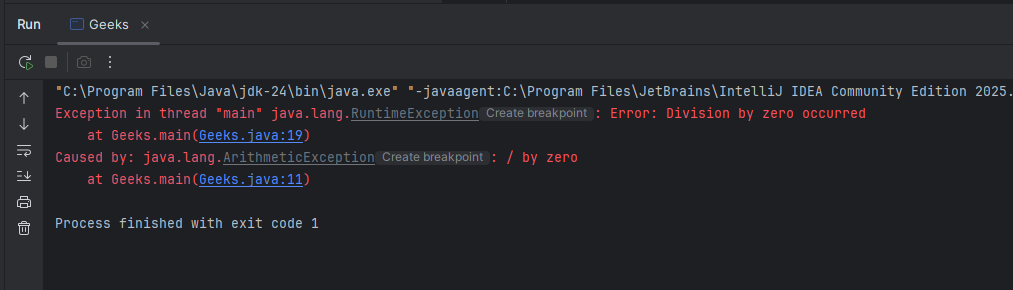
Explanation: In this example, an array of integers and sets the divisor to 0.
- Inside the try block, it try to divide each element of the array by 0, which throws an ArithmeticException.
- This ArithmeticException is caught in the catch block, where a new RuntimeException is created with the original exception i.e. ArithmeticException as its cause.
- The RuntimeException is not caught, so the JVM prints its stack trace. The stack trace shows the RuntimeException first, followed by the original ArithmeticException as the Caused by exception.
Advantages of Chained Exceptions
- This exception helps in debugging by providing details about both primary and root causes.
- It simplifies error handling by enabling propagation of complete exception context.
- This improves traceability of errors in complex applications.
Limitations of Chained Exceptions
- Chained exceptions can make stack traces longer and more difficult to understand.
- Unnecessary chaining may lead to confusing or redundant error messages.
- Incorrectly linking the cause of an exception can make debugging more difficult.
- Developers need to provide meaningful exception causes to maintain clear error context.