
Java IO API provides classes and methods to handle input and output operations efficiently. It allows reading data from various sources and writing data to different destinations, essential for almost all Java applications.
- Supports reading from files, user input and other sources.
- Enables writing to files, consoles and other output destinations.
- Includes byte streams and character streams for flexible I/O handling.
What is Java IO
Java IO (Input/Output) is used to process input and produce output. Java uses the concept of streams to make I/O operations efficient.
- The java.io package provides all the classes required for input and output.
- It supports operations like file handling, console input/output and working with data streams.
Note: The java.io package does not handle network sockets (that’s done via java.net).

Java IO Streams
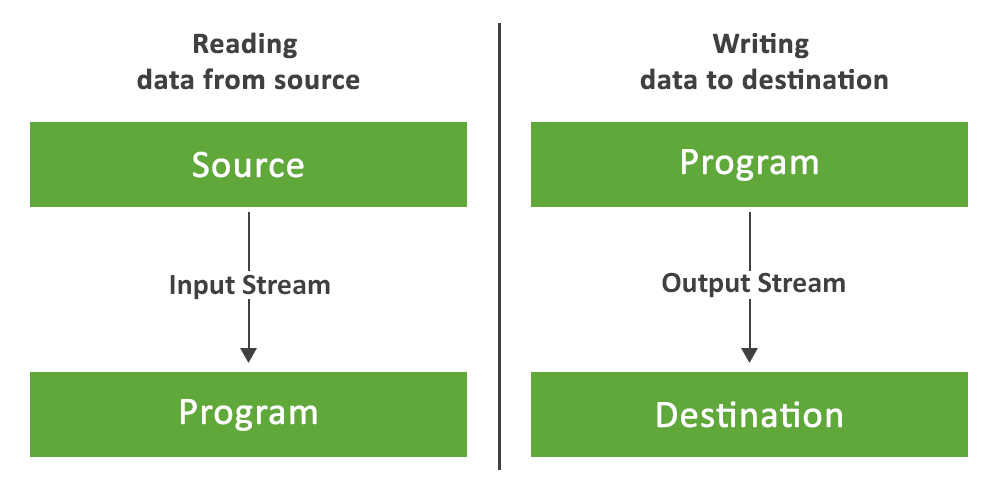
A stream is a sequence of data that flows from a source to a destination, similar to water flowing in a pipe.
- Input Stream
- Output Stream
Unlike arrays, streams don’t support random access (no indexing). Data flows sequentially.
1. InputStream in Java
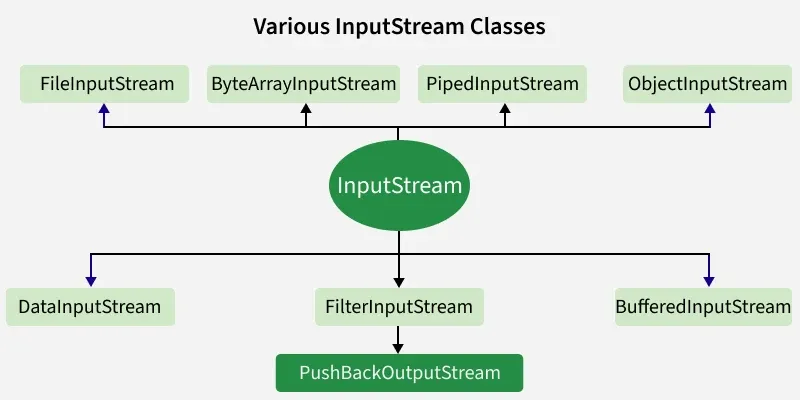
An input stream is used to read the data from a source in a Java application. Data can be anything, a file, an array, a peripheral device or a socket. In Java, the class java.io.InputStream is the base class for all Java IO input streams.
Example: Java program illustrates the use of the Java IO InputStream.
import java.io.*;

public class InputStreamExample
{
    public static void main(String[] args) throws Exception
    {
        InputStream input = null;
        try {

            input = new FileInputStream("Text.txt");

            // read() method - reading and printing Characters one by one
            System.out.println("Char - "+(char)input.read());
            System.out.println("Char - "+(char)input.read());

            // mark() - read limiting the 'input' input stream
            input.mark(0);

            // skip() - it results in skipping of 'e' in Ge'e'ksforGeeks
            input.skip(1);
            System.out.println("skip() method comes to play");
            System.out.println("mark() method comes to play");
            System.out.println("Char - "+(char)input.read());
            System.out.println("Char - "+(char)input.read());

            boolean check = input.markSupported();
            if (input.markSupported())
            {
                // reset() method - repositioning the stream to marked positions.
                input.reset();
                System.out.println("reset() invoked");
                System.out.println("Char - "+(char)input.read());
                System.out.println("Char - "+(char)input.read());
            }
            else
                System.out.println("reset() method not supported.");

            System.out.println("input.markSupported() supported"+" reset() - "+check);
        }
        catch(Exception e)
        {
            // in case of I/O error
            e.printStackTrace();
        }
        finally
        {
            if (input!=null)
            {
                // Use of close() - closing the file and releasing resources
                input.close();
            }
        }
    }
}
Text.txt content:
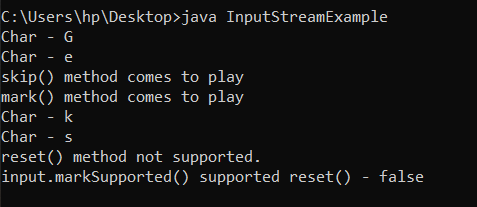
GeeksforGeeks
Output:
2. OutputStream in Java
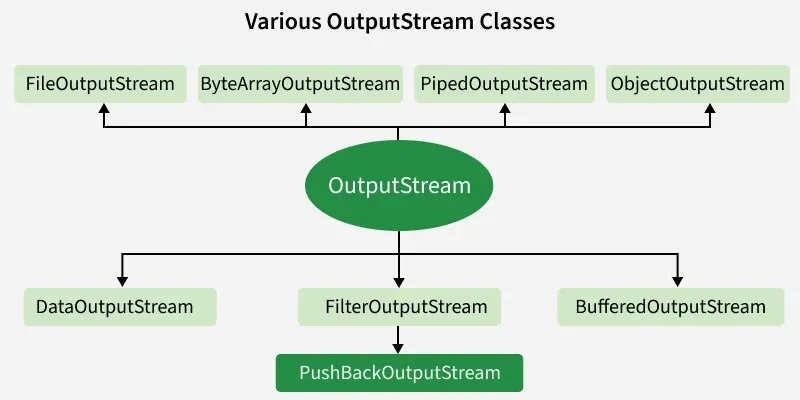
An output stream is used to write data (a file, an array, a peripheral device or a socket) to a destination. In Java, the class java.io.OutputStream is the base class for all Java IO output streams.
Example: Java program illustrates the use of the Java IO OutputStream.
import java.io.*;

public class OutputStreamExample {
    public static void main(String args[]) throws Exception
    {
        OutputStream output
            = new FileOutputStream("file.txt");
        byte b[] = { 65, 66, 67, 68, 69, 70 };

        // illustrating write(byte[] b) method
        output.write(b);

        // illustrating flush() method
        output.flush();

        // illustrating write(int b) method
        for (int i = 71; i < 75; i++) {
            output.write(i);
        }

        output.flush();

        // close the stream
        output.close();
    }
}
Output: When we run the program, the file.txt file is filled with the following content.
ABCDEFGHIJ
Note:
This code won’t run on an online IDE as no such file is present there. You can run this code on your System to check it's working.
Types of Streams in Java IO
The Streams in Java IO are of the following types:

1. Byte Streams
Java byte streams are the ones that are used to implement the input and output of 8-bit bytes. Several classes are affiliated with byte streams in Java. However, the most generally practiced classes are FileInputStream and FileOutputStream.
Different classes of Byte Streams
- InputStream: This is an abstract class that defines stream input.
- FileInputStream: This is used to reads from a file.
- DataInputStream: It contains a method for reading java standard datatypes.
- BufferedInputStream: It is used for Buffered Input Stream.
- PrintStream: This class comprises the commonly used print() and println() methods.
- OutputStream: This is an abstract class that describes stream output.
- FileOutputStream: This class is used to write to a file.
- DataOutputStream: This contains a method for writing java standard data types.
- BufferedOutputStream : This is used for Buffered Output Stream.
2. Character Streams
In Java, character streams handle input and output of 16-bit Unicode characters. The most commonly used classes are FileReader (internally uses FileInputStream) and FileWriter (internally uses FileOutputStream). Unlike byte streams, they read and write data as characters (two bytes at a time).
Different classes of Character Streams
- Reader: This is an abstract class that defines character stream input.
- Writer: This is an abstract class that defines character stream output.
- FileReader: This is an input stream that reads from the file.
- FileWriter: This is used to the output stream that writes to the file.
- BufferedReader: It is used to handle buffered input streams.
- BufferedWriter: This is used to handle buffered output streams.
- InputStreamReader: This input stream is used to translate the byte to the character.
- OutputStreamReader: This output stream is used to translate characters to bytes.
- PrintWriter: This contains the most used print() and println() methods.
3. Standard Streams
Java supports standard I/O like C/C++, with three streams: System.in (input), System.out (output) and System.err (error).
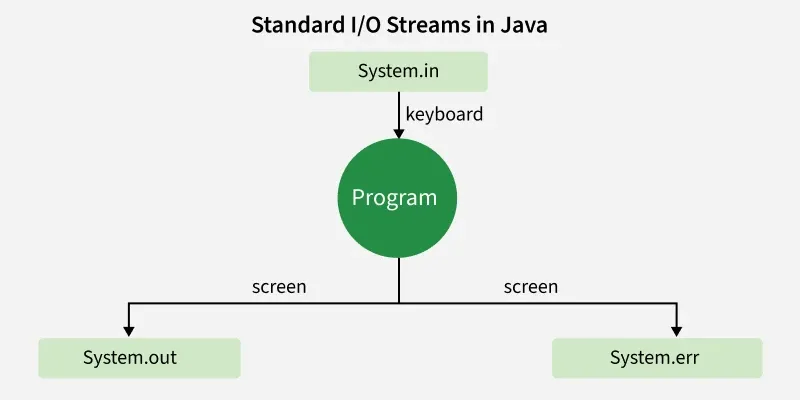
- Standard Input : The Standard Input class is used to accept input data to the user's program. Usually, a keyboard is utilized as a standard input stream and described as System.in.
- Standard Output : This class is used to output the data generated by the user's program and usually, a computer screen is used for standard output stream and described as System.out.
- Standard Error : The Standard error class is used to output the data having an error that is generated by the user's program. Normally, a computer screen is utilized for standard error stream and described as System.err.
Java IO Console
The java.io.Console class (introduced in JDK 6) is used for character-based console input. It provides methods to read text and passwords securely (passwords are not displayed on screen) and is internally linked to the system console.
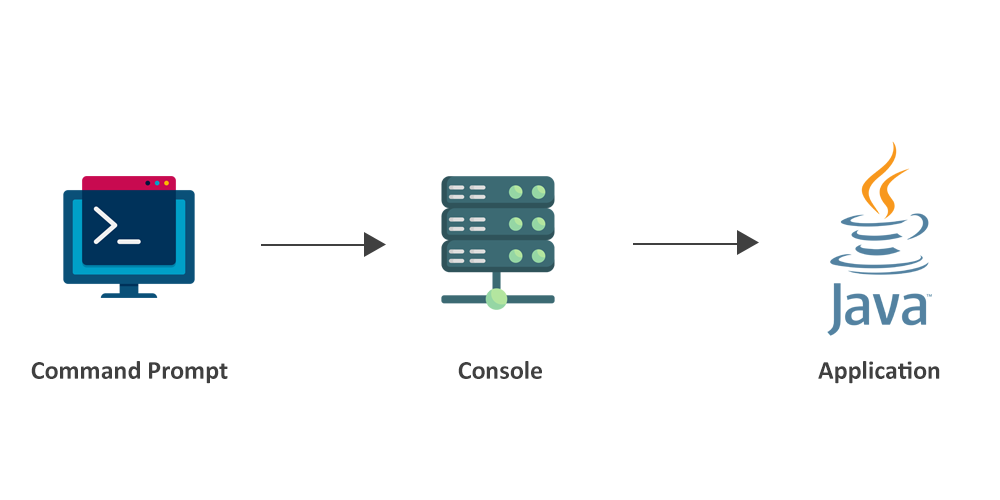
Characteristics of Java IO Console
- Used for reading/writing via console (if available).
- Simplifies interactions compared to System.in/System.out.
- No constructors; obtained using System.console().
- Returns a Console object if available, otherwise null.
Java IO Reader and Writer
Unlike byte-based streams, Reader and Writer handle character-based I/O, converting between bytes and characters according to encoding. java.io.Reader and java.io.Writer are abstract superclasses with subclasses for managing different character sets. Java provides 9 reader and 8 writer classes in the java.io package.
Java IO Reader
Reader class is an abstract class for reading character-based data. Subclasses must implement read(char[], int, int) and close() and often override other methods for efficiency or added functionality.
Different classes of Java IO Reader
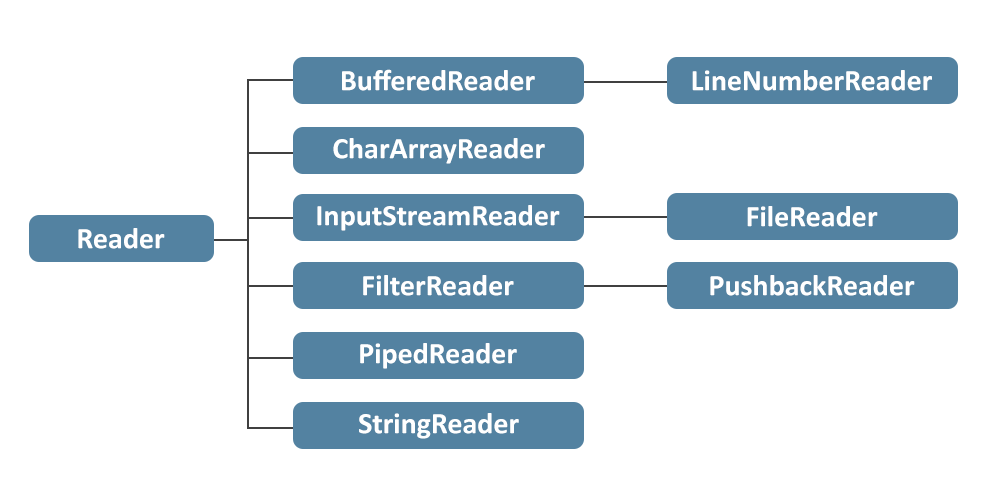
- BufferedReader: Java BufferedReader class is used to record the information from a character-based input stream.
- CharArrayReader: The CharArrayReader class is used to read the character array as a reader (stream). It inherits Reader class.
- FilterReader: Java FilterReader is used to perform filtering operations on the reader stream.
- InputStreamReader: An InputStreamReader class is a bridge from byte streams to character streams.
- LineNumberReader: The LineNumberReaser class keeps track of line numbers of the read characters. Line numbering begins at 0.
- PushbackReader: Java PushbackReader class is a character stream reader. It is used to pushes back a character into the stream.
- PipedReader: The PipedReader class is utilized to read the data of a pipe in the form of a stream of characters.
- StringReader: Java StringReader class is a stream of characters with string as an origin. It takes an input string and changes it into a character stream.
Java IO Writer
Writer class is an abstract class for writing character streams. Subclasses must implement write(char[], int, int), flush() and close() and often override other methods for efficiency or added functionality.
Different classes of Java IO Writer
The list of different classes of Java IO Writer is given below -
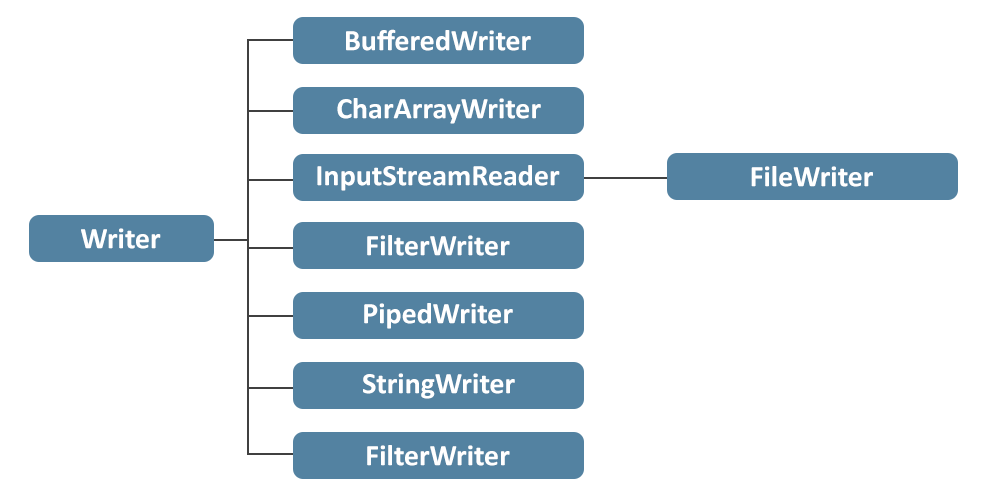
- BufferedWriter: Java BufferedWriter class is used to implement buffering for the instances of the Writer class.
- CharArrayWriter: The CharArrayWriter class can be used to write common data to multiple files. This class inherits the Writer class.
- FileWriter: Java FileWriter class is applied to write data to a file that is character-oriented.
- OutputStreamWriter: OutputStreamWriter is a class used to transform the character streams to the byte stream.
- PipedWriter: The PipedWriter class is used to write a stream of characters in the form of a java pipe. This class is generally used for writing text.
- PrintWriter: Java PrintWriter class can be described as an implementation of the Writer class.
- StringWriter: Java StringWriter class is used to collect the output from a string buffer, which can be utilized to build a string.
Java IO File
The Java IO File represents a file or directory path. Since file and directory structures vary across platforms, File provides a platform-independent way to handle them. It allows operations such as creating, deleting, renaming files/directories, listing contents and managing file properties.
Characteristics of Java IO File
- Represents files and directory pathnames.
- Pathnames can be absolute or relative.
- Objects are created by providing a filename or directory name.
- File access is controlled by permissions (read/write/execute).
- File instances are immutable; their pathnames cannot change after creation.