

Exception Handling is a mechanism used to handle abnormal situations that occur during program execution. It helps maintain the normal flow of a program by detecting exceptions and providing appropriate handling for them.
- Java exceptions are mainly classified into checked and unchecked exceptions, while serious runtime problems are represented by the Error class.
- Java provides try, catch, finally, throw, and throws keywords for handling exceptions
Exception Hierarchy
The exception hierarchy in Java starts with the Object class. The Throwable class extends Object and is the parent class of both Error and Exception.
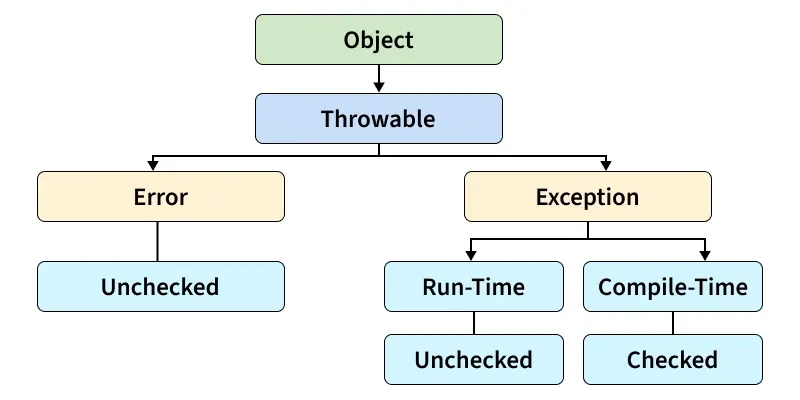
1. Error
The Error class represents serious problems that generally occur during runtime. These problems are usually related to the JVM or system resources and are not normally handled by application code. Errors generally indicate serious conditions from which a program may not be able to recover.
class RecursionDemo {

    static void display(int n) {

        // Recursive call without a stopping condition
        System.out.println("Value: " + n);
        display(n + 1);
    }

    public static void main(String[] args) {
        display(1);
    }
}
Output :
Exception in thread "main" java.lang.StackOverflowError
	at java.base/java.lang.System$1.encodeASCII(System.java:2165)
	at java.base/sun.nio.cs.UTF_8$Encoder.encodeArrayLoop(UTF_8.java:455)
	at java.base/sun.nio.cs.UTF_8$Encoder.encodeLoop(UTF_8.java:563)
	at java.base/java.nio.charset.CharsetEncoder.encode(CharsetEncoder.java:597)
	at java.base/sun.nio.cs.StreamEncoder.implWrite(StreamEncoder.java:280)
	at java.base/sun.nio.cs.StreamEncoder.implWrite(StreamEncoder.java:267)
	at java.base/sun.ni...
Explanation: The StackOverflowError occurs because the display() method keeps calling itself recursively without a terminating condition. The continuous method calls consume the available stack memory, causing the JVM to throw a StackOverflowError. The exact stack trace may vary depending on the Java version and system.
2. Exception
The Exception class represents abnormal conditions that a program can generally handle. Exceptions may occur because of invalid input, unavailable resources, or programming mistakes.
Exceptions are mainly divided into:
- Checked Exceptions
- Unchecked Exceptions
Checked Exceptions
Checked exceptions are checked by the compiler during compilation. The programmer must either handle them using a try-catch block or declare them using the throws keyword. Examples include IOException, FileNotFoundException, SQLException, and ClassNotFoundException.
Example: Program to reads data from a file. If an input/output problem occurs, the IOException is handled by the catch block.
import java.io.BufferedReader;
import java.io.FileReader;
import java.io.IOException;

class CheckedExceptionDemo {

    public static void main(String[] args) {

        try {
            BufferedReader reader =
                new BufferedReader(new FileReader("data.txt"));

            String line = reader.readLine();

            System.out.println("Data: " + line);

            reader.close();
        }
        catch (IOException e) {
            System.out.println("Unable to read the file");
        }
    }
}
Output
Unable to read the file
Explanation: The FileReader is used to open data.txt and BufferedReader reads its contents. If the file cannot be accessed or another input/output problem occurs, Java throws an IOException. The catch block handles the exception and displays an appropriate message.
Unchecked Exceptions
Unchecked exceptions are not checked by the compiler during compilation. They generally occur at runtime and are often caused by mistakes in program logic or invalid operations. Examples include: ArithmeticException, NullPointerException, NumberFormatException, ArrayIndexOutOfBoundsException
Example: NumberFormatException
A NumberFormatException occurs when a string that does not contain a valid numeric value is converted into a number.
class NumberExceptionDemo {

    public static void main(String[] args) {

        String value = "Java";

        try {
            int number = Integer.parseInt(value);

            System.out.println("Number: " + number);
        }
        catch (NumberFormatException e) {
            System.out.println(
                "The given value is not a valid number");
        }
    }
}
Output
The given value is not a valid number
Explanation: The string "Java" cannot be converted into an integer because it does not represent a valid numeric value. Therefore, Integer.parseInt() throws a NumberFormatException, which is handled by the catch block.
Multiple Catch Blocks
A single try block can contain statements that may produce different types of exceptions. Java allows multiple catch blocks to handle these exceptions separately.
class MultipleCatchDemo {

    public static void main(String[] args) {

        String value = "0";

        try {
            int number = Integer.parseInt(value);

            int result = 100 / number;

            System.out.println("Result: " + result);
        }
        catch (NumberFormatException e) {

            System.out.println(
                "Please enter a valid number");
        }
        catch (ArithmeticException e) {

            System.out.println(
                "Division by zero is not allowed");
        }
    }
}
Output
Division by zero is not allowed
Explanation: The string "0" is successfully converted into the integer 0. However, the statement 100 / number attempts to divide 100 by zero, which causes an ArithmeticException. The second catch block handles the exception and prints the appropriate message.