

Regular Expressions (Regex) in Java are a sequence of characters used to define a search pattern for text processing tasks. They help in efficiently matching, searching, and manipulating strings based on specific rules.
- Used for validating input formats like email, phone numbers, and passwords
- Helps in searching and extracting specific patterns from large text data
- Supports powerful text manipulation operations such as find and replace
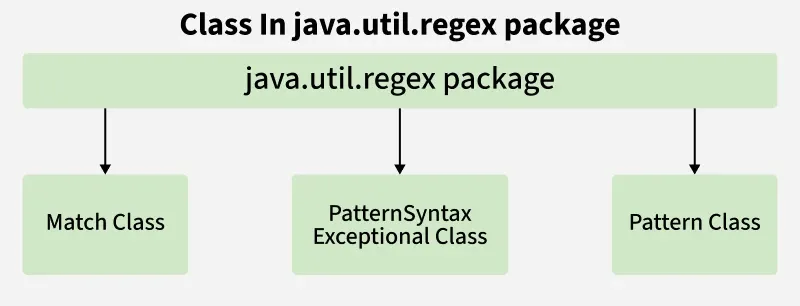
In Java, regular expressions are supported through the java.util.regex package, which mainly consists of the following classes:
- Pattern: Defines the regular expression.
- Matcher: Used to perform operations such as matching, searching and replacing.
- PatternSyntaxException: Indicates a syntax error in the regular expression.
Pattern Class
The Pattern class compiles regex strings into pattern objects.
Methods
- compile(String regex): Compiles a regex.
- matcher(CharSequence input): Creates a matcher to search a string.
- matches(String regex, CharSequence input): Checks full-string match.
- split(CharSequence input): Splits input based on the pattern.
import java.util.regex.Pattern;

class PatternExample {
    public static void main(String[] args){
        System.out.println(Pattern.matches("geeks.*", "geeksforgeeks")); // true
        System.out.println(Pattern.matches("geeks[0-9]+", "geeks12s"));   // false
    }
}
Output
true
false
Matcher Class
The Matcher class performs matching operations for input strings.
Key Methods:
- find(): Searches for pattern occurrences.
- start() / end(): Returns start and end indices of a match.
- group() / groupCount(): Retrieves matched subsequences.
- matches(): Checks if the entire input matches the pattern.
import java.util.regex.Matcher;
import java.util.regex.Pattern;

class MatcherExample {
    public static void main(String[] args) {
        Pattern p = Pattern.compile("geeks");
        Matcher m = p.matcher("geeksforgeeks.org");

        while (m.find()) {
            System.out.println("Pattern found from " + m.start() + " to " + (m.end() - 1));
        }
    }
}
Output:
Pattern found from 0 to 4
Pattern found from 8 to 12
Regex Character Classes
- [xyz]: Matches x, y, or z
- [^xyz]: Matches any character except x, y, or z
- [a-zA-Z]: Matches any character in the specified range
- [a-f[m-t]]: Union of ranges a–f and m–t
- [a-z && [^m-p]]: Intersection of a–z excluding m–p
import java.util.regex.Pattern;

class CharClassExample {
    public static void main(String[] args) {
        System.out.println(Pattern.matches("[a-z]", "g"));      // true
        System.out.println(Pattern.matches("[a-zA-Z]", "Gfg")); // false
    }
}
Regex Quantifiers / Metacharacters
| Quantifier | Meaning | Example Matches |
|---|---|---|
| X? | Appears 0 or 1 time | "a?" -> "", "a" |
| X+ | Appears 1 or more times | "a+" -> "a", "aa" |
| X* | Appears 0 or more times | "a*" -> "", "a", "aa" |
| X{n} | Appears exactly n times | "a{3}" -> "aaa" |
| X{n,} | Appears at least n times | "a{2,}" -> "aa", "aaa" |
| X{n,m} | Appears between n and m times | "a{2,4}" -> "aa", "aaa", "aaaa" |
Example: Using quantifiers with Pattern.matches()
System.out.println(Pattern.matches("\\d{4}", "1234")); // true
System.out.println(Pattern.matches("\\d{4}", "123"));  // false
System.out.println(Pattern.matches("[a-z]+", "hello")); // true
System.out.println(Pattern.matches("[a-z]+", ""));      // false
System.out.println(Pattern.matches("a*", "aaaa"));      // true
Common Regex Patterns in Java
- . : Any character
- \d : Digit [0-9]
- \D : Non-digit
- \s : Whitespace
- \S : Non-whitespace
- \w : Word character [a-zA-Z0-9_]
- \W : Non-word character
- \b : Word boundary
- \B : Non-word boundary
System.out.println(Pattern.matches("\\d+", "1234")); // true
System.out.println(Pattern.matches("\\D+", "1234")); // false
System.out.println(Pattern.matches("\\D+", "Gfg"));  // true
System.out.println(Pattern.matches("\\S+", "gfg"));  // true
Important Notes
- Use Pattern.compile() to create a regex pattern.
- Use matcher() on a Pattern to perform matches.
- Pattern.matches() validates the whole string, while Matcher.find() searches for multiple occurrences.
- Regex can split text, validate input, and extract data efficiently in Java.