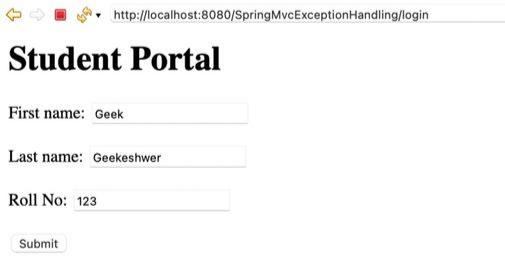
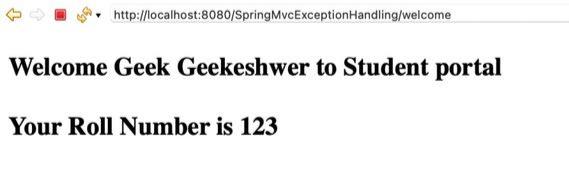
Exception handling in Spring MVC allows developers to handle runtime errors gracefully and return meaningful responses instead of application crashes. It helps in building robust, user-friendly, and maintainable web applications.
- Prevents application failure due to unhandled runtime exceptions
- Provides centralized and reusable error-handling mechanisms
Types of Exception Handling in Spring MVC
Spring MVC supports the following approaches:
1. Try–Catch Block
Try–catch is the most basic way of handling exceptions directly inside controller methods.
@RequestMapping("/welcome")
public String processForm(@ModelAttribute Student student, Model model) {
    try {
        int roll = Integer.parseInt(student.getRollNo());
        model.addAttribute("roll", roll);
        return "welcome";
    } catch (NumberFormatException e) {
        model.addAttribute("err", "Invalid Roll Number");
        return "error";
    }
}
Key points:
- Simple and easy to understand
- Handles exceptions locally within the method
- Not suitable for large applications
2. @ExceptionHandler
@ExceptionHandler handles specific exceptions at the controller level.
@ExceptionHandler(NumberFormatException.class)
public String handleNumberFormat(Model model) {
    model.addAttribute("err", "Number Format Exception");
    return "error";
}
Drawbacks:
- Cleaner than try–catch
- Handles exceptions for a single controller
- Improves code readability
- Limited to one controller
3. @ControllerAdvice
@ControllerAdvice provides global exception handling across all controllers.
Example:
@ControllerAdvice
public class GlobalExceptionHandler {

    @ExceptionHandler(NullPointerException.class)
    public String handleNull(Model model) {
        model.addAttribute("err", "Null Pointer Exception");
        return "error";
    }
}
Key points:
- Centralized error handling
- Applies to all controllers
- Reduces duplicate code
- Less control over individual controllers
4. @ResponseStatus
@ResponseStatus maps exceptions directly to HTTP status codes.
Example:
@ResponseStatus(value = HttpStatus.NOT_FOUND)
public class ResourceNotFoundException extends RuntimeException {
}
Key Points:
- Simple mapping to HTTP status
- No extra handler methods required
- Useful for REST APIs
- Not suitable for complex error responses
5. HandlerExceptionResolver
HandlerExceptionResolver is a low-level interface for custom exception resolution.
Example:
public class MyExceptionResolver implements HandlerExceptionResolver {
    public ModelAndView resolveException(
        HttpServletRequest request,
        HttpServletResponse response,
        Object handler,
        Exception ex) {

        ModelAndView mv = new ModelAndView("error");
        mv.addObject("err", ex.getMessage());
        return mv;
    }
}
Key Points:
- Full control over exception handling
- Works before controller execution ends
- Highly customizable
- More complex to implement
6. Spring Boot Default Exception Handling
Spring Boot provides built-in exception handling via BasicErrorController.
Example: No custom code required-Spring Boot automatically returns error responses like:-
{
"status": 404,
"error": "Not Found",
"path": "/invalid-url"
}
Key Points:
- Enabled by default
- Auto-configured error responses
- Best for quick REST applications
- Not suitable for custom UI error pages
Steps to Create the Application
Step 1: Create a Maven Web Application
- Open Eclipse IDE
- Create a New Maven Project
- Select maven-archetype-webapp
- Enter Group Id and Artifact Id
- Click Finish
After project creation, the basic project structure is generated automatically.

After clicking finish your project structure would look something like this:

Step 2: Project Structure
After adding all the classes and configuration files your project would look something like this:

Step 3: Configure pom.xml
The pom.xml is auto-created with any maven project, it defines all the dependencies required for the project. Make sure to add all the dependencies mentioned in this file.
<?xml version="1.0" encoding="UTF-8"?>
<project xmlns="https://maven.apache.org/POM/4.0.0"
         xmlns:xsi="https://www.w3.org/2001/XMLSchema-instance"
           xsi:schemaLocation="https://maven.apache.org/POM/4.0.0
                             https://maven.apache.org/xsd/maven-4.0.0.xsd">
  <modelVersion>4.0.0</modelVersion>

  <groupId>com.gfg</groupId>
  <artifactId>SpringMvcExceptionHandling</artifactId>
  <version>0.0.1-SNAPSHOT</version>
  <packaging>war</packaging>

  <name>SpringMvcExceptionHandling Maven Webapp</name>
  <!-- FIXME change it to the project's website -->
  <url>http://www.example.com</url>

  <properties>
    <project.build.sourceEncoding>UTF-8</project.build.sourceEncoding>
    <maven.compiler.source>1.7</maven.compiler.source>
    <maven.compiler.target>1.7</maven.compiler.target>
  </properties>

  <dependencies>
    <dependency>
      <groupId>junit</groupId>
      <artifactId>junit</artifactId>
      <version>4.11</version>
      <scope>test</scope>
    </dependency>
    <dependency>
        <groupId>org.springframework</groupId>
        <artifactId>spring-webmvc</artifactId>
        <version>5.1.1.RELEASE</version>
    </dependency>
    <dependency>
        <groupId>org.apache.tomcat</groupId>
        <artifactId>tomcat-jasper</artifactId>
        <version>9.0.12</version>
    </dependency>
    <dependency>
        <groupId>javax.servlet</groupId>
        <artifactId>servlet-api</artifactId>
        <version>3.0-alpha-1</version>
    </dependency>
    <dependency>
        <groupId>javax.servlet</groupId>
        <artifactId>jstl</artifactId>
        <version>1.2</version>
    </dependency>
  </dependencies>

  <build>
    <finalName>SpringMvcExceptionHandling</finalName>
    <pluginManagement>
      <plugins>
        <plugin>
          <artifactId>maven-clean-plugin</artifactId>
          <version>3.1.0</version>
        </plugin>
        <plugin>
          <artifactId>maven-resources-plugin</artifactId>
          <version>3.0.2</version>
        </plugin>
        <plugin>
          <artifactId>maven-compiler-plugin</artifactId>
          <version>3.8.0</version>
        </plugin>
        <plugin>
          <artifactId>maven-surefire-plugin</artifactId>
          <version>2.22.1</version>
        </plugin>
        <plugin>
          <artifactId>maven-war-plugin</artifactId>
          <version>3.2.2</version>
        </plugin>
        <plugin>
          <artifactId>maven-install-plugin</artifactId>
          <version>2.5.2</version>
        </plugin>
        <plugin>
          <artifactId>maven-deploy-plugin</artifactId>
          <version>2.8.2</version>
        </plugin>
      </plugins>
    </pluginManagement>
  </build>
</project>
Step 4: Configure web.xml
The web.xml file maps incoming requests to the DispatcherServlet, which is the front controller of Spring MVC.
<web-app xmlns="http://www.oracle.com/webfolder/technetwork/jsc/xml/ns/javaee/index.html"
         xmlns:xsi="https://www.w3.org/2001/XMLSchema-instance"
    xsi:schemaLocation="http://www.oracle.com/webfolder/technetwork/jsc/xml/ns/javaee/index.html
                        http://www.oracle.com/webfolder/technetwork/jsc/xml/ns/javaee/web-app_3_0.xsd"
    version="3.0">

    <servlet>
        <servlet-name>gfg</servlet-name>
        <servlet-class>
            org.springframework.web.servlet.DispatcherServlet
        </servlet-class>
        <init-param>
            <param-name>contextConfigLocation</param-name>
            <param-value>/WEB-INF/gfg-servlet.xml</param-value>
        </init-param>
        <load-on-startup>1</load-on-startup>
    </servlet>

    <servlet-mapping>
        <servlet-name>gfg</servlet-name>
        <url-pattern>/</url-pattern>
    </servlet-mapping>
</web-app>
Step 5: Configure Spring MVC (gfg-servlet.xml)
This file enables:
- Component scanning
- Annotation-driven MVC
- View resolution for JSP files
<beans xmlns="http://www.springframework.org/schema/beans/"
    xmlns:context="http://www.springframework.org/schema/context/"
    xmlns:mvc="http://www.springframework.org/schema/mvc/"
    xmlns:xsi="https://www.w3.org/2001/XMLSchema-instance"
    xsi:schemaLocation="http://www.springframework.org/schema/beans/
                        http://www.springframework.org/schema/beans//spring-beans.xsd
                        http://www.springframework.org/schema/mvc/
                        http://www.springframework.org/schema/mvc//spring-mvc.xsd
                        http://www.springframework.org/schema/context/ \
                        http://www.springframework.org/schema/context//spring-context.xsd">

    <context:component-scan base-package="com.gfg" />
     <bean
        class="org.springframework.web.servlet.view.InternalResourceViewResolver">
        <property name="prefix">
            <value>/WEB-INF/views/</value>
        </property>
        <property name="suffix">
            <value>.jsp</value>
        </property>
    </bean>
    <mvc:annotation-driven />

</beans>
Step 6: Create the Model Class (Student)
The rollNo field is intentionally kept as String to demonstrate a NumberFormatException.
package com.gfg.model;
public class Student {

    private String firstName;
    private String lastName;
    private String rollNo;

    public Student(String firstName, String lastName,
                   String rollNo)
    {
        super();
        this.firstName = firstName;
        this.lastName = lastName;
        this.rollNo = rollNo;
    }

    public Student() {}

    public String getFirstName() { return firstName; }

    public void setFirstName(String firstName)
    {
        this.firstName = firstName;
    }

    public String getLastName() { return lastName; }

    public void setLastName(String lastName)
    {
        this.lastName = lastName;
    }

    public String getRollNo() { return rollNo; }

    public void setRollNo(String rollNo)
    {
        this.rollNo = rollNo;
    }
}
Step 7:Create Controller with Method-Level Exception Handling
- The LoginController has two methods: showForm (GET) to display the login form, and processForm to handle form data using @ModelAttribute and Model.
- The rollNo field in the Student class is a String but parsed to int, which may throw a NumberFormatException if it's empty or contains letters.
- To handle this, a method numberformatHandler is defined with @ExceptionHandler(NumberFormatException.class) to catch the error and improve user experience.
package com.gfg.controller;
import org.springframework.stereotype.Controller;
import org.springframework.ui.Model;
import org.springframework.web.bind.annotation.ExceptionHandler;
import org.springframework.web.bind.annotation.ModelAttribute;
import org.springframework.web.bind.annotation.RequestMapping;

import com.gfg.model.Student;

@Controller
public class LoginController {

    @RequestMapping("/login")
    public String showForm(Model theModel) {
        theModel.addAttribute("student", new Student());
        return "portal";
    }
    @RequestMapping("/welcome")
    public String processForm(@ModelAttribute("welcome") Student student, Model mod) {
        mod.addAttribute("FirstName", student.getFirstName());
        mod.addAttribute("LastName", student.getLastName());
        int n = Integer.parseInt(student.getRollNo());
        mod.addAttribute("RollNo", n);
        return "welcome";
    }
      @ExceptionHandler(value = NumberFormatException.class)
    public String numberformatHandler(Model theModel) {
        theModel.addAttribute("err", "NumberFormatException");
        return "error";
    }
}
Step 8: Global Exception Handling Using @ControllerAdvice
- The MyExceptionHandler class handles all exceptions in the app and shows user-friendly error pages.
- By adding @ControllerAdvice, it applies to all controllers, allowing Spring MVC to use custom error methods instead of server-generated pages. This is an example of class-level exception handling.
package com.gfg.errorhandler;

import org.springframework.ui.Model;
import org.springframework.web.bind.annotation.ControllerAdvice;
import org.springframework.web.bind.annotation.ExceptionHandler;

@ControllerAdvice
public class MyExceptionHandler {

    @ExceptionHandler(value = NullPointerException.class)
    public String nullPointerHandler(Model theModel) {
        theModel.addAttribute("err", "NullPointerException");
        return "error";
    }

    @ExceptionHandler(value = Exception.class)
    public String AnyOtherHandler() {
        return "error";
    }
}
Step 9: Create JSP Views
This file in the views folder defines the Student login portal.
portal.jsp
<%@ taglib prefix="form" url="http://www.springframework.org/tags/form" %>

 <html>
<head>
</head>
<body>
    <h1>Student Portal</h1>
    <form:form action="welcome" modelAttribute="student">
       <label>First name:</label>
         <form:input path="firstName" />
        <br><br>

         <label>Last name:</label>
         <form:input path="lastName" />
        <br><br>

         <label>Roll No:</label>
          <form:input path="rollNo" />
         <br><br>

        <input type="submit" value="Submit" />

    </form:form>
</body>
</html>
welcome.jsp:
This page in the views folder defines the welcome page for our application.
<%@ taglib prefix="form" url="http://www.springframework.org/tags/form" %>

 <html>
<head>
</head>
<body>
    <h1>Student Portal</h1>
    <form:form action="welcome" modelAttribute="student">
       <label>First name:</label>
         <form:input path="firstName" />
        <br><br>

         <label>Last name:</label>
         <form:input path="lastName" />
        <br><br>

         <label>Roll No:</label>
          <form:input path="rollNo" />
         <br><br>

        <input type="submit" value="Submit" />

    </form:form>
</body>
</html>
error.jsp
This page is a simple exception handler page that defines the name of the exception and informs the user about an exception.
<%@ page language="java" contentType="text/html; charset=UTF-8"
    pageEncoding="UTF-8"%>
<!DOCTYPE html>
<html>
<head>
<meta charset="UTF-8">
<title>Insert title here</title>
</head>
<body>
    <h1>Opps....</h1>
    <h1> ${err} Exception caused</h1>
</body>
</html>
Step 10: Run the Application
Deploy the application on Apache Tomcat and access:
http://localhost:8080/SpringMvcExceptionHandling/login
Enter invalid roll number data to trigger exceptions.
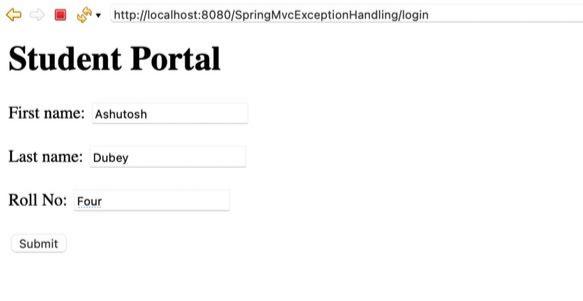
When Roll No is invalid:

Fill Correct data: