

StringBuilder is a mutable sequence of characters provided by the java.lang package. Unlike String, its contents can be modified without creating a new object for every operation. It is commonly used when a string needs to be changed frequently, especially in single-threaded applications
- It provides similar functionality to StringBuffer, but without thread safety.
- StringBuilder is not synchronized, so it performs better in single-threaded applications.
- Use StringBuffer only when thread safety is required; otherwise, prefer StringBuilder for improved performance.
public class Geeks {
    public static void main(String[] args)
    {
        StringBuilder sb
            = new StringBuilder("GeeksforGeeks");
        System.out.println("Initial StringBuilder: " + sb);

        sb.append(" is awesome!");
        System.out.println("After append: " + sb);
    }
}
Output
Initial StringBuilder: GeeksforGeeks
After append: GeeksforGeeks is awesome!
Explanation : Above example demonstrates the use of the append() method in StringBuilder to add text at the end of an existing string.
The append() method adds the given string to the end of the existing sequence without creating a new object. This makes StringBuilder efficient for concatenation operations.
Declaration
StringBuilder sb = new StringBuilder("Initial String");
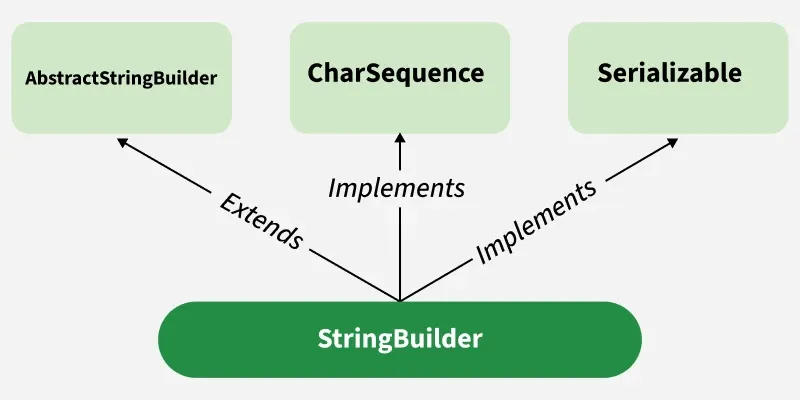
Hierarchy of StringBuilder
StringBuilder extends AbstractStringBuilder and implements Serializable, CharSequence, and Comparable<StringBuilder>.
StringBuilder Constructors
StringBuilder class provides multiple constructors for different use cases.
- StringBuilder() : Creates an empty builder with a default capacity of 16 characters.
- StringBuilder(int capacity) : Creates an empty builder with a specified initial capacity.
- StringBuilder(String str) : Initializes the builder with the content of the given String.
- StringBuilder(CharSequence cs) : Initializes the builder with the given CharSequence (for example, String or StringBuffer).
public class StringBuilderConstructorsDemo {
    public static void main(String[] args)
    {
        StringBuilder sb1 = new StringBuilder();
        sb1.append("Hello");
        System.out.println("sb1: " + sb1);

        StringBuilder sb2 = new StringBuilder(50);
        sb2.append("This has initial capacity 50");
        System.out.println("sb2: " + sb2);

        StringBuilder sb3 = new StringBuilder("Geeks");
        sb3.append("ForGeeks");
        System.out.println("sb3: " + sb3);

        CharSequence cs = "Java";
        StringBuilder sb4 = new StringBuilder(cs);
        sb4.append("Programming");
        System.out.println("sb4: " + sb4);
    }
}
Output
sb1: Hello
sb2: This has initial capacity 50
sb3: GeeksForGeeks
sb4: JavaProgramming
Explanation : This program demonstrates different constructors of the StringBuilder class and how to append data using the append() method.
Commonly Used Methods in StringBuilder
The StringBuilder class provides various methods for string manipulation.
Example: Using StringBuilder Methods
public class Geeks {
    public static void main(String[] args) {
        StringBuilder sb = new StringBuilder("GeeksforGeeks");
        System.out.println("Initial: " + sb);

        sb.append(" is awesome!");
        System.out.println("After append: " + sb);

        sb.insert(13, " Java");
        System.out.println("After insert: " + sb);

        sb.replace(0, 5, "Welcome to");
        System.out.println("After replace: " + sb);

        sb.delete(8, 14);
        System.out.println("After delete: " + sb);

        sb.reverse();
        System.out.println("After reverse: " + sb);

        System.out.println("Capacity: " + sb.capacity());
        System.out.println("Length: " + sb.length());

        char c = sb.charAt(5);
        System.out.println("Character at index 5: " + c);

        sb.setCharAt(5, 'X');
        System.out.println("After setCharAt: " + sb);

        String sub = sb.substring(5, 10);
        System.out.println("Substring (5–10): " + sub);

        sb.reverse(); // Revert for search
        System.out.println("Index of 'Geeks': " + sb.indexOf("Geeks"));

        sb.deleteCharAt(5);
        System.out.println("After deleteCharAt: " + sb);

        String result = sb.toString();
        System.out.println("Final String: " + result);
    }
}
Output:

Explanation : This program demonstrates various StringBuilder methods such as append(), insert(), replace(), delete(), reverse(), substring(), and setCharAt() to perform dynamic string manipulation efficiently in Java.
Important StringBuilder Methods
| Method | Description | Example |
|---|---|---|
| append(String str) | Appends the specified string to the end of the StringBuilder. | sb.append("Geeks"); |
| insert(int offset, String) | Inserts the specified string at the given position in the StringBuilder. | sb.insert(5, " Geeks"); |
| replace(int start, int end, String) | Replaces characters in a substring with the specified string. | sb.replace(6, 11, "Geeks"); |
| delete(int start, int end) | Removes characters in the specified range. | sb.delete(5, 11); |
| reverse() | Reverses the sequence of characters in the StringBuilder. | sb.reverse(); |
| capacity() | Returns the current capacity of the StringBuilder. | int cap = sb.capacity(); |
| length() | Returns the number of characters in the StringBuilder. | int len = sb.length(); |
| charAt(int index) | Returns the character at the specified index. | char ch = sb.charAt(4); |
| setCharAt(int index, char) | Replaces the character at the specified position with a new character. | sb.setCharAt(0, 'G'); |
| substring(int start, int end) | Returns a new String that contains characters from the specified range. | String sub = sb.substring(0, 5); |
| ensureCapacity(int minimum) | Ensures the capacity of the StringBuilder is at least equal to the specified minimum. | sb.ensureCapacity(50); |
| deleteCharAt(int index) | Removes the character at the specified position. | sb.deleteCharAt(3); |
| indexOf(String str) | Returns the index of the first occurrence of the specified string. | int idx = sb.indexOf("Geeks"); |
| lastIndexOf(String str) | Returns the index of the last occurrence of the specified string. | int idx = sb.lastIndexOf("Geeks"); |
| toString() | Converts the StringBuilder object to a String. | String result = sb.toString(); |
StringBuilder vs String vs StringBuffer
The table below demonstrates the difference between String, StringBuilder and StringBuffer:
Features | String | StringBuilder | StringBuffer |
|---|---|---|---|
Mutability | String are immutable(creates new objects on modification) | StringBuilder are mutable(modifies in place) | StringBuffer are mutable (modifies in place) |
Thread-Safe | It is thread-safe | It is not thread-safe | It is thread-safe |
Performance | It is slow because it creates an object each time | It is faster (no object creation) | It is slower due to synchronization overhead |
Use Case | Fixed, unchanging strings | Single-threaded string manipulation | Multi-threaded string manipulation |
Advantages of StringBuilder
- Performs faster string manipulations in single-threaded environments.
- Reduces memory overhead by modifying content in place.
- Automatically increases capacity when needed.
- Suitable for operations inside loops where strings are frequently changed.
Limitations of StringBuilder
- Not thread-safe because it is not synchronized.
- May consume extra memory if large capacity is allocated unnecessarily.
- Requires additional synchronization for safe use in multi-threaded applications.