
Spring AOP (Aspect-Oriented Programming) helps separate cross-cutting concerns like logging, security, and transaction management from the main business logic of an application. It allows developers to execute additional code at specific points during method execution.
- Provides advice annotations such as @Before, @After, @Around, @AfterReturning, and @AfterThrowing.
- Helps keep the code modular, clean, and easier to maintain by separating concerns.
Commonly used AOP advice annotations
Let’s discuss some commonly used Spring AOP advice annotations that define when the aspect code should be executed during method execution.
1. @Before
@Before advice is used when you want to run some code before a specific method executes like a pre-processing step. @Before advice runs before the execution of a method. It is mainly used for validation or logging before the actual method runs.
- Executes before the target method starts.
- Used for validation, authentication, or logging.
Example:
@Before("execution(* com.example.service.*.*(..))")
public void beforeMethod() {
System.out.println("Method is about to execute");
}
2. @After
@After advice runs after the method execution, whether the method completes successfully or throws an exception.
- Executes after the method finishes.
- Runs for both success and failure cases.
Example:
@After("execution(* com.example.service.*.*(..))")
public void afterMethod() {
System.out.println("Method execution completed");
}
3. @Around
@Around is an advice type that allows you to run code both before and after the actual method execution.@Around advice runs both before and after the method execution and can control the execution of the method.
- Executes before and after the method.
- Can control whether the method should run.
Example:
@Around("execution(* com.example.service.*.*(..))")
public Object aroundMethod(ProceedingJoinPoint joinPoint) throws Throwable {
System.out.println("Before method");
Object result = joinPoint.proceed();
System.out.println("After method");
return result;
}
4. @AfterReturning
@AfterReturning advice runs only when the method executes successfully and returns a result.
- Executes only after successful method completion.
- Used for logging results or sending notifications.
Example:
@AfterReturning(pointcut="execution(* com.example.service.*.*(..))", returning="result")
public void afterReturningMethod(Object result) {
System.out.println("Method returned: " + result);
}
5. @AfterThrowing
@AfterThrowing will be executed whenever there is an exception in the code. We need to handle that by putting try-catch blocks and always it is a good practice to handle exceptions.
- Executes when the method throws an exception.
- Used for exception logging or error handling.
Example:
@AfterThrowing(pointcut="execution(* com.example.service.*.*(..))", throwing="ex")
public void afterThrowingMethod(Exception ex) {
System.out.println("Exception occurred: " + ex.getMessage());
}
Steps to Build the Project with All Advice
Step 1: Create a Spring Boot Maven Project
Create a Spring Boot project using Spring Initializer with these details:
- Project: Maven
- Language: Java
- Spring Boot Version: Latest stable version
- Group: com.example
- Artifact: different-advice-example
- Packaging: Jar
- Java Version: 17
- Dependencies: Spring Web, Spring AOP
Project structure

pom.xml
<?xml version="1.0" encoding="UTF-8"?>
<project xmlns="https://maven.apache.org/POM/4.0.0"
         xmlns:xsi="https://www.w3.org/2001/XMLSchema-instance"
         xsi:schemaLocation="https://maven.apache.org/POM/4.0.0
                             https://maven.apache.org/xsd/maven-4.0.0.xsd">

    <modelVersion>4.0.0</modelVersion>
    <parent>
        <groupId>org.springframework.boot</groupId>
        <artifactId>spring-boot-starter-parent</artifactId>
        <version>2.2.2.RELEASE</version>
        <relativePath/>
    </parent>
    <groupId>com.examples</groupId>
    <artifactId>aop-different-advice-example</artifactId>
    <version>0.0.1-SNAPSHOT</version>
    <name>aop-around-advice-example</name>
    <description>Demo project for Spring Boot</description>

    <properties>
        <java.version>1.8</java.version>
    </properties>

    <dependencies>
        <dependency>
            <groupId>org.springframework.boot</groupId>
            <artifactId>spring-boot-starter-web</artifactId>
        </dependency>

          <!-- This is the much required dependency to have various advices -->
        <dependency>
            <groupId>org.springframework.boot</groupId>
            <artifactId>spring-boot-starter-aop</artifactId>
        </dependency>

        <!-- For testing -->
        <dependency>
            <groupId>org.springframework.boot</groupId>
            <artifactId>spring-boot-starter-test</artifactId>
            <scope>test</scope>
            <exclusions>
                <exclusion>
                    <groupId>org.junit.vintage</groupId>
                    <artifactId>junit-vintage-engine</artifactId>
                </exclusion>
            </exclusions>
        </dependency>
    </dependencies>

    <build>
        <plugins>
            <plugin>
                <groupId>org.springframework.boot</groupId>
                <artifactId>spring-boot-maven-plugin</artifactId>
            </plugin>
        </plugins>
    </build>

</project>
Step 2: Add Main Class
Create the main Spring Boot application file.DifferentAdviceExampleApplication.java
DifferentAdviceExampleApplication.java
import com.examples.service.GeneralService;
import org.springframework.boot.SpringApplication;
import org.springframework.boot.autoconfigure.SpringBootApplication;
import org.springframework.context.ConfigurableApplicationContext;
import org.springframework.context.annotation.EnableAspectJAutoProxy;

@SpringBootApplication
@EnableAspectJAutoProxy
public class DifferentAdviceExampleApplication {
    public static void main(String[] args {
        ConfigurableApplicationContext context = SpringApplication.run(DifferentAdviceExampleApplication.class, args);
        // Fetching the  object from the application context.
        GeneralService service = context.getBean(GeneralService.class);
        // checking for an employee available in the organization
        String employeeNumber = "A123";
        try {
            service.checkEmployeeExistence(employeeNumber);
        }
        catch (Exception ex) {
            System.out.println("Exception occurred.."
                               + ex.getMessage());
        }
        // Displaying balance in the account.
        String accnumber = "10000";
        try {
            service.getBalance(accnumber);
        }
        catch (Exception ex) {
            System.out.println("Exception occurred.."
                               + ex.getMessage());
        }
        context.close();
    }
}
Step 3: Create the Aspect Class
Create DifferentAspect.java and add AOP advice annotations:
- @Around
- @Before
- @After
- @AfterReturning
- @AfterThrowing
This class contains logging and monitoring logic for the service methods.
DifferentAspect.java
import org.aspectj.lang.JoinPoint;
import org.aspectj.lang.ProceedingJoinPoint;
import org.aspectj.lang.annotation.After;
import org.aspectj.lang.annotation.AfterReturning;
import org.aspectj.lang.annotation.AfterThrowing;
import org.aspectj.lang.annotation.Around;
import org.aspectj.lang.annotation.Aspect;
import org.aspectj.lang.annotation.Before;
import org.aspectj.lang.annotation.Pointcut;
import org.springframework.stereotype.Component;

@Aspect
@Component
public class DifferentAspect {
    @Pointcut(value = "execution(* com.examples.service.GeneralService.*(..))")
    private void logDisplay()
    {
    }

    @Before("execution(* com.examples.service.GeneralService.*(..))")
    public void logBefore(){
      System.out.println(".............I WILL EXECUTE BEFORE EACH AND EVERY METHOD.............");
    }

    @After("execution(* com.examples.service.GeneralService.*(..))")
    public void logAfter(){
        System.out.println(".............I WILL EXECUTE AFTER EACH AND EVERY METHOD.............");
    }


    @AfterReturning(value = "execution(* com.examples.service.GeneralService.*(..))", returning = "account")
    public void afterReturningAdvice(JoinPoint joinPoint){
        System.out.println("After Returning method:" + joinPoint.getSignature());
    }

    @AfterThrowing(value = "execution(* com.examples.service.GeneralService.*(..))", throwing = "ex")
    public void afterThrowingAdvice(JoinPoint joinPoint, Exception ex){
        System.out.println("After Throwing exception in method:"+ joinPoint.getSignature());
        System.out.println("Exception is:" + ex.getMessage());
    }

    @Around(value = "logDisplay()")
    public void aroundAdvice(ProceedingJoinPoint proceedingJoinPoint) throws Throwable
    {
        System.out.println("The method aroundAdvice() before invocation of the method " + proceedingJoinPoint.getSignature().getName()+ " method");
        try {
            proceedingJoinPoint.proceed();
        }
        finally {
        }
        System.out.println("The method aroundAdvice() after invocation of the method "+ proceedingJoinPoint.getSignature().getName() + " method");
    }
}
Step 4: Create the Service Class
Create GeneralService.java which contains methods on which AOP advice will run.
GeneralService.java
import org.springframework.stereotype.Service;

@Service
public class GeneralService {
    public void getBalance(String accNum)
    {
        System.out.println("Inside getBalance() method");
        if (accNum.equals("12345")) {
            System.out.println("Total balance: ......");
        }
        else {
            System.out.println(
                "Sorry! wrong account number.");
        }
    }

    public String checkEmployeeExistence(String employeeNumber)
    {
        System.out.println("Inside checkEmployeeExistence() method");
        String status = null;
        if (employeeNumber.equals("A123")) {
            System.out.println(employeeNumber + " is currently active");
            status = "active";
        }
        else {
            System.out.println(employeeNumber + " is currently inactive");
            status = "Inactive";
        }
        return status;
    }
}
Step 5 :Program Execution Flow
Program execution and output:

Output:
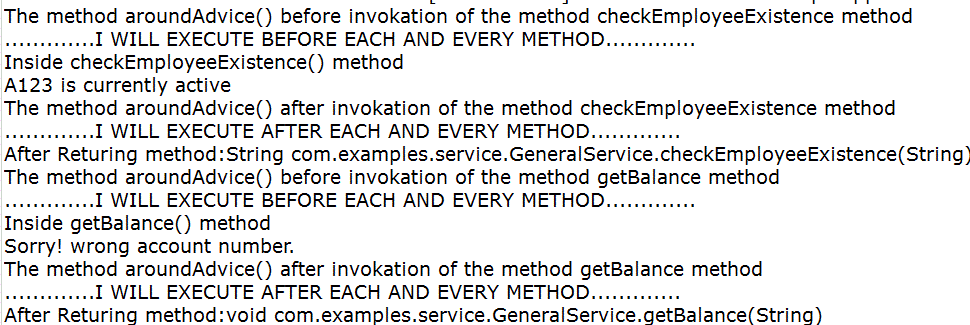
Explanation:
- @Around Advice (Before): Logs before the method runs.
- @Before Advice: Executes just before the actual method logs a general message for all methods.
- Actual Method Execution: checkEmployeeExistence() runs then Prints: "A123 is currently active".
- @Around Advice (After): Logs after the method runs.
- @After Advice: Executes after the method finishes (whether success or error).
- @AfterReturning Advice: Executes only if the method completes successfully then Logs method return information.
Let us see when an exception throws for getBalance method by just passing accountnumber to null
// Displaying balance in the account.
String accnumber = null;
try {
    service.getBalance(accnumber);
}
catch (Exception ex) {
    System.out.println("Exception occurred.."
                       + ex.getMessage());
}
Explanation:
- @Around Advice: Logs before getBalance() is called.
- @Before Advice: Executes before every method (here, before getBalance()).
- Inside Method: Execution enters the getBalance() method.
- Exception Occurs: A NullPointerException happens because accNum is null and accNum.equals(...) is called.
- @After Advice: Still runs after the method (regardless of exception).
- @AfterThrowing Advice: Specifically handles the exception, logs method info and exception message.
- Final Output: Exception message- Cannot invoke "String.equals(Object)" because "accNum" is null.