Backbone.js is a compact library used to organize JavaScript code. An MVC/MV* framework is another term for it. If MVC is unfamiliar to you, it is just a technique for designing user interfaces. The creation of a program's user interface is made considerably easier by JavaScript functions. BackboneJS provides a variety of building elements to aid developers in creating client-side web applications, including models, views, events, routers, and collections.
The methods of utility in Backbone.js:
Backbone.noConflict: The Backbone.js noConflict Utility is employed when the Backbone object should retain its original value. As a reference to the Backbone, we can utilize the function's return value for the Backbone.
Syntax:
var backbone = Backbone.noConflict();
Backbone.$: The Backbone.js $ Utility is advantageous when there are several jQuery. It is used to designate a specific object as having a particular DOM or AJAX library.
Syntax:
Backbone.$ = $
Example 1: The code below demonstrates how we can use the noConflict Utility:
<!DOCTYPE html>

<head>
    <script src=
"https://code.jquery.com/jquery-2.1.3.min.js"
            type="text/javascript"></script>
    <script src=
"https://cdnjs.cloudflare.com/ajax/libs/underscore.js/1.8.2/underscore-min.js"
            type="text/javascript"></script>
</head>

<body>
    <h1 style="color: green;">
        GeeksforGeeks
    </h1>
    <h3>What are the methods of utility in Backbone.js?</h3>
    <script type="text/javascript">
        this.Backbone = {
"Test": "This is not original Backbone's Version value which is being used, Version:"
            , VERSION: '1.1.0'
        }
    </script>
    <script src=
"https://cdnjs.cloudflare.com/ajax/libs/backbone.js/1.1.2/backbone-min.js"
            type="text/javascript">
    </script>
    <script>
        var testbackbone = Backbone.noConflict();
        console.log(Backbone)
        document.write(Backbone["Test"], `
        ${Backbone['VERSION']}<br>`);
        console.log(
"Original version's value of backbone which is being used is ",
          testbackbone.VERSION);
    </script>
</body>

</html>
Output:

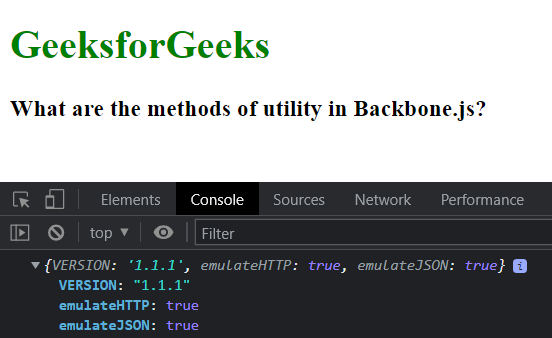
Example 2: The code below demonstrates how we can use the $ utility:
<!DOCTYPE html>
<html>

<head>
    <script src=
"https://code.jquery.com/jquery-1.12.4.min.js"
            type="text/javascript">
    </script>
    <script src=
"https://cdnjs.cloudflare.com/ajax/libs/underscore.js/1.8.2/underscore-min.js"
            type="text/javascript">
    </script>
    <script src=
"https://cdnjs.cloudflare.com/ajax/libs/backbone.js/1.1.2/backbone-min.js"
            type="text/javascript">
    </script>
</head>

<body>
    <h1 style="color: green;">
        GeeksforGeeks
    </h1>

    <h3>What are the methods of utility in Backbone.js?</h3>

    <script type="text/javascript">
        Backbone.$ = {
            VERSION: '1.1.1',
            emulateHTTP: true,
            emulateJSON: true
        };
        console.log(Backbone.$);
    </script>
</body>

</html>