

To group similar data points into clusters based on their proximity, Agglomerative Clustering is used which is a type of hierarchical clustering. It follows a bottom-up approach, where each data point starts as its own cluster and gradually merges with others based on similarity.
- The merging continues until all points form a single cluster or a set number of clusters remain.
- It uses distance metrics like Euclidean or Manhattan distance to measure similarity.
- The process is often visualized using a dendrogram, which shows the hierarchy of cluster formation.
- Common linkage methods include single, complete, average and ward linkage.
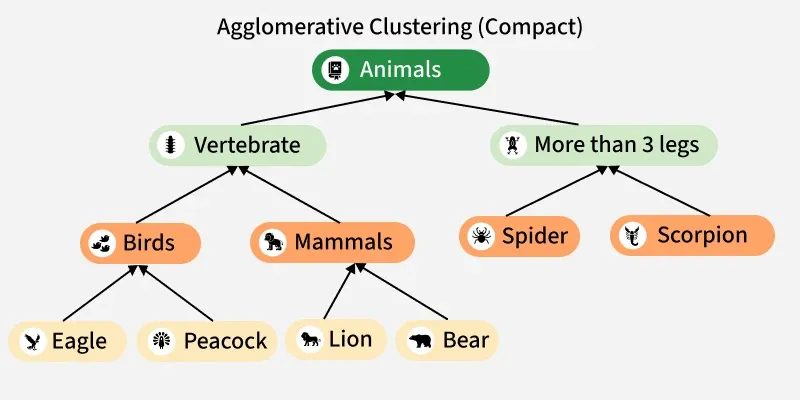
Workflow
Lets dicuss step by step how it works:

1. Start with all points separate:
- Treat each data point as its own cluster like A, B, C, ...
- Initially, you have n clusters for n data points.
2. Compute pairwise distances:
- Calculate the distance between every pair of clusters.
- Common choices include Euclidean, Manhattan or Cosine distance.
- Store these values in a distance matrix.
To know more about them refer to: Measures of Distance
3. Merge the nearest clusters:
- Identify the two clusters that are closest based on the chosen linkage method such as single, complete, average or Ward linkage.
- Combine them into a single new cluster.
4. Update distances:
- Recalculate the distances between the newly formed cluster and all remaining clusters.
- Use the same linkage rule to ensure consistency.
5. Repeat the process:
- Continue merging clusters and updating distances iteratively.
- Stop when you reach a predefined number of clusters (k) or a distance threshold.
6. Visualize the results:
- Create a dendrogram to visualize how clusters merged at each step.
- Choose a suitable cut on the dendrogram to obtain the final cluster groups.
Implementation
Let's see the implementation to show how agglomerative clustering works:
Step 1: Import Library
We need to import matplotlib library.
import matplotlib.pyplot as plt
Step 2: Define Leaves and Merge Sequence
List the leaf nodes (individual items) and define the bottom-up merge sequence. Each merge tuple is (left_item, right_item, parent_name).
leaves = ["Eagle", "Peacock", "Lion", "Bear", "Spider", "Scorpion"]
merges = [
    ("Eagle", "Peacock", "Birds"),
    ("Lion", "Bear", "Mammals"),
    ("Spider", "Scorpion", "More than 3 legs"),
    ("Birds", "Mammals", "Vertebrate"),
    ("Vertebrate", "More than 3 legs", "Animals")
]
Step 3: Build nested dictionary from merges
This creates a nested tree structure (dictionary) from the bottom-up merges. The resulting cluster_tree is a nested dict where each key maps to either a leaf string or another dict.
def build_tree_from_merges(leaves, merges):
    tree = {leaf: leaf for leaf in leaves}
    def replace_node(container, target, subtree):
        if isinstance(container, dict):
            if target in container:
                container[target] = subtree
                return True
            for k, v in container.items():
                if replace_node(v, target, subtree):
                    return True
        return False
    for a, b, parent in merges:
        subtree = {
            a: tree.pop(a) if a in tree else a,
            b: tree.pop(b) if b in tree else b
        }
        tree[parent] = subtree
        for top in list(tree.keys()):
            if top == parent:
                continue
            replace_node(tree[top], a, subtree)
            replace_node(tree[top], b, subtree)

    root = list(tree.keys())[0]
    return {root: tree[root]}

cluster_tree = build_tree_from_merges(leaves, merges)
Step 4: Compute positions
This recursive function computes (x,y) positions for every node to lay out the tree compactly. Small dx/dy values produce a compact tree.
def compute_positions(tree, x=0.0, y=0.0, dx=1.0, dy=1.0):
    positions = {}
    if isinstance(tree, dict):
        total_w = 0
        child_centers = []
        children_positions = {}
        for key, subtree in tree.items():
            sub_pos, sub_w = compute_positions(
                subtree, x + total_w * dx, y - dy, dx, dy)
            children_positions.update(sub_pos)
            xs = [px for (px, py) in sub_pos.values()]
            center_x = sum(xs) / len(xs)
            child_centers.append((key, center_x))
            total_w += sub_w
        for key, cx in child_centers:
            positions[key] = (cx, y)
        positions.update(children_positions)
        return positions, max(1, total_w)
    else:
        positions[tree] = (x, y)
        return positions, 1

positions, _ = compute_positions(cluster_tree, x=0.0, y=0.0, dx=0.9, dy=1.0)
Step 5: Extract edges i.e Parent → Child
This function walks the nested tree and returns a list of (parent, child) edges used to draw arrows.
def extract_edges(tree, parent=None):
    edges = []
    if isinstance(tree, dict):
        for key, subtree in tree.items():
            if parent is not None:
                edges.append((parent, key))
            edges.extend(extract_edges(subtree, key))
    return edges
edges = extract_edges(cluster_tree)
Step 6: Plot the compact tree
This draws the nodes using text boxes (rounded) and arrows using ax.annotate. It sets axis limits tightly around the nodes and saves the plot to /mnt/data/agglomerative_compact.png.
def plot_compact_tree(positions, edges, leaves, title="Agglomerative Clustering"):
    fig, ax = plt.subplots(figsize=(8, 5))
    ax.axis("off")
    xs = [p[0] for p in positions.values()]
    ys = [p[1] for p in positions.values()]
    xmin, xmax = min(xs) - 0.9, max(xs) + 0.9
    ymin, ymax = min(ys) - 0.6, max(ys) + 0.6
    ax.set_xlim(xmin, xmax)
    ax.set_ylim(ymin, ymax)
    for parent, child in edges:
        if parent in positions and child in positions:
            x_parent, y_parent = positions[parent]
            x_child, y_child = positions[child]
            ax.annotate("",
                        xy=(x_child, y_child + 0.08), xycoords='data',
                        xytext=(x_parent, y_parent - 0.08), textcoords='data',
                        arrowprops=dict(arrowstyle="->", lw=1.4,
                                        color="black", shrinkA=4, shrinkB=4)
                        )
    for node, (x, y) in positions.items():
        if node in leaves:
            face = "#fff2c2"
            txtcol = "black"
            fontsize = 10
            pad = 0.25
        elif node == "Animals":
            face = "#6e6e6e"
            txtcol = "white"
            fontsize = 11
            pad = 0.32
        elif node == "Vertebrate":
            face = "#ffd24d"
            txtcol = "black"
            fontsize = 11
            pad = 0.30
        else:
            face = "#7fd8c7"
            txtcol = "black"
            fontsize = 10
            pad = 0.27
        ax.text(x, y, node, ha="center", va="center",
                fontsize=fontsize, weight="bold" if node not in leaves else "normal",
                bbox=dict(boxstyle="round,pad={}".format(pad),
                          facecolor=face, edgecolor="black"))
    ax.set_title(title, fontsize=14, weight="bold", pad=12)
    ax.text(xmin + 0.15, (ymin + ymax) / 2, "Agglomerative\nClustering\n(Bottom-Up)",
            ha="center", va="center", rotation=90, fontsize=9)
    try:
        out_path = "/mnt/data/agglomerative_compact.png"
        plt.savefig(out_path, dpi=200, bbox_inches="tight")
        print(f"Saved compact tree to: {out_path}")
    except Exception:
        pass
    plt.show()
plot_compact_tree(positions, edges, leaves)
Output:

Real-World Applications
- Customer Segmentation (Marketing): Used to group customers based on purchase habits, browsing patterns or spending level when no predefined categories exist.
- Document & Topic Grouping (NLP / Search Engines): Clusters similar articles, research papers or news items to build topic hierarchies and recommendation systems.
- Fraud Detection (Finance & Security): Identifies unusual behavior by grouping normal patterns together and highlighting deviations as potential anomalies.
- Image Segmentation (Computer Vision): Groups pixels with similar properties like color, intensity or texture to detect objects or separate regions in an image.
- Bioinformatics & Gene Expression Analysis: Reveals hierarchical relationships between genes, proteins or species in evolutionary trees or similarity maps.
Advantages
- No Need to Predefine Number of Clusters: We don’t have to choose k beforehand. Clusters can be selected later by cutting the dendrogram at any level.
- Produces a Full Hierarchical Structure: It reveals how clusters form step-by-step, providing a clear and interpretable tree of relationships.
- Works With Any Distance Metric: Supports Euclidean, Manhattan, cosine, correlation, etc making it flexible for many types of data.
- Handles Non-Spherical and Complex Cluster Shapes: Depending on the linkage method, it can capture irregular or elongated patterns that methods like k-means cannot.