
KNN is a machine learning algorithm which is used for both classification (using KNearestClassifier) and Regression (using KNearestRegressor) problems.In KNN algorithm K is the Hyperparameter. Choosing the right value of K matters. A machine learning model is said to have high model complexity if the built model is having low Bias and High Variance.
We know that,
python3
Output:
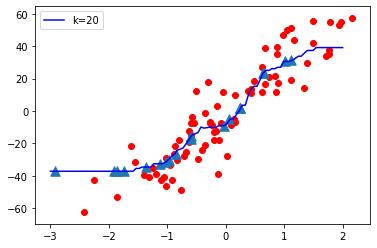
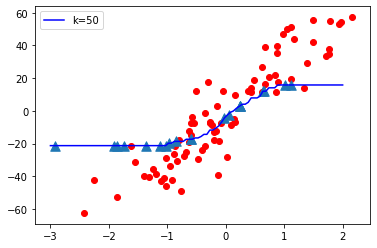
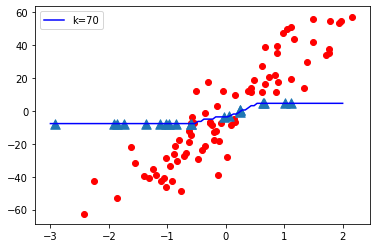
python3
Output:
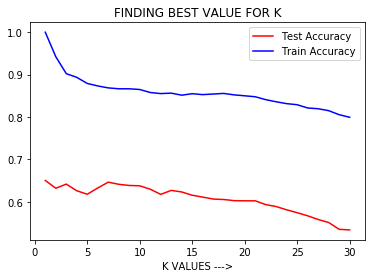
- High Bias and Low Variance = Under-fitting model.
- Low Bias and High Variance = Over-fitting model. [Indicated highly complex model ].
- Low Bias and Low Variance = Best fitting model. [This is preferred ].
- High training accuracy and Low test accuracy ( out of sample accuracy ) = High Variance = Over-fitting model = More model complexity.
- Low training accuracy and Low test accuracy ( out of sample accuracy ) = High Bias = Under-fitting model.
# This code may not run on GFG ide
# As required modules are not found.

# Import required modules
import matplotlib.pyplot as plt
from sklearn.datasets import make_regression
from sklearn.neighbors import KNeighborsRegressor
from sklearn.model_selection import train_test_split
import numpy as np

# Synthetically Create Data Set
plt.figure()
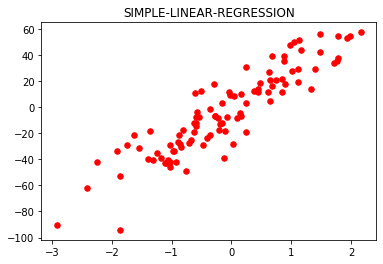
plt.title('SIMPLE-LINEAR-REGRESSION')
x, y = make_regression(
    n_samples = 100, n_features = 1,
    n_informative = 1, noise = 15, random_state = 3)
plt.scatter(x, y, color ='red', marker ='o', s = 30)

# Train the model.
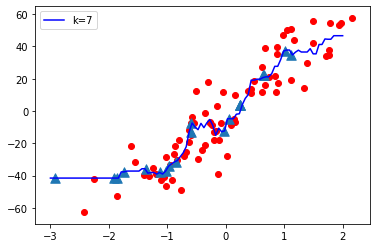
knn = KNeighborsRegressor(n_neighbors = 7)
x_train, x_test, y_train, y_test = train_test_split(
    x, y, test_size = 0.2, random_state = 0)
knn.fit(x_train, y_train)
predict = knn.predict(x_test)
print('Test Accuracy:', knn.score(x_test, y_test))
print('Training Accuracy:', knn.score(x_train, y_train))

# Plot The Output
x_new = np.linspace(-3, 2, 100).reshape(100, 1)
predict_new = knn.predict(x_new)
plt.plot(
    x_new, predict_new, color ='blue',
    label ="K = 7")
plt.scatter(x_train, y_train, color ='red' )
plt.scatter(x_test, predict, marker ='^', s = 90)
plt.legend()
Test Accuracy: 0.6465919540035108
Training Accuracy: 0.8687977824212627
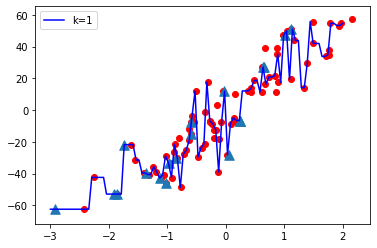
- When K value is small i.e. K=1, The model complexity is high ( Over-fitting or High Variance).
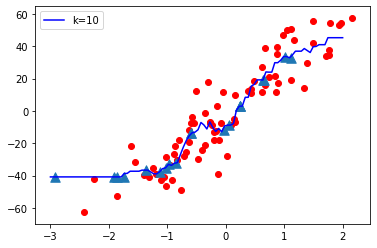
- When K value is very large i.e. K=70, The model complexity decreases ( Under-fitting or High Bias ).
# This code may not run on GFG
# As required modules are not found.

# To plot test accuracy and train accuracy Vs K value.
p = list(range(1, 31))
lst_test =[]
lst_train =[]
for i in p:
    knn = KNeighborsRegressor(n_neighbors = i)
    knn.fit(x_train, y_train)
    z = knn.score(x_test, y_test)
    t = knn.score(x_train, y_train)
    lst_test.append(z)
    lst_train.append(t)

plt.plot(p, lst_test, color ='red', label ='Test Accuracy')
plt.plot(p, lst_train, color ='b', label ='Train Accuracy')
plt.xlabel('K VALUES --->')
plt.title('FINDING BEST VALUE FOR K')
plt.legend()