
An embedding is a list of numbers (a vector) that represents the meaning of a piece of data. Most commonly, this is text, but embeddings can represent images, audio, and other data types depending on the model.
// Text -> embedding
"What is an embedding?" -> [0.00072939653, ..., -0.033257525]
The main idea is that semantically similar inputs produce vectors that are "close" to each other in vector space. That's what makes embeddings useful: instead of matching exact keywords, you can retrieve results that are related in meaning.
In practice, embeddings show up in semantic search ("find things like this"), recommendations ("users who liked X might like Y"), and retrieval-augmented generation (RAG), where you retrieve relevant context from a database and feed it into an LLM.
What is a Vector Database?
A vector database is a system that stores vectors and can efficiently retrieve the nearest vectors to a query vector. "Nearest" is defined using a similarity measure such as dot product, cosine similarity, or Euclidean distance.
MongoDB can act as your vector database without splitting your stack. You store embeddings inside the same documents as your operational fields, and then query them using MongoDB Vector Search. That means the "thing you search" (like a support ticket body) and the embedding for that thing can live together in one document, which simplifies your architecture.
Here's an example of a MongoDB document storing operational fields for a movie, plus an embedding stored as binary (BinData):
{
  "_id": { "...": "..." },
  "plot": "A young aristocrat must masquerade as a fop in order to maintain his secret identity of Zorro as he restores justice to early California.",
  "title": "The Mark of Zorro",
  "year": 1940,
  "imdb": { "rating": 7.6, "votes": 7260, "id": 32762 },
  "plot_embedding": {
    "$binary": {
      "base64": "JwD5iDi8...vLhGxbw=",
      "subType": "09"
    }
  }
}
In this tutorial we'll start with the simplest storage format (an array), and later talk about compression options like BinData vectors for scale.
What is Semantic Search?
Semantic search retrieves results based on meaning, not just keyword overlap.
If someone searches for "ocean tragedy", a keyword search might miss "Titanic: the story of the 1912 sinking…" because the query words don't appear in the text. Semantic search should still retrieve Titanic, because the meaning is closely related.
Most semantic search pipelines follow the same pattern:
- Embed your documents and store those vectors.
- Embed the user's query into a query vector.
- Use a vector index to find the closest document vectors to that query vector.
The important MongoDB-specific detail is that step 3 requires a vector search index on your embedding field.
MongoDB Vector Search Skills Badge
If you want a structured way to keep learning, the MongoDB Vector Search Fundamentals skills badge is a good next step. It walks you through the core concepts with hands-on exercises, and you'll earn a credential you can share on LinkedIn.
How to Create an Embedding?
To create embeddings, you use an embedding model. In this tutorial, we'll use Voyage AI's voyage-3-large model via LangChain4j. The model takes in text and returns a vector.
What is an Embedding Model?
An embedding model is the component that converts input (like a string of text) into a numeric vector. Different models produce different vector sizes, called dimensions. That matters because MongoDB Vector Search needs you to specify the exact dimensions in your index definition.
If your model outputs 1024-dimensional vectors, then:
- Stored vectors must be length 1024
- Query vectors must be length 1024
- Your vector search index must declare numDimensions: 1024
How to Choose the Right Embedding Model?
Choosing a model is mostly about tradeoffs: storage cost versus quality. A smaller embedding can be more storage-efficient. A larger embedding can capture more nuance, which can improve retrieval quality depending on your data.
The model also determines the maximum input size (tokens) and the operational cost of generating embeddings at scale. For RAG-style retrieval, you'll often care about how well the model ranks relevant results near the top of the list.
Here's a quick reference for the models mentioned in the MongoDB docs:
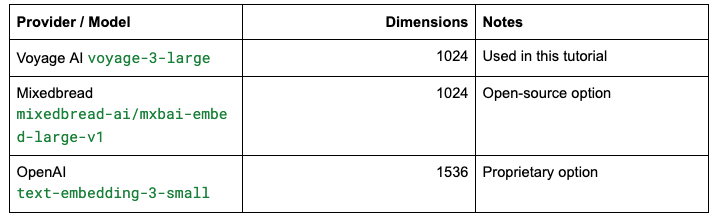
Prerequisites
- You'll need a MongoDB deployment that supports Search + Vector Search.
- An Atlas cluster running MongoDB version 6.0.11, 7.0.2, or later. Ensure that your IP address is included in your Atlas project's access list.
- A local Atlas deployment created using the Atlas CLI. To learn more, see Create a Local Atlas Deployment.
- A MongoDB Community or Enterprise cluster with Search and Vector Search installed.
- Java Development Kit (JDK) version 8 or later.
- An environment to set up and run a Java application. We recommend that you use an integrated development environment (IDE) such as IntelliJ IDEA or Eclipse IDE to configure Maven or Gradle to build and run your project.
- A Voyage AI API Key. To create an account and API Key, see the Voyage AI website.
Set Environment Variables
This tutorial expects two environment variables at runtime:
- VOYAGE_AI_KEY for the embedding model
- MONGODB_URI for connecting to MongoDB
In a terminal session, you can set them like this:
export VOYAGE_AI_KEY="<api-key>"
export MONGODB_URI="<connection-string>"
In an IDE, you'd typically set these in the run configuration. In production, you'd manage them through your deployment environment, CI/CD, or a secrets manager.
How to Create Embeddings from Data?
In this section we'll build a small Java demo project with four classes that mirror the real workflow:
- EmbeddingProvider wraps the embedding model and converts vectors into BSON-friendly types.
- CreateEmbeddings generates embeddings for a few sample strings and inserts them into MongoDB.
- CreateIndex creates a MongoDB Vector Search index for the embedding field.
- VectorQuery embeds a search phrase and runs a $vectorSearch query.
You can treat these classes as "scripts," but the separation of concerns is intentional. In business systems, ingestion, indexing, and query-time retrieval are usually separate flows that may run at different times.
Add Maven Dependencies
Create a new maven project. In here, you'll include two core dependencies.
First is the MongoDB Java Sync Driver. This gives you MongoClient, collections, insertMany(), and the aggregation pipeline APIs you'll use for vector search queries.
Second is LangChain4j's Voyage AI module. This gives you an embedding model client that can call Voyage AI and return vectors for your text.
Add this to your pom.xml:
<dependencies>
   <!-- MongoDB Java Sync Driver v5.2.0 or later -->
   <dependency>
      <groupId>org.mongodb</groupId>
      <artifactId>mongodb-driver-sync</artifactId>
      <version>[5.2.0,)</version>
   </dependency>


   <!-- Java library for working with Voyage AI models -->
   <dependency>
      <groupId>dev.langchain4j</groupId>
      <artifactId>langchain4j-voyage-ai</artifactId>
      <version>1.1.0-beta7</version>
   </dependency>
</dependencies>
If you want to run each class from the command line using Maven, add the exec-maven-plugin. This isn't required if you only plan to run in your IDE, but it makes tutorial instructions and testing much smoother:
<build>
  <plugins>
    <plugin>
      <groupId>org.codehaus.mojo</groupId>
      <artifactId>exec-maven-plugin</artifactId>
      <version>3.5.0</version>
    </plugin>
  </plugins>
</build>
Create an Embedding Provider
You don't run this file directly. It's the shared piece that the ingestion and query code call into. The goal is to keep embedding logic in one place: the model choice, authentication, and conversion into BSON-friendly values.
It exposes two methods. One generates embeddings in batch for a list of strings, which is what you want for ingestion/backfills. The other generates a single embedding for query-time search.
Create EmbeddingProvider.java:
import dev.langchain4j.data.embedding.Embedding;
import dev.langchain4j.data.segment.TextSegment;
import dev.langchain4j.model.embedding.EmbeddingModel;
import dev.langchain4j.model.output.Response;
import dev.langchain4j.model.voyageai.VoyageAiEmbeddingModel;
import org.bson.BsonArray;
import org.bson.BsonDouble;

import java.util.List;

public class EmbeddingProvider {

    private static EmbeddingModel embeddingModel;

    private static EmbeddingModel getEmbeddingModel() {
        if (embeddingModel == null) {
            String apiKey = System.getenv("VOYAGE_AI_KEY");
            if (apiKey == null || apiKey.isEmpty()) {
                throw new IllegalStateException("VOYAGE_AI_KEY env variable is not set or is empty.");
            }
            embeddingModel = VoyageAiEmbeddingModel.builder()
                    .apiKey(apiKey)
                    .modelName("voyage-3-large")
                    .build();
        }
        return embeddingModel;
    }

    /**
     * Takes a list of strings and returns a list of embeddings as BSON arrays
     * so they can be inserted into MongoDB documents.
     */
    public List<BsonArray> getEmbeddings(List<String> texts) {

        List<TextSegment> textSegments = texts.stream()
                .map(TextSegment::from)
                .toList();

        Response<List<Embedding>> response = getEmbeddingModel().embedAll(textSegments);

        return response.content().stream()
                .map(e -> new BsonArray(
                        e.vectorAsList().stream()
                                .map(BsonDouble::new)
                                .toList()))
                .toList();
    }

    /**
     * Takes a single string and returns one embedding as a BSON array
     * so it can be used in a vector search query.
     */
    public BsonArray getEmbedding(String text) {
        Response<Embedding> response = getEmbeddingModel().embed(text);
        return new BsonArray(
                response.content().vectorAsList().stream()
                        .map(BsonDouble::new)
                        .toList());
    }
}
The conversion to BsonArray and BsonDouble is the key integration detail here. The embedding model gives you a list of numeric values; you need to store those in MongoDB as part of a BSON document. This format is easy to insert and works cleanly with the indexing and query steps in this tutorial.
Generate Embeddings and Store them in MongoDB
Now we'll build the ingestion script. This is the part that mimics a real "embedding backfill": take some source text, generate embeddings for it, and insert documents that include both the raw text and its embedding.
Create CreateEmbeddings.java:
import com.mongodb.MongoException;
import com.mongodb.client.MongoClient;
import com.mongodb.client.MongoClients;
import com.mongodb.client.MongoCollection;
import com.mongodb.client.MongoDatabase;
import com.mongodb.client.result.InsertManyResult;
import org.bson.BsonArray;
import org.bson.Document;

import java.util.ArrayList;
import java.util.Arrays;
import java.util.List;

public class CreateEmbeddings {

    static List<String> data = Arrays.asList(
            "Titanic: The story of the 1912 sinking of the largest luxury liner ever built",
            "The Lion King: Lion cub and future king Simba searches for his identity",
            "Avatar: A marine is dispatched to the moon Pandora on a unique mission"
    );

    public static void main(String[] args) {

        String uri = System.getenv("MONGODB_URI");
        if (uri == null || uri.isEmpty()) {
            throw new RuntimeException("MONGODB_URI env variable is not set or is empty.");
        }

        try (MongoClient mongoClient = MongoClients.create(uri)) {

            MongoDatabase database = mongoClient.getDatabase("sample_db");
            MongoCollection<Document> collection = database.getCollection("embeddings");

            System.out.println("Creating embeddings for " + data.size() + " documents");

            EmbeddingProvider embeddingProvider = new EmbeddingProvider();
            List<BsonArray> embeddings = embeddingProvider.getEmbeddings(data);

            List<Document> documents = new ArrayList<>();
            for (int i = 0; i < data.size(); i++) {
                documents.add(new Document("text", data.get(i))
                        .append("embedding", embeddings.get(i)));
            }

            try {
                InsertManyResult result = collection.insertMany(documents);
                System.out.println("Inserted " + result.getInsertedIds().size()
                        + " documents into " + collection.getNamespace());
            } catch (MongoException me) {
                throw new RuntimeException("Failed to insert documents", me);
            }

        } catch (MongoException me) {
            throw new RuntimeException("Failed to connect to MongoDB ", me);
        } catch (Exception e) {
            throw new RuntimeException("Operation failed: ", e);
        }
    }
}
This script deliberately keeps the "business field" (text) and the embedding field together. While it is very convenient, it's also the pattern you want when you build real systems. It makes debugging and iteration easier, and it keeps your database model aligned with the actual meaning you're storing.
If you're running from the command line, make sure your environment variables are set, then run:
mvn -q compile exec:java -Dexec.mainClass="com.mongodb.CreateEmbeddings"
When it runs successfully, you should see output similar to:
- Creating embeddings for 3 documents
- Inserted 3 documents...
If you run exec:java and Maven can't find your class, double-check your package name matches the folder structure under src/main/java.
If you're using Atlas, you can open sample_db.embeddings in the Atlas UI and confirm the documents contain both text and embedding.
How to Embed Queries
At this point you've stored vectors, but you can't search them yet. MongoDB Vector Search requires a vector index on the embedding field. Once the index exists, query-time search becomes: embed the query string, then use $vectorSearch to find the closest vectors.
How to Create a Vector Search Index in MongoDB?
This script creates a vector search index named vector_index on the embedding field. The key configuration is numDimensions, which must exactly match the model output dimensions. For voyage-3-large, that's 1024.
Create CreateIndex.java:
import com.mongodb.MongoException;
import com.mongodb.client.ListSearchIndexesIterable;
import com.mongodb.client.MongoClient;
import com.mongodb.client.MongoClients;
import com.mongodb.client.MongoCollection;
import com.mongodb.client.MongoCursor;
import com.mongodb.client.MongoDatabase;
import com.mongodb.client.model.SearchIndexModel;
import com.mongodb.client.model.SearchIndexType;
import org.bson.Document;
import org.bson.conversions.Bson;

import java.util.Collections;
import java.util.List;

public class CreateIndex {

    public static void main(String[] args) {

        String uri = System.getenv("MONGODB_URI");
        if (uri == null || uri.isEmpty()) {
            throw new IllegalStateException("MONGODB_URI env variable is not set or is empty.");
        }

        try (MongoClient mongoClient = MongoClients.create(uri)) {

            MongoDatabase database = mongoClient.getDatabase("sample_db");
            MongoCollection<Document> collection = database.getCollection("embeddings");

            String indexName = "vector_index";
            int dimensionsVoyageAiModel = 1024;

            Bson definition = new Document(
                    "fields",
                    Collections.singletonList(
                            new Document("type", "vector")
                                    .append("path", "embedding")
                                    .append("numDimensions", dimensionsVoyageAiModel)
                                    .append("similarity", "dotProduct")
                    )
            );

            SearchIndexModel indexModel = new SearchIndexModel(
                    indexName,
                    definition,
                    SearchIndexType.vectorSearch()
            );

            try {
                List<String> result = collection.createSearchIndexes(
                        Collections.singletonList(indexModel)
                );
                System.out.println("Successfully created a vector index named: " + result);
            } catch (Exception e) {
                throw new RuntimeException(e);
            }

            System.out.println("Polling to confirm the index has completed building.");

            ListSearchIndexesIterable<Document> searchIndexes = collection.listSearchIndexes();
            Document ready = null;

            while (ready == null) {
                try (MongoCursor<Document> cursor = searchIndexes.iterator()) {
                    if (!cursor.hasNext()) {
                        break;
                    }

                    Document current = cursor.next();
                    String name = current.getString("name");
                    boolean queryable = current.getBoolean("queryable");

                    if (indexName.equals(name) && queryable) {
                        ready = current;
                    } else {
                        Thread.sleep(500);
                    }
                } catch (Exception e) {
                    throw new RuntimeException(e);
                }
            }

            System.out.println(indexName + " index is ready to query");

        } catch (MongoException me) {
            throw new RuntimeException("Failed to connect to MongoDB ", me);
        } catch (Exception e) {
            throw new RuntimeException("Operation failed: ", e);
        }
    }
}
This uses dotProduct similarity, matching the sample approach in the MongoDB docs. The polling loop is there because index creation is asynchronous. If you try to query immediately, you may hit a "not queryable" state. In practice, index build time is usually around a minute for small demos, but can vary depending on your environment.
mvn -q compile exec:java -Dexec.mainClass="com.mongodb.CreateIndex"
You should see output like:
- Successfully created a vector index named: [vector_index]
- Polling to confirm the index has completed building.
- vector_index index is ready to query
How to Run a Vector Search Query?
Now we'll do the end-to-end search flow.
We'll embed a search phrase (for example, "ocean tragedy"), then run a $vectorSearch stage against our indexed embedding field. The query returns the closest matches, along with a search score.
Create VectorQuery.java:
import com.mongodb.MongoException;
import com.mongodb.client.MongoClient;
import com.mongodb.client.MongoClients;
import com.mongodb.client.MongoCollection;
import com.mongodb.client.MongoDatabase;
import com.mongodb.client.model.search.FieldSearchPath;
import org.bson.BsonArray;
import org.bson.BsonValue;
import org.bson.Document;
import org.bson.conversions.Bson;

import java.util.ArrayList;
import java.util.List;

import static com.mongodb.client.model.Aggregates.project;
import static com.mongodb.client.model.Aggregates.vectorSearch;
import static com.mongodb.client.model.Projections.exclude;
import static com.mongodb.client.model.Projections.fields;
import static com.mongodb.client.model.Projections.include;
import static com.mongodb.client.model.Projections.metaVectorSearchScore;
import static com.mongodb.client.model.search.SearchPath.fieldPath;
import static com.mongodb.client.model.search.VectorSearchOptions.exactVectorSearchOptions;
import static java.util.Arrays.asList;

public class VectorQuery {

    public static void main(String[] args) {

        String uri = System.getenv("MONGODB_URI");
        if (uri == null || uri.isEmpty()) {
            throw new IllegalStateException("MONGODB_URI env variable is not set or is empty.");
        }

        try (MongoClient mongoClient = MongoClients.create(uri)) {

            MongoDatabase database = mongoClient.getDatabase("sample_db");
            MongoCollection<Document> collection = database.getCollection("embeddings");

            String query = "ocean tragedy";

            EmbeddingProvider embeddingProvider = new EmbeddingProvider();
            BsonArray embeddingBsonArray = embeddingProvider.getEmbedding(query);

            List<Double> embedding = new ArrayList<>();
            for (BsonValue value : embeddingBsonArray) {
                embedding.add(value.asDouble().getValue());
            }

            String indexName = "vector_index";
            FieldSearchPath fieldSearchPath = fieldPath("embedding");
            int limit = 5;

            List<Bson> pipeline = asList(
                    vectorSearch(
                            fieldSearchPath,
                            embedding,
                            indexName,
                            limit,
                            exactVectorSearchOptions()
                    ),
                    project(
                            fields(
                                    exclude("_id"),
                                    include("text"),
                                    metaVectorSearchScore("score")
                            )
                    )
            );

            List<Document> results = collection.aggregate(pipeline).into(new ArrayList<>());

            if (results.isEmpty()) {
                System.out.println("No results found.");
            } else {
                results.forEach(doc -> {
                    System.out.println("Text: " + doc.getString("text"));
                    System.out.println("Score: " + doc.getDouble("score"));
                });
            }

        } catch (MongoException me) {
            throw new RuntimeException("Failed to connect to MongoDB ", me);
        } catch (Exception e) {
            throw new RuntimeException("Operation failed: ", e);
        }
    }
}
A small but important detail here is conversion. EmbeddingProvider returns a BSON array. The $vectorSearch helper expects a plain Java List<Double>, so we walk the BSON values and extract the doubles. Once you have that list, the vector search stage can run.
mvn -q compile exec:java -Dexec.mainClass="com.mongodb.VectorQuery"
You should see results similar to:
- Titanic … (highest relevance for "ocean tragedy")
- Avatar …
- The Lion King …
The exact scores will vary by model and environment, but the semantic ordering is what you care about.
Production Considerations for Storing Embeddings
Our demo works on three documents. Real embedding pipelines work on hundreds of thousands or millions, and the operational constraints become very real.
Create Embeddings in Batches
Embedding generation costs time and compute, and you can hit memory bottlenecks if you try to do too much at once. The simplest safe pattern is batching: generate embeddings in chunks, insert/update in chunks, and measure performance as you scale.
If you're backfilling an existing collection, it's common to page through documents, generate embeddings for a batch, and write them back using bulk writes or batched updates.
Ensure Consistent Dimensions
Vector Search is strict about dimensions. If your index says numDimensions: 1024 but the stored vectors are 1536-dimensional, you'll get errors at index or query time.
A practical rule is: model dimensions = stored vector dimensions = index dimensions = query vector dimensions.
Consider BinData Vectors for Compression
If you store a large number of vectors, the default array format can become expensive in disk and memory footprint. MongoDB supports compressing embeddings by converting float vectors to BSON BinData vectors (float32 subtype). Binary storage is more space efficient and can improve performance because less data needs to be loaded into the working set during queries, especially when returning larger result sets.
Driver support for BinData vectors includes Java Driver v5.3.1+ (as well as multiple other drivers). If you decide to adopt this, the natural place to implement it is in EmbeddingProvider, because that's where vectors are currently converted into BSON.
Key Takeaways
- Embeddings turn meaning into numbers, which enables semantic search and RAG.
- MongoDB can store embeddings inside your documents and query them with Vector Search.
- Your vector search index must match your model's embedding dimensions exactly.
- The workflow is: embed documents → store vectors → create vector index → embed query → $vectorSearch.
- For production workloads, batch embedding generation and consider vector compression (BinData) to reduce resource usage.
Important Questions:
1. Do I Need a Separate Vector Database if I'm Already using MongoDB?
Not necessarily. If your app data already lives in MongoDB, storing embeddings alongside your existing documents can simplify architecture and keep operational + vector workloads in one place.
2. Why do I have to Set numDimensions when Creating the Vector Index?
MongoDB needs to know the expected vector size to index and query correctly. numDimensions must exactly match what your embedding model produces.
3. What Similarity Metric should I use: dotProduct, cosine, or euclidean?
MongoDB supports all three, and you choose it as part of the vector field's index definition (similarity). The "best" choice is the one your embedding model is intended to be compared with:
- Cosine similarity compares direction (angle) and is a common default for text embeddings.
- Dot product is closely related: if your vectors are normalized to unit length, dot product and cosine produce the same ranking (because cosine becomes dot product when norms are 1).
- Euclidean distance compares straight-line distance in the vector space; it can work well when the model/space is trained with L2 distance in mind.
The most defensible guidance for a tutorial is: use the metric recommended by the embedding provider or model docs, and if they don't specify, start with cosine or dotProduct and validate with a small evaluation set (because relevance quality is ultimately empirical).
4. Should I Store Embeddings as Arrays of Doubles or as BinData Vectors?
For a demo and for learning, arrays are the simplest: they're readable in the UI, easy to debug, and work cleanly with the driver APIs.
For production scale, you should strongly consider storing vectors as binary float vectors (BinData) instead of "array of doubles". The MongoDB docs explicitly support indexing vector fields stored as binary data (and discuss quantization options), and the Java driver provides a BinaryVector helper specifically because it's more storage-efficient than a List<Double>. Smaller vectors mean a smaller working set and less I/O pressure, which can translate into better performance and lower cost as your dataset grows.
A reasonable "business" rule of thumb:
- Arrays for prototypes, small corpora, or when you're still iterating on your pipeline.
- BinData float vectors once you care about footprint, throughput, and predictable query latency.
5. How do I Validate that my Embeddings "work"?
Start small. Embed a handful of known texts, run a few test queries, and check whether the returned results make semantic sense. Once the workflow is correct, iterate on model choice, chunking strategy, and retrieval settings based on relevance and performance.