

The $pull operator in MongoDB removes matching values from an array field during updates, enabling in-place modification of arrays without rewriting the entire document.
- Removes all instances of specified values from an array.
- Works on arrays inside embedded (nested) documents.
- Leaves the array unchanged if no matching value is found.
- Performs in-place updates; errors may still occur if the field type is invalid or the query is incorrect.
Syntax
{ $pull: { <field1>: <value|condition>, <field2>: <value|condition>, ... } }- <field1>, <field2>, ... specifies the array fields from which values should be removed.
- <value | condition> defines the value or matching condition to pull from each array.
Examples of $pull Operator
To understand MongoDB $pull Operator we need a collection and some documents on which we will perform various operations and queries. Here we will consider a collection called contributor.

Example 1: Removing a Specific value
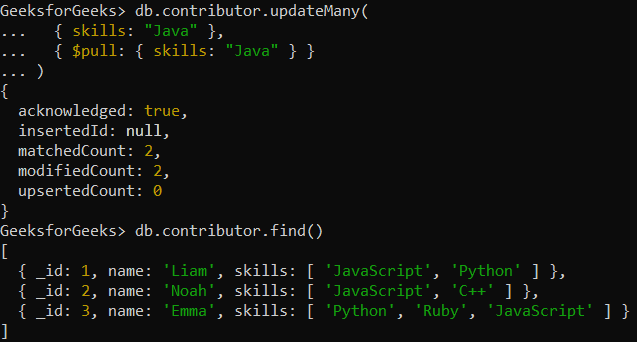
Remove the skill "Java" from all contributors who have it.
db.contributor.updateMany(
  { skills: "Java" },
  { $pull: { skills: "Java" } }
)
Output:
Example 2: Removing Multiple Values
Remove the skills "JavaScript" and "Python" from all contributors who have them.
db.contributor.updateMany(
  { skills: { $in: ["JavaScript", "Python"] } },
  { $pull: { skills: { $in: ["JavaScript", "Python"] } } }
)
Output:

Example 3: Removing Based on Condition
Remove skills that are shorter than 5 characters from all contributors.
db.contributor.updateMany(
  {},
  { $pull: { skills: { $regex: "^.{1,4}$" } } }
)
The regex "^.{1,4}$" matches strings of length 1 to 4, so $pull removes skills shorter than 5 characters.
Output:

Usage of $pull Operator
Here are some uses of $pull operator:
- Remove specific elements from arrays for data cleanup and customization.
- Apply conditions to match and remove elements or embedded documents within array fields.
- Remove exact values or documents that match specified fields and values.
- Use with update methods like updateMany() and findAndModify() as needed.