
MySQL Aggregate Functions are used to perform calculations on multiple rows and return a single summarized result, making data analysis easier. They are commonly used with the SELECT statement and often combined with GROUP BY for grouping data.
- They process a set of values and return a single summarized value (e.g., total, average, count).
- Common functions include COUNT(), SUM(), AVG(), MAX(), and MIN().
- Useful for summarizing and analyzing large datasets efficiently.
Syntax:
SELECT AGGREGATE_FUNCTION(column_name)
FROM table_name
WHERE condition;
- AGGREGATE_FUNCTION(): The aggregate function you want to use (e.g., COUNT, SUM).
- column_name: The column on which the function is applied.
- table_name: The name of the table from which to retrieve the data.
- condition: An optional WHERE clause to filter the rows.
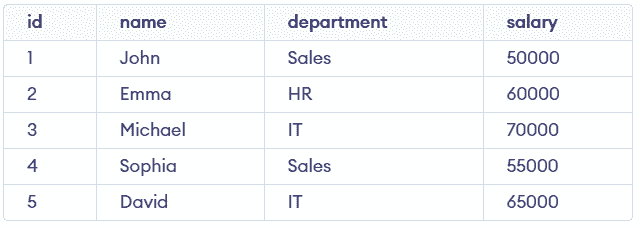
First, we will create a demo table on which the aggregate functions will be applied:
1. COUNT()
The COUNT() function returns the number of rows that match a specified condition. It is commonly used to count total records or filtered results.
Syntax:
SELECT COUNT(column_name)
FROM table_name
WHERE condition;
Query:
SELECT COUNT(*) AS total_employees
FROM employees;
Output:

- Counts all rows in the employees table.
- COUNT(*) includes every record, even if values are NULL.
2. SUM()
The SUM() function calculates the total sum of values in a numeric column. It is useful for finding totals like salary, sales, or marks.
Syntax:
SELECT SUM(column_name)
FROM table_name
WHERE condition;
Query:
SELECT SUM(salary) AS total_salary
FROM employees;
Output:

- Adds all values from the salary column.
- Returns the total salary of all employees.
3. AVG()
The AVG() function returns the average value of a numeric column. It is commonly used to find mean values.
Syntax:
SELECT AVG(column_name)
FROM table_name
WHERE condition;
Query:
SELECT AVG(salary) AS average_salary
FROM employees;
Output:

- Calculates the average of all salary values.
- Ignores NULL values while computing the result.
4. MAX()
The MAX() function returns the highest value in a column. It is useful for finding maximum values like highest salary or marks.
Syntax:
SELECT MAX(column_name)
FROM table_name
WHERE condition;
Query:
SELECT MAX(salary) AS highest_salary
FROM employees;
Output:

- Finds the maximum value in the salary column.
- Returns the highest salary among all employees.
5. MIN()
The MIN() function returns the lowest value in a column. It is useful for identifying minimum values like lowest salary or marks.
Syntax:
SELECT MIN(column_name)
FROM table_name
WHERE condition;
Query:
SELECT MIN(salary) AS lowest_salary
FROM employees;
Output:

- Finds the minimum value in the salary column.
- Returns the lowest salary among all employees.
Using Aggregate Functions with GROUP BY
The GROUP BY clause is used with aggregate functions to group rows based on one or more columns. It helps perform calculations on each group instead of the entire table.
Syntax:
SELECT column_name, AGGREGATE_FUNCTION(column_name)
FROM table_name
GROUP BY column_name;
Query:
SELECT department, AVG(salary) AS avg_salary
FROM employees
GROUP BY department;
Output:

- Groups employees based on the department column.
- Calculates the average salary for each department separately.