
Spooling stands for Simultaneous Peripheral Operation On-Line. It refers to the process of temporarily storing data in a buffer (usually on secondary memory like a hard disk) before it is sent to a peripheral device (e.g., printers) or before being processed by a program.
- This decouples the speed of the CPU from the speed of peripheral devices.
- Helps in preventing CPU idleness and improving overall system efficiency.
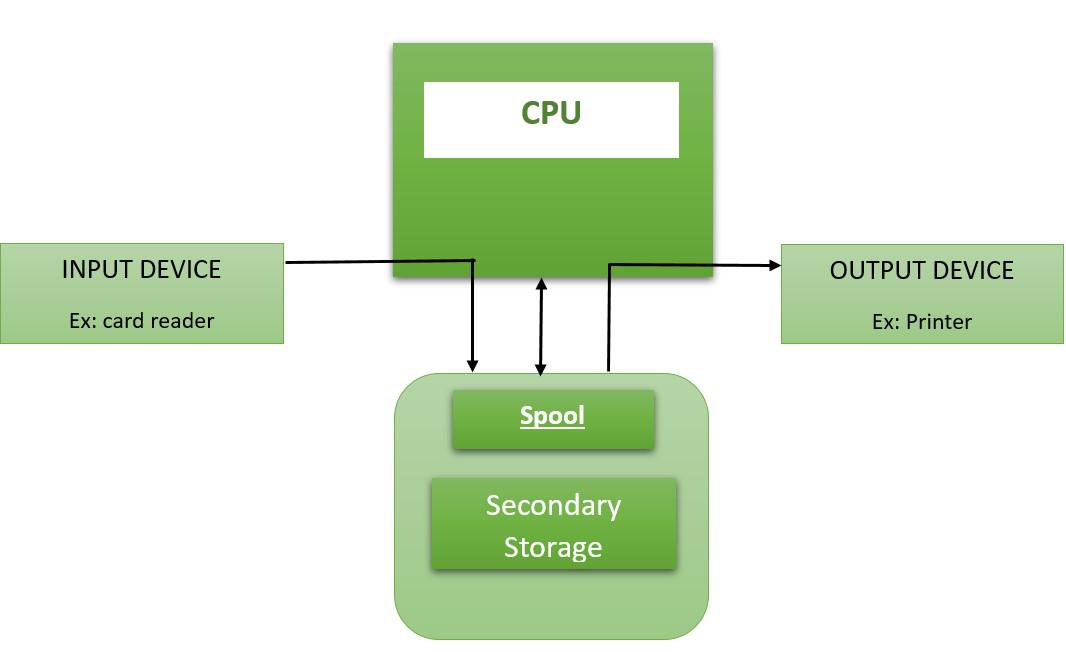
Note: It allows multiple processes to send their I/O jobs to a centralized storage area (known as the SPOOL), which holds the data until the respective I/O device is ready to process it.
Why is Spooling Needed?
To Avoid CPU Idle Time
- Without spooling, the CPU would remain idle while waiting for slow I/O devices (like printers) to complete their operations.
- Spooling allows the CPU to continue processing other tasks while I/O jobs are stored temporarily in secondary storage.
To Synchronize I/O Operations
- Multiple processes or users may request I/O simultaneously (e.g., several print jobs).
- Spooling manages these requests in an orderly FIFO (First In First Out) manner, preventing data mixing or output corruption.
To Manage Speed Mismatch
- I/O devices (printers, disk drives, etc.) are much slower compared to the CPU.
- Spooling acts as a buffer that holds data temporarily, allowing devices to operate at their own pace without stalling the CPU.
To Enable Parallelism
- Spooling enables overlapping of CPU and I/O operations.
- While one job is spooled and processed by the I/O device, the CPU can execute other processes, enhancing overall system throughput.
To Provide Reliable Output Management
- In printing or other output tasks, spooling prevents multiple jobs from being printed together and getting mixed up.
- The spool system handles jobs sequentially, ensuring clean orderly output.
How Spooling Works?
Input Spooling
- When a fast device (e.g., CPU) sends data to a slower device (e.g., printer), the data is not sent directly.
- Instead, the data is first stored in a spool area (secondary storage).
- Once the slower device is ready, the data is fetched from the spool into main memory and processed.
Job Queue Management
- Each input device can submit multiple jobs to the spool.
- These jobs are stored in FIFO (First In, First Out) order.
- The spool ensures proper synchronization, preventing the output from getting mixed when multiple users send print jobs simultaneously.
Output Spooling
- After CPU processing, the output is first written to main memory.
- It is then transferred to secondary memory (SPOOL).
- The output device fetches data from the spool and processes it sequentially.
Combination of Buffering and Queuing
- Spooling acts as both a buffer (temporary storage of data) and a queue (sequential management of jobs).
- This helps overlap I/O operations with CPU operations, enhancing parallelism.
Example of Spooling
Printing Operation

- Documents submitted for printing are stored in the spool.
- While the printer is busy printing one document, other jobs can continue to be spooled.
- This ensures that the CPU continues executing other processes without waiting for the printer to finish.
- Jobs are printed one by one in the order they were received (FIFO order).
Pros of Spooling
- Efficient use of system resources by enabling parallelism between CPU and I/O operations.
- Allows applications to run at CPU speed without waiting for slow peripheral devices.
- Prevents data loss and output mixing by enforcing ordered job processing.
- Provides a simple way to manage multiple jobs from various users in a synchronized manner.
Cons of Spooling
- High Storage Requirement: Spooling requires significant secondary memory space as multiple jobs from various input devices are temporarily stored.
- Disk Traffic Overhead: When many devices are actively using the spool, the disk traffic increases, slowing down performance.
- Storage Limits: If the spool becomes full, new jobs cannot be spooled until existing ones are processed, potentially causing delays.
Difference Between Spooling and Buffering

Spooling | Buffering | |
|---|---|---|
Basic Difference | It overlap the input/output of one job with the execution of another job. | It overlaps the input/output of one job with the execution of the same job. |
Efficiency | Spooling is more efficient than buffering | Buffering is less efficient than spooling. |
Consider Size | It consider disk as a huge spool or buffer. | Buffer is limited area in main memory. |
remote processing | It can process data at remote places. | It does not support remote processing. |
Implementation | Implemented using spoolers which manage input/output requests and allocate resources as needed | Implemented through software or hardware-based mechanisms such as circular buffers or FIFO queues |
Capacity | Can handle large amounts of data since spooled data is stored on disk or other external storage | Limited by the size of memory available for buffering. |
Error handling | Since data is stored on external storage, spooling can help recover from system crashes or other errors | Error can occur if buffer overflow happens, which can cause data loss or corruption. |
Complexity | More complex than buffering since spooling requires additional software to manage input/output requests. | Less complex than spooling since buffering is a simpler technique for managing data transfer. |