
SPOOL stands for Simultaneous Peripheral Operations On-Line. It is a buffering technique used by operating systems to manage input and output (I/O) operations efficiently. In simple terms, spooling temporarily holds data in memory or on disk until the device, program or system is ready to process it.
- Some spooling systems allow priority scheduling for urgent jobs.
- Spooling supports network printing for multiple users.
- Temporary files created by spooling are deleted after job completion.
- Spooler monitoring tools help check job status or cancel jobs.
- Spooling can manage multiple output devices and route jobs efficiently.
Example: When multiple documents are sent to a printer, the OS stores them in a spool, and the printer prints them one by one while you continue other tasks.
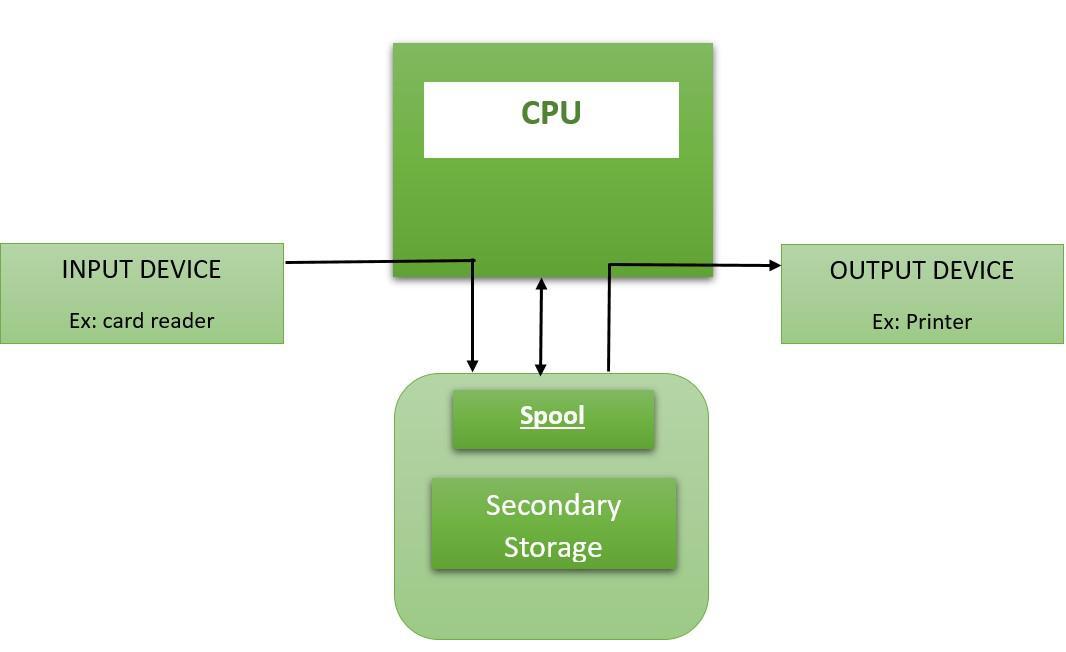
Need for Spooling
Peripheral devices such as printers, disk drives, keyboards and punch card readers operate much slower than the CPU and main memory. This difference in speed creates a bottleneck during I/O operations. To overcome this issue, spooling acts as an intermediary that:
- Spooling collects data, instructions, or processes from multiple sources.
- Stores them temporarily in a queue.
- Processes them in First-In, First-Out (FIFO) order.
- Keeps the CPU busy while I/O operations are handled in the background.
Working of Spooling
Spooling uses buffers, temporary files or memory queues to manage data flow between fast and slow devices. Here’s how it works step by step:
- Data is generated by a program or user and sent to an I/O device such as a printer or disk.
- Instead of directly accessing the device, the data is stored in a spool area - a special region in secondary storage (usually a hard disk).
- The device retrieves the data from the spool whenever it becomes available.
- The operating system maintains a spool queue that ensures all I/O requests are processed in order.
Example:
When you print multiple documents:
- All documents are first placed in the printer’s spooler.
- The printer then prints each document sequentially.
- Meanwhile, users can continue working without waiting for the printer to finish.
Applications and Implementations of Spooling
1. I/O Devices (Printer, Keyboard, Mouse)
- Printer: When you print a file, it is first sent to the printer spooler. The spooler stores all pending print jobs and feeds them to the printer one by one.
- Keyboard/Mouse: Input devices are handled using interrupts and buffering, not spooling. Spooling is mainly used for output devices like printers.
2. Batch Processing Systems
- In batch operating systems, spooling is used to queue up multiple jobs.
- Each job waits in the spool area until system resources become available.
- Once a job finishes execution, the next one automatically begins, ensuring efficient job scheduling and CPU utilization.
3. Overlapping I/O and Processing
- Spooling allows overlapping of operations - while one job’s I/O is being processed, the CPU can execute another job.
- For example, multiple users can send print requests simultaneously; all documents are queued in the spooler and the printer processes them sequentially without making users wait.
4. E-Mail Systems
- Email delivery systems use spooling as well.
- A Mail Transfer Agent (MTA) temporarily stores an outgoing email in a spool (mail queue) before transferring it to another MTA for delivery to the destination mail server.
5. Banner Page Generation
- Spooling is also used for banner pages - special pages printed to separate different documents in a shared printer environment.
- These pages identify the user, account number or pickup location of each print job.
- It’s commonly used in offices where many users share limited printing resources.
Example Scenario
Imagine a busy office printer shared by many employees:
- Each employee sends a print request.
- The operating system stores all print jobs in the spool area.
- The printer fetches one document at a time and prints it.
- Other employees can continue their work while the printer processes the queue.
Note: Spooling acts as a bridge between high-speed processes and slower peripheral devices, ensuring smooth workflow and resource efficiency.
Advantages of Spooling
- Efficient CPU Utilization: CPU doesn’t have to wait for slow I/O operations.
- Improved System Performance: Overlaps computation with I/O, increasing throughput.
- Better Resource Sharing: Multiple processes can use the same device without conflict.
- Orderly Execution: Jobs are processed in the sequence they were submitted (FIFO).
- Reduced Idle Time: Devices like printers or disks are utilized more efficiently.
Disadvantages of Spooling
- Requires Secondary Storage: Spooling depends on disk or memory space for temporary storage.
- Complex Management: Managing large spool queues can increase system overhead.
- Delay for Small Jobs: Smaller jobs may experience delays when large jobs are queued; however, priority scheduling can be used to reduce this issue.