
PostgreSQL basic interview questions cover fundamental concepts required to understand and work with PostgreSQL databases effectively.
- Focus on core PostgreSQL concepts and features.
- Help build a strong foundation in database management.
- Improve confidence for interviews and practical use.
- Include topics like queries, constraints and data types.
- Prepare candidates for real-world database scenarios.
1. What Is PostgreSQL And How Does It Differ From Other SQL Databases?
PostgreSQL is an open-source database system used to store and manage data. It supports SQL for working with tables and also supports JSON for flexible data. It provides useful features like complex queries, foreign keys and triggers, making it powerful and flexible.
2. What Are the Advantages of Using PostgreSQL?
PostgreSQL offers several advantages that make it a powerful and reliable database system:
- It is open-source and free to use.
- It supports advanced features like JSON, indexing and transactions.
- It ensures data integrity with ACID compliance.
- It handles large amounts of data efficiently.
3. How to Create a New Database In PostgreSQL?
To create a new database in PostgreSQL, you can use the CREATE DATABASE command. For example:
CREATE DATABASE mydatabase;4. How to Create a New Table In PostgreSQL?
To create a new table in PostgreSQL, you can use the CREATE TABLE command. For example:
CREATE TABLE employees (
    employee_id SERIAL PRIMARY KEY,
    name VARCHAR(100),
    position VARCHAR(100),
    salary NUMERIC,
    hire_date DATE
);
5. What is a Primary Key in PostgreSQL?
A primary key is a column or a set of columns that uniquely identifies each row in a table. It ensures that the values in the primary key column(s) are unique and not null. For example:
CREATE TABLE employees (
    employee_id SERIAL PRIMARY KEY,
    name VARCHAR(100)
);
6. How to Insert Data Into a Table in PostgreSQL?
To insert data into a table, you can use the INSERT INTO command. For example:
INSERT INTO employees (name, position, salary, hire_date)
VALUES ('John Doe', 'Software Engineer', 80000, '2021-01-15');
7. How to Query Data From a Table in PostgreSQL?
To query data from a table, you can use the SELECT statement. For example:
SELECT * FROM employees;8. What is a Foreign Key in PostgreSQL?
A foreign key is a column or a set of columns that establishes a link between data in two tables. It ensures that the value in the foreign key column matches a value in the referenced column of another table, enforcing referential integrity. For example:
CREATE TABLE departments (
    department_id SERIAL PRIMARY KEY,
    department_name VARCHAR(100)
);

CREATE TABLE employees (
    employee_id SERIAL PRIMARY KEY,
    name VARCHAR(100),
    department_id INT,
    FOREIGN KEY (department_id) REFERENCES departments(department_id)
);
9. How to Update Data in a Table in PostgreSQL?
To update data in a table, you can use the UPDATE statement. For example:
UPDATE employees
SET salary = 85000
WHERE name = 'John Doe';
10. How to Delete Data From a Table in PostgreSQL?
To delete data from a table, you can use the DELETE statement.
Example:
DELETE FROM employees
WHERE name = 'John Doe';
11. What is a View in PostgreSQL?
A view is a virtual table based on the result of a SELECT query. It allows you to encapsulate complex queries and reuse them as if they were tables.
12. How to Create an Index in PostgreSQL?
To create an index in PostgreSQL, you can use the CREATE INDEX statement. Indexes improve query performance by allowing faster retrieval of records. For example:
CREATE INDEX idx_employee_name ON employees(name);13. What Is a Transaction In PostgreSQL?
A transaction is a sequence of one or more SQL statements that are executed as a single unit of work. It ensures data integrity and consistency by making sure that either all operations are completed successfully or none are applied.
BEGIN;
UPDATE employees SET salary = 90000 WHERE name = 'John Doe';
COMMIT;
14. What is VACUUM in PostgreSQL?
VACUUM is a process in PostgreSQL that cleans up dead rows (tuples) created due to UPDATE and DELETE operations.
15. How to Handle Backup and Restore in PostgreSQL?
To backup a PostgreSQL database, you can use the pg_dump utility. To restore a database, you can use the psql utility. For example:
pg_dump mydatabase > mydatabase_backup.sql
psql mydatabase < mydatabase_backup.sql
PostgreSQL Intermediate Interview Questions
This section covers advanced PostgreSQL topics such as complex SQL queries, data modeling, performance tuning and transaction management. These questions help enhance skills for both database developers and administrators, preparing you for more challenging roles in the field.
16. What is a Schema in PostgreSQL and How to Use It?
A schema in PostgreSQL is a way to organize and group database objects such as tables, views and functions. It helps manage namespaces, so objects with the same name can exist in different schemas. To create and use a schema, you can use the following commands:
CREATE SCHEMA myschema;
CREATE TABLE myschema.mytable (id SERIAL PRIMARY KEY, name VARCHAR(100));
SELECT * FROM myschema.mytable;
17. What Are Joins in PostgreSQL?
Joins are used to combine rows from two or more tables based on a related column. They help retrieve related data from multiple tables in a single query.
18. What Is a Subquery in PostgreSQL?
A subquery is a query written inside another SQL query. It is used to perform operations that depend on the result of another query.
19. What are Triggers in PostgreSQL and How to Create Them?
Triggers are special procedures that automatically execute when certain events (INSERT, UPDATE, DELETE) occur on a table. To create a trigger:
CREATE FUNCTION update_timestamp() RETURNS TRIGGER AS $$
BEGIN
    NEW.updated_at = NOW();
    RETURN NEW;
END;
$$ LANGUAGE plpgsql;

CREATE TRIGGER update_timestamp
BEFORE UPDATE ON employees
FOR EACH ROW
EXECUTE FUNCTION update_timestamp();
20. What Are Constraints in PostgreSQL?
Constraints are rules applied to table columns to ensure data accuracy and integrity in the database.
- PRIMARY KEY: Uniquely identifies each record and does not allow NULL values.
- FOREIGN KEY: Maintains relationships between tables.
- UNIQUE : Ensures all values in a column are different.
- NOT NULL: Prevents NULL values.
- CHECK : Ensures values meet a specific condition.
21. How to Create a View?
To create a view:
CREATE VIEW high_salary_employees AS
SELECT name, salary
FROM employees
WHERE salary > 80000;
22. How to Handle Exceptions in PL/pgSQL?
In PL/pgSQL, exceptions are handled using the EXCEPTION block, which allows you to manage errors during execution.
Example:
DO $$
BEGIN
    -- Attempt to insert a duplicate key
    INSERT INTO employees (employee_id, name) VALUES (1, 'John Doe');
EXCEPTION
    WHEN unique_violation THEN
        RAISE NOTICE 'Duplicate key error!';
END;
$$;
23. What are CTEs (Common Table Expressions) in PostgreSQL?
Common Table Expressions (CTEs) are temporary result sets that we can reference within a SELECT, INSERT, UPDATE or DELETE statement. CTEs improve query readability and organization. To use a CTE:
WITH employee_salaries AS (
    SELECT department_id, AVG(salary) AS avg_salary
    FROM employees
    GROUP BY department_id
)
SELECT * FROM employee_salaries;
24. How to Use Window Functions in PostgreSQL?
Window functions perform calculations across a set of table rows related to the current row. They are used for ranking, running totals and moving averages. For example:
SELECT name, salary,
    RANK() OVER (ORDER BY salary DESC) AS salary_rank
FROM employees;
25. Explain the Concept of JSON Data Types in PostgreSQL.
PostgreSQL supports JSON data types, which allow us to store and query JSON (JavaScript Object Notation) data. This enables semi-structured data storage. You can use json or jsonb types, where jsonb is a binary format that is more efficient for indexing. Example:
CREATE TABLE products (
    id SERIAL PRIMARY KEY,
    details JSONB
);

INSERT INTO products (details) VALUES ('{"name": "Laptop", "price": 1200}');
26. How to Implement Partitioning in PostgreSQL?
Partitioning divides a large table into smaller, more manageable pieces, improving performance and maintenance. PostgreSQL supports range and list partitioning. Example:
CREATE TABLE sales (
    sale_id SERIAL,
    sale_date DATE,
    amount NUMERIC
) PARTITION BY RANGE (sale_date);

CREATE TABLE sales_2021 PARTITION OF sales
FOR VALUES FROM ('2021-01-01') TO ('2022-01-01');
27. What Is The pg_hba.conf File and What Is Its Purpose?
The pg_hba.conf file controls client authentication in PostgreSQL. It specifies which clients are allowed to connect, their authentication methods and the databases they can access. It is essential for securing our PostgreSQL server.
28. How Do You Optimize Queries In PostgreSQL?
To optimize queries, we can:
- Use indexes to speed up data retrieval
- Analyze and vacuum tables regularly
- Write efficient SQL queries (avoid SELECT *)
- Use EXPLAIN to understand query execution plans
- Optimize joins and subqueries
29. Explain The Concept Of Table Inheritance In PostgreSQL.
Table inheritance allows a table to inherit columns from a parent table. This feature helps organize data hierarchically. Example:
CREATE TABLE employees (
    id SERIAL PRIMARY KEY,
    name VARCHAR(100)
);

CREATE TABLE managers (
    department VARCHAR(100)
) INHERITS (employees);
30. How to Perform Full-Text Search in PostgreSQL?
Full-text search allows you to search for text within a large corpus of documents. PostgreSQL supports full-text search using tsvector and tsquery types. Example:
CREATE TABLE documents (
    id SERIAL PRIMARY KEY,
    content TEXT,
    tsvector_content TSVECTOR
);

UPDATE documents SET tsvector_content = to_tsvector(content);

SELECT * FROM documents
WHERE tsvector_content @@ to_tsquery('search_term');
PostgreSQL Advanced Interview Questions
This section covers in-depth PostgreSQL topics like index optimization, replication, partitioning and advanced data handling techniques. Tackling these questions will enhance expertise, making us well-prepared for senior roles and technical interviews.
31. What Is The WAL (Write-Ahead Logging) In PostgreSQL and How Does It Work?
Write-Ahead Logging (WAL) in PostgreSQL is a method used to ensure data integrity. Before any changes are made to the database, the changes are first recorded in a log (WAL). This log helps in recovering the database to a consistent state in case of a crash. WAL operates by writing the changes to a log file before they are applied to the database, ensuring that the data is safe even if a failure occurs.
32. How to Configure Replication in PostgreSQL?
Replication in PostgreSQL involves copying data from one database server (master) to another (slave). To configure replication:
- Edit postgresql.conf on the master server to enable WAL archiving and set up replication parameters.
wal_level = replica
max_wal_senders = 3
archive_mode = on
archive_command = 'cp %p /var/lib/postgresql/wal_archive/%f'- Create a replication user on the master.
CREATE ROLE replication_user WITH REPLICATION PASSWORD 'password' LOGIN;- Set up pg_hba.conf to allow replication connections from the slave.
host replication replication_user 192.168.1.10/32 md5- On the slave, set up recovery.conf with the connection information
standby_mode = 'on'
primary_conninfo = 'host=192.168.1.1 port=5432 user=replication_user password=password'
trigger_file = '/tmp/postgresql.trigger'- Start the slave server and it will begin replicating data from the master.
33. What are the Different Types of Indexes Available in PostgreSQL?
PostgreSQL provides different types of indexes to improve query performance by enabling faster data retrieval.
- B-Tree Index: Default index type, suitable for most queries and comparisons.
- Hash Index: Used for equality comparisons (
=operator). - GiST Index: Supports complex data types like geometric data and full-text search.
- SP-GiST Index: Handles partitioned data structures efficiently.
- GIN Index: Optimized for full-text search and JSONB data.
- BRIN Index: Efficient for large tables with naturally ordered data.
34. Explain the Concept of MVCC (Multi-Version Concurrency Control) in PostgreSQL.
Multi-Version Concurrency Control (MVCC) in PostgreSQL is a method to handle concurrent transactions without locking. It allows multiple transactions to access the database simultaneously by maintaining multiple versions of data. Each transaction sees a consistent snapshot of the database, ensuring isolation. MVCC helps avoid conflicts and improves performance in a multi-user environment.
35. How to Use the pg_stat_activity View to Monitor PostgreSQL?
The pg_stat_activity view provides information about the current activity in the PostgreSQL database. It includes details like active queries, process IDs, user information and query start times. To use it:
SELECT pid, usename, application_name, state, query
FROM pg_stat_activity;
This query lists all active connections and their current state.
36. What are the Different Isolation Levels in PostgreSQL?
PostgreSQL supports four isolation levels to control how transactions interact:
- Read Uncommitted: Same as Read Committed; dirty reads are not allowed.
- Read Committed: Each query sees only committed data.
- Repeatable Read: Transaction sees the same data throughout (no changes from others).
- Serializable: Highest level; transactions behave as if run one by one.
37. How to Handle Deadlocks in PostgreSQL?
Deadlocks occur when two or more transactions block each other.It automatically detects deadlocks and terminates one of the transactions to resolve it. To minimize deadlocks:
- Access tables in a consistent order.
- Keep transactions short and simple.
- Use explicit locking carefully.
- To investigate deadlocks, check the pg_locks view and PostgreSQL logs.
38. Explain the Concept of the Query Planner and Optimizer in PostgreSQL.
The query planner and optimizer in PostgreSQL analyze SQL queries to determine the most efficient execution plan. The planner uses statistics about the tables and indexes to estimate the cost of different execution strategies and chooses the one with the lowest cost. The optimizer considers factors like join methods, index usage and query rewriting to improve performance.
39. How Do You Implement Sharding In PostgreSQL?
Sharding involves partitioning data across multiple servers to distribute load and improve performance. PostgreSQL doesn't have built-in sharding but can be implemented using logical replication, partitioning and custom routing logic in the application. Tools like Citus can also be used to add sharding capabilities to PostgreSQL.
40. What are the Different Types of Backup Strategies in PostgreSQL?
PostgreSQL supports several backup strategies:
- SQL Dump: Using pg_dump to create a logical backup of the database.
- File System Level Backup: Using tools like rsync to copy the data directory while the server is offline.
- Continuous Archiving: Using WAL archiving and pg_basebackup for continuous backups.
- Logical Replication: Setting up logical replication for real-time data backup and recovery.
PostgreSQL Query-Based Interview Questions
This section focuses on practical SQL query challenges in PostgreSQL, including complex joins, subqueries, aggregate functions and window functions. Mastering these questions will strengthen your query-building skills and prepare you to handle real-world database scenarios confidently.
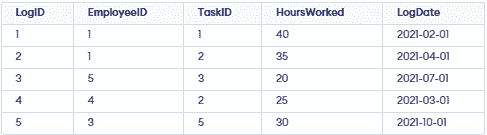
We have created some table for the reference of the questions like: Departments Table, Projects Table, Employees Table, Tasks Table and TimeLogs Table
CREATE TABLE Departments (
    DepartmentID SERIAL PRIMARY KEY,
    DepartmentName VARCHAR(100) NOT NULL
);

INSERT INTO Departments (DepartmentID, DepartmentName) VALUES
(1, 'Engineering'),
(2, 'Design'),
(3, 'Management');
Output

CREATE TABLE Projects (
    ProjectID SERIAL PRIMARY KEY,
    ProjectName VARCHAR(100) NOT NULL,
    Budget DECIMAL(15, 2),
    StartDate DATE,
    EndDate DATE,
    DepartmentID INT REFERENCES Departments(DepartmentID)
);

INSERT INTO Projects (ProjectName, Budget, StartDate, EndDate, DepartmentID) VALUES
('Project Alpha', 100000, '2021-01-01', '2021-12-31', 1),
('Project Beta', 200000, '2021-02-01', '2021-11-30', 2),
('Project Gamma', 150000, '2021-03-01', '2022-03-01', 3);
Output:

CREATE TABLE Employees (
    EmployeeID SERIAL PRIMARY KEY,
    Name VARCHAR(100) NOT NULL,
    Age INT,
    Position VARCHAR(100),
    Salary DECIMAL(10, 2),
    DepartmentID INT REFERENCES Departments(DepartmentID),
    HireDate DATE
);

INSERT INTO Employees (Name, Age, Position, Salary, DepartmentID, HireDate) VALUES
('John Doe', 28, 'Software Engineer', 80000, 1, '2021-01-15'),
('Jane Smith', 34, 'Project Manager', 95000, 1, '2019-06-23'),
('Emily Johnson', 41, 'CTO', 150000, 3, '2015-03-12'),
('Michael Brown', 29, 'Software Engineer', 85000, 1, '2020-07-30'),
('Sarah Davis', 26, 'UI/UX Designer', 70000, 2, '2022-10-12');
Output

CREATE TABLE Tasks (
    TaskID SERIAL PRIMARY KEY,
    TaskName VARCHAR(100) NOT NULL,
    ProjectID INT REFERENCES Projects(ProjectID),
    AssignedTo INT REFERENCES Employees(EmployeeID),
    Status VARCHAR(50),
    Deadline DATE
);

INSERT INTO Tasks (TaskName, ProjectID, AssignedTo, Status, Deadline) VALUES
('Design Database', 1, 1, 'Completed', '2021-03-01'),
('Develop API', 1, 1, 'In Progress', '2021-06-01'),
('Create UI', 2, 5, 'Not Started', '2021-09-01'),
('Project Planning', 3, 2, 'Completed', '2021-05-01'),
('Market Analysis', 3, 3, 'In Progress', '2021-12-01');
Output

CREATE TABLE TimeLogs (
    LogID SERIAL PRIMARY KEY,
    EmployeeID INT REFERENCES Employees(EmployeeID),
    TaskID INT REFERENCES Tasks(TaskID),
    HoursWorked DECIMAL(5, 2),
    LogDate DATE
);

INSERT INTO TimeLogs (LogID, EmployeeID, TaskID, HoursWorked, LogDate) VALUES
(1, 1, 40, '2021-02-01'),
(1, 2, 35, '2021-04-01'),
(5, 3, 20, '2021-07-01'),
(2, 4, 25, '2021-03-01'),
(3, 5, 30, '2021-10-01');
Output
41. Find all Employees Who have Logged More than 30 Hours on a Single Task
Query:
SELECT E.Name, T.TaskName, TL.HoursWorked
FROM Employees E
JOIN TimeLogs TL ON E.EmployeeID = TL.EmployeeID
JOIN Tasks T ON TL.TaskID = T.TaskID
WHERE TL.HoursWorked > 30;
Output

Explanation: This query joins the Employees, TimeLogs and Tasks tables and filters the results to show employees who have logged more than 30 hours on a single task.
42. List the Total Hours Worked by Each Employee on All Projects
Query:
SELECT E.Name, SUM(TL.HoursWorked) AS TotalHoursWorked
FROM Employees E
JOIN TimeLogs TL ON E.EmployeeID = TL.EmployeeID
GROUP BY E.Name;
Output

Explanation: This query sums the total hours worked by each employee by grouping the results by the employee name.
43. Find the Average Salary of Employees in Each Department Where the Average Salary is Greater Than 75,000
Query:
SELECT D.DepartmentName, AVG(E.Salary) AS AvgSalary
FROM Departments D
JOIN Employees E ON D.DepartmentID = E.DepartmentID
GROUP BY D.DepartmentName
HAVING AVG(E.Salary) > 75000;
Output:

Explanation: This query calculates the average salary of employees in each department and filters the results to show only those departments where the average salary is greater than 75,000.
44. Retrieve the Details of Projects That Have More Than 2 Tasks Assigned
Query:
SELECT P.ProjectName, P.Budget, P.StartDate, P.EndDate, D.DepartmentName
FROM Projects P
JOIN Tasks T ON P.ProjectID = T.ProjectID
JOIN Departments D ON P.DepartmentID = D.DepartmentID
GROUP BY P.ProjectName, P.Budget, P.StartDate, P.EndDate, D.DepartmentName
HAVING COUNT(T.TaskID) > 2;
Output

Explanation: This query groups the tasks by project and filters the results to show projects that have more than 2 tasks assigned.
45. List the Employees Who Have Not Been Assigned to Any Tasks
Query:
SELECT E.Name
FROM Employees E
LEFT JOIN Tasks T ON E.EmployeeID = T.AssignedTo
WHERE T.AssignedTo IS NULL;
Output

Explanation: This query performs a left join between the Employees and Tasks tables and filters the results to show employees who have not been assigned to any tasks.
46. Find the Project with the Highest Total Budget and Display Its Department Name
Query:
SELECT P.ProjectName, P.Budget, D.DepartmentName
FROM Projects P
JOIN Departments D ON P.DepartmentID = D.DepartmentID
ORDER BY P.Budget DESC
LIMIT 1;
Output

Explanation: This query orders the projects by budget in descending order and limits the result to show only the project with the highest budget, along with its department name.
47. Calculate the Total Budget Allocated to Each Department
Query:
SELECT D.DepartmentName, SUM(P.Budget) AS TotalBudget
FROM Departments D
JOIN Projects P ON D.DepartmentID = P.DepartmentID
GROUP BY D.DepartmentName;
Output

Explanation: This query sums the total budget allocated to each department by grouping the results by the department name.
48. List the Names of Employees Who Have Worked on 'Project Alpha'
Query:
SELECT DISTINCT E.Name
FROM Employees E
JOIN Tasks T ON E.EmployeeID = T.AssignedTo
JOIN Projects P ON T.ProjectID = P.ProjectID
WHERE P.ProjectName = 'Project Alpha';
Output

Explanation: This query joins the Employees, Tasks and Projects tables and filters the results to show employees who have worked on 'Project Alpha'.
49. Find the Department with the Most Employees and Display the Number of Employees
Query:
SELECT D.DepartmentName, COUNT(E.EmployeeID) AS NumberOfEmployees
FROM Departments D
JOIN Employees E ON D.DepartmentID = E.DepartmentID
GROUP BY D.DepartmentName
ORDER BY NumberOfEmployees DESC
LIMIT 1;
Output

Explanation: This query counts the number of employees in each department, orders the results by the number of employees in descending order and limits the result to show only the department with the most employees.
50. Retrieve the Details of Employees Who Have Been Hired in the Last Two Years
Query:
SELECT *
FROM Employees
WHERE HireDate >= (CURRENT_DATE - INTERVAL '2 years');
Output

Explanation: This query retrieves the details of employees who have been hired in the last two years by comparing their hire date with the current date minus two years.