
Data analysis expressions or DAX, are formulas or expressions used in calculations and data analysis. It is a previously written formula that performs calculations using input values to give the desired outcomes. A column reference, numbers, text, constants, references to other formulas or functions and logical values like TRUE or FALSE are all acceptable function arguments. We know look at DAX Logical Functions:
- The Logical function of Power BI is among its most crucial components. It offers up a result as either True or False.
- Logical functions return information about the values or sets in an expression.
- For instance, you can check an expression's output and produce conditional results using the IF function.
In order to study these functions, you may look at the data. Below is the screenshot of the dataset:
You can download dataset from here.
.png)
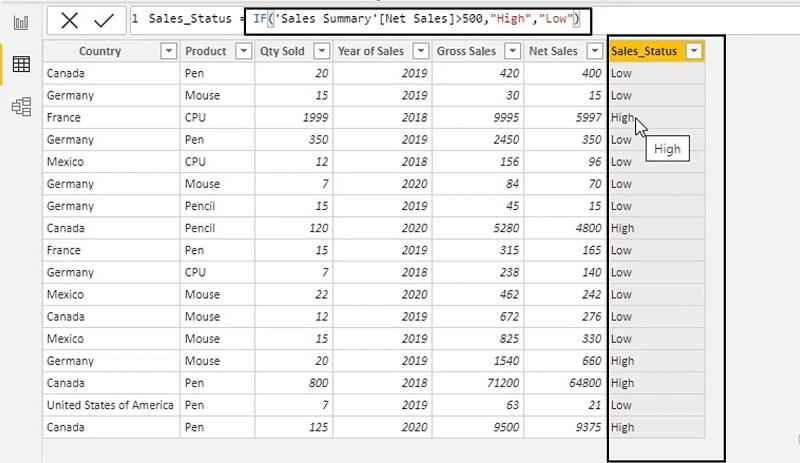
1. IF
A condition is checked and if it is TRUE, one value is returned; otherwise, a different value is returned.
Syntax: IF(<logical_test>, <value_if_true>[, <value_if_false>])
Example:
2. AND
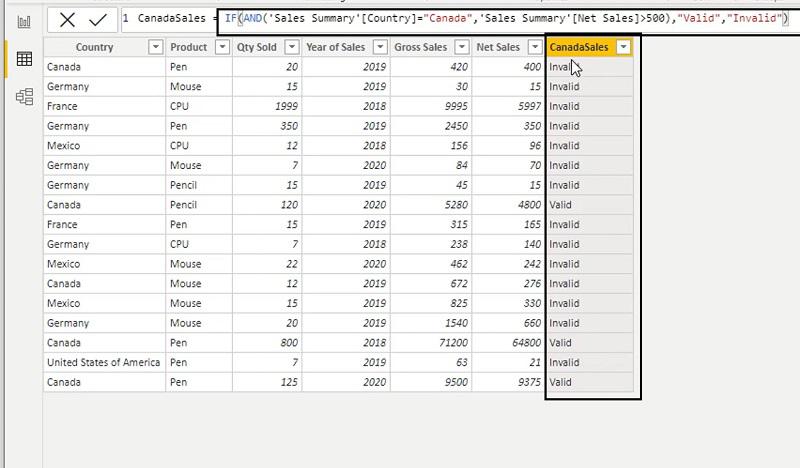
The function determines whether both arguments are TRUE and returns TRUE if they are. If not, returns false.
Syntax: AND(<logical1>,<logical2>)
Example:
3. COALESCE
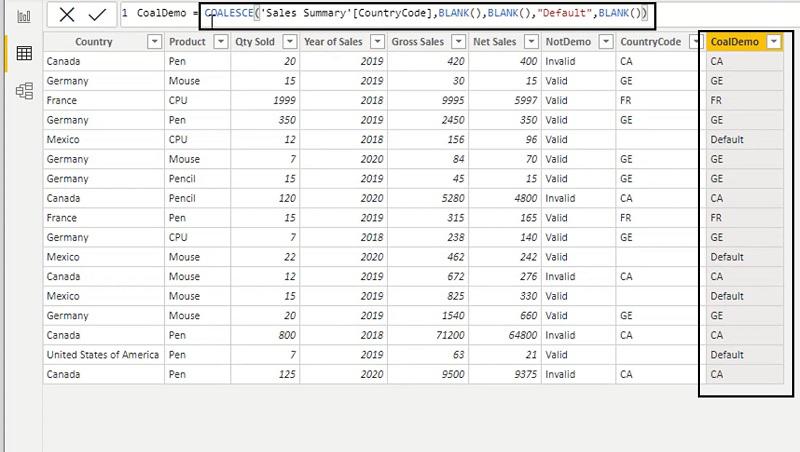
Identifies the first expression that is not BLANK and returns it. BLANK is returned if all expressions evaluate to NULL.
Syntax: COALESCE(<expression>, <expression>[, <expression>]…)
Example:
4. IFERROR
Returns the value of the expression itself unless the expression returns an error, in which case it returns a specified value.
Syntax: IFERROR(value, value_if_error)
Example:

5. NOT
This function converts either FALSE or TRUE values into the other.
Syntax: NOT(<logical>)
Example:

6. OR
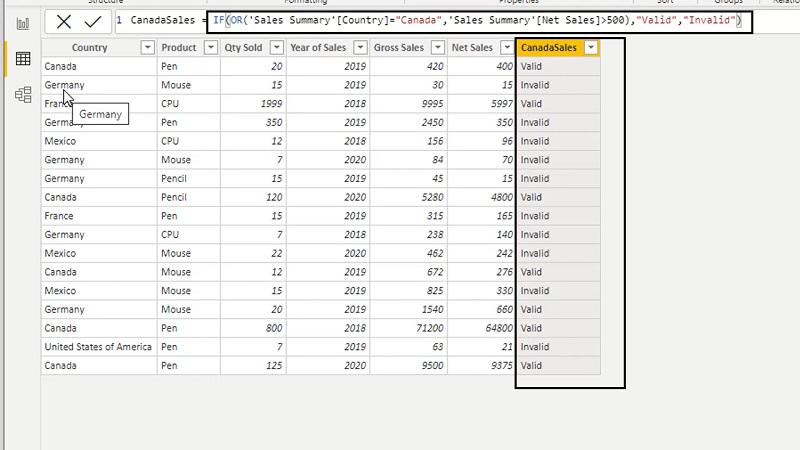
Returns TRUE if one of the arguments is verified to be TRUE. If both arguments are false, the function returns FALSE.
Syntax: OR(<logical1>,<logical2>)
Example:
7. SWITCH
Returns one of several potential result expressions after comparing an expression to a list of values.
Syntax: SWITCH(<expression>, <value>, <result>[, <value>, <result>]…[, <else>])
Example:

Below is the List of all Logical DAX Functions in PowerBI:
| Function | Description | Syntax |
|---|---|---|
IF | A condition is checked and if it is TRUE, one value is returned; otherwise, a different value is returned. | IF(<logical_test>, <value_if_true>[, <value_if_false>]) |
IF.EAGER | If the condition is true, the check returns one value; if not, a different value is returned. The branch expressions are always executed regardless of the condition expression thanks to the eager execution plan that is used. | IF.EAGER(<logical_test>, <value_if_true>[, <value_if_false>]) |
IFERROR | Returns the value of the expression itself unless the expression returns an error, in which case it returns a specified value. | IFERROR(value, value_if_error) |
AND | The function determines whether both arguments are TRUE and returns TRUE if they are. If not, returns false. | AND(<logical1>,<logical2>) |
BITAND | The output of this function is the bitwise AND of two numbers. | BITAND(<number>, <number>) |
BITLSHIFT | Returns a number with the specified number of bits shifted to the left. | BITLSHIFT(<Number>, <Shift_Amount>) |
BITOR | It provides a bitwise OR of two numbers as a result. | BITOR(<number>, <number>) |
BITRSHIFT | Returns a number with the specified number of bits shifted to the right. | BITRSHIFT(<Number>, <Shift_Amount>) |
BITXOR | It provides a bitwise XOR of two numbers as a result. | BITXOR(<number>, <number>) |
COALESCE | Identifies the first expression that is not BLANK and returns it. BLANK is returned if all expressions evaluate to NULL. | COALESCE(<expression>, <expression>[, <expression>]…) |
FALSE | The logical value FALSE is returned by this function. | FALSE() |
TRUE | The logical value TRUE is returned by this function. | TRUE() |
NOT | This function converts either FALSE or TRUE values into the other. | NOT(<logical>) |
OR | Returns TRUE if one of the arguments is verified to be TRUE. If both arguments are false, the function returns FALSE. | OR(<logical1>,<logical2>) |
SWITCH | Returns one of several potential result expressions after comparing an expression to a list of values. | SWITCH(<expression>, <value>, <result>[, <value>, <result>]…[, <else>]) |