
In Python, when working with MongoDB using PyMongo, functions like find() and find_one() return a Cursor object. But sometimes we may want to convert this cursor into a Pandas DataFrame for easier data manipulation and analysis. In this article, we will learn how to do this step by step.
Note: Before starting, make sure you have MongoDB, PyMongo and Pandas installed.
Below is the Sample Database used in this article.
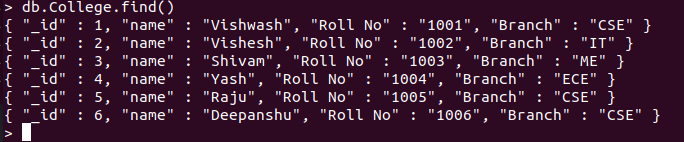
Steps to Convert PyMongo Cursor to DataFrame
Step 1: Import Required Modules
Import the necessary Python modules:
from pymongo import MongoClient
from pandas import DataFrame
Step 2: Connect to MongoDB
Establish a connection to the MongoDB server. By default, MongoDB runs on localhost at port 27017.
client = MongoClient('localhost', 27017)
Step 3: Access the Database
After connecting, we can select an existing database or create a new one.
mydatabase = client.GFG
Step 4: Access the Collection
Next, select the collection from which you want to fetch documents.
mycollection = mydatabase.College
Step 5: Fetch Documents Using Cursor
Use the find() method to retrieve all documents from the collection. This returns a Cursor object.
cursor = mycollection.find()
print('Type of cursor:', type(cursor))
Step 6: Convert Cursor to Pandas DataFrame
To convert the cursor into a DataFrame, first convert it to a list of dictionaries.
list_cur = list(cursor)
Now, convert the list into a Pandas DataFrame:
df = DataFrame(list_cur)
print('Type of df:', type(df))
print(df.head())
Output:
Type of cursor: <class 'pymongo.cursor.Cursor'>
Type of df: <class 'pandas.core.frame.DataFrame'>
_id name Roll No Branch
0 1 Vishwash 1001 CSE
1 2 Vishesh 1002 IT
2 3 Shivam 1003 ME
3 4 Yash 1004 ECE
4 5 Raju 1005 CSE