
DateField is a Django model field used to store date values only (without time).
- Represented in Python as a datetime.date object
- Stores only the date (year, month, day) in the database
- Uses TextInput as the default form widget
- In Django Admin, it includes a JavaScript calendar widget and a shortcut for "Today".
Syntax
field_name = models.DateField(**options)
Optional Arguments for DateField
DateField provides useful options to manage date values automatically.
1. auto_now=True
Automatically sets the field to the current date every time the model instance is saved. Commonly used for last-modified dates.
Example:
updated_at = models.DateField(auto_now=True)
- Updates only when Model.save() is called.
- Does not update when using QuerySet.update() unless explicitly specified.
- The value cannot be manually overridden.
2. auto_now_add=True
Automatically sets the field to the current date only when the model instance is first created. Commonly used for creation dates.
Example:
created_at = models.DateField(auto_now_add=True)
- The value is set only once.
- The value cannot be overridden during object creation.
- Suitable for recording when an object was created.
3. Using default
If the field needs to remain editable or modifiable, use default instead of auto_now_add. A default date can be specified using a callable such as date.today from Python’s datetime module.
Example:
from datetime import date
created_at = models.DateField(default=date.today)
This approach allows the date to be modified later if needed.
Note: The options auto_now_add, auto_now, and default are mutually exclusive. Any combination of these options will result in an error.
Creating a Model with DateField
Consider a project named geeksforgeeks having an app named geeks.
In models.py:
from django.db import models

class GeeksModel(models.Model):
    geeks_field = models.DateField()

    def __str__(self):
        return str(self.geeks_field)
After running makemigrations and migrate, Django creates a Date column to store date values only.
Opening Django Shell
Validation can be tested interactively by opening the Django shell:
python manage.py shell
Create a model instance by assigning a Python datetime.date object:
from geeks.models import GeeksModel
from datetime import dateGeeksModel.objects.create(
geeks_field=date.today()
)
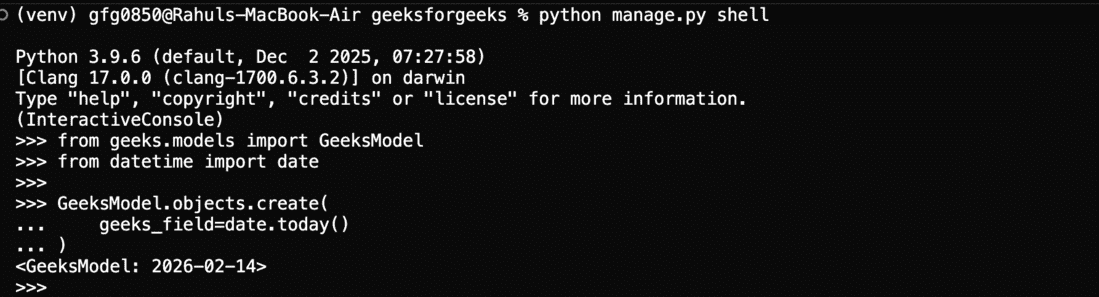
Stored objects can be retrieved using:
GeeksModel.objects.all()

This confirms that the DateField successfully stores datetime.date values in the database.
Validation Using Django Admin
Register the Model (geeks/admin.py):
from django.contrib import admin
from .models import GeeksModel

admin.site.register(GeeksModel)
Create a Superuser: Enter username, email, and password when prompted.
python manage.py createsuperuser
Run the Server:
python manage.py runserver
Visit: http://127.0.0.1:8000/admin/ and log in using the superuser credentials, then navigate to the Geeks models section.

New instances can be added through this interface, and saved records can be viewed directly in the admin panel.
Field Options
Field options are arguments provided to a model field to apply constraints or define specific characteristics for that field.Here are the field options and attributes that a DateField can use. For example, adding the argument null=True to a DateField allows the corresponding database column to store NULL values in a relational database.
The following are the field options and attributes that a DateField supports.
| Field Options | Description |
|---|---|
| Null | If True, Django will store empty values as NULL in the database. Default is False. |
| Blank | If True, the field is allowed to be blank. Default is False. |
| db_column | The name of the database column to use for this field. If this isn’t given, Django will use the field’s name. |
| db_index | If True, a database index will be created for this field |
| db_tablespace | The name of the database tablespace to use for this field’s index, if this field is indexed. The default is the project’s DEFAULT_INDEX_TABLESPACE setting, if set, or the db_tablespace of the model, if any. If the backend doesn’t support tablespaces for indexes, this option is ignored. |
| Default | The default value for the field. This can be a value or a callable object. If callable it will be called every time a new object is created. |
| help_text | Extra “help” text to be displayed with the form widget. It’s useful for documentation even if your field isn’t used on a form. |
| primary_key | If True, this field is the primary key for the model. |
| editable | If False, the field will not be displayed in the admin or any other ModelForm. They are also skipped during model validation. Default is True. |
| error_messages | The error_messages argument lets you override the default messages that the field will raise. Pass in a dictionary with keys matching the error messages you want to override. |
| help_text | Extra “help” text to be displayed with the form widget. It’s useful for documentation even if your field isn’t used on a form. |
| verbose_name | A human-readable name for the field. If the verbose name isn’t given, Django will automatically create it using the field’s attribute name, converting underscores to spaces. |
| validators | A list of validators to run for this field. |
| Unique | If True, this field must be unique throughout the table. |