
Testing is a critical part of the development process, ensuring that an application behaves as expected. Django provides robust tools for writing and executing tests. Tests are typically organized within a tests directory inside each app. Running specific test cases helps focus on particular functionality or debug failing tests without executing the entire test suite.
Running Specific Test Case
Consider a project named 'myproject' having an app named 'myapp'. Create a tests directory inside myapp and add an __init__.py file to make it a package.
mkdir myapp/tests

New-Item -Path . -Name '__init__.py' -ItemType File

File Structure

Writing Test Cases
Create model in the tests directory. The following test case verifies that a model instance is created with the correct field values.
In myapp/tests/test_models.py:
from django.test import TestCase
from myapp.models import MyModel

class MyModelTestCase(TestCase):
    def setUp(self):
        self.instance = MyModel.objects.create(name="Test Name")

    def test_instance_name(self):
        self.assertEqual(self.instance.name, "Test Name")

    def test_instance_name_not_equal(self):
        self.assertNotEqual(self.instance.name, "Another Name")
In the above test_models.py:
- setUp method runs before each test method to create a test instance of the model.
- test_instance_name checks if the instance's name field is set correctly.
- test_instance_name_not_equal verifies that the instance's name does not match an incorrect value.
These tests ensure that the model behaves as expected when creating objects.
Test Views
Create test_views.py in the tests directory. The following test case verifies that the homepage view responds correctly.
In myapp/tests/test_views.py:
from django.test import TestCase
from django.urls import reverse

class MyViewTestCase(TestCase):
    def test_homepage(self):
        response = self.client.get(reverse('home'))
        self.assertEqual(response.status_code, 200)
        self.assertContains(response, "Welcome to the Homepage")
In the above test_views.py:
- self.client.get simulates a GET request to the homepage URL.
- assertEqual confirms the response status code is 200 (successful).
- assertContains ensures the response content contains expected text.
This test validates that the view renders correctly and includes required content.
Model and URL Configuration
Ensure the model and URL exist in myapp/models.py:
from django.db import models

class MyModel(models.Model):
    name = models.CharField(max_length=100)
This model is required for testing the MyModelTestCase. The name field provides the data that the test verifies.
Test Database Setup
Django uses a separate database for testing. Apply migrations to ensure the test database is configured:
python manage.py makemigrations
python manage.py migrate
Running Specific Test Cases
Django allows running specific tests, classes, or methods for efficient debugging.
Running All Tests in a Single File: Executes every test defined within a specific test file using Django's test runner.
python manage.py test myapp.tests.test_models
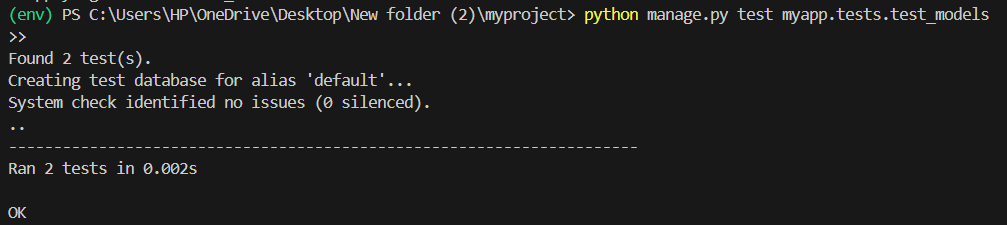
Running All Tests in a Specific Test Case Class: Executes every test method defined within a particular test case class using Django's test runner.
python manage.py test myapp.tests.test_models.MyModelTestCase

Running a Specific Test Method: Executes a single test method within a test case class using Django's test runner.
python manage.py test myapp.tests.test_models.MyModelTestCase.test_instance_name
