
JUnit is a popular testing framework used to validate Java applications. It helps ensure that business logic works correctly by writing and executing test cases.
- Used for unit testing Java applications
- Validates business logic automatically
- Helps improve code quality and reliability
Project Overview
In this project, we manage student data using a service class and validate operations using JUnit. The system performs operations like add, insert, remove, and filter students.
- Uses ArrayList to store student data
- Includes operations like filtering by course and GPA
- All operations are validated using JUnit
Project Structure
This is a Maven-based project where dependencies and build configuration are managed in pom.xml.
- model -> Student class
- service -> Business logic
- test -> JUnit test cases
Step-by-Step Project Creation
Step 1: Create Maven Project
Create a new Maven project in IntelliJ/Eclipse.
- Select Maven archetype
- Set GroupId and ArtifactId
- Use Java version (8 or above)
Step 2: Add Dependencies (pom.xml)
Add JUnit dependency for testing.
pom.xml
<?xml version="1.0" encoding="UTF-8"?>
<project xmlns="https://maven.apache.org/POM/4.0.0"
         xmlns:xsi="https://www.w3.org/2001/XMLSchema-instance"
         xsi:schemaLocation="https://maven.apache.org/POM/4.0.0
                             https://maven.apache.org/xsd/maven-4.0.0.xsd">

    <modelVersion>4.0.0</modelVersion>
    <groupId>com.gfg.StudentServicesJava</groupId>
    <artefactId>StudentServicesJava</artefactId>
    <packaging>jar</packaging>
    <version>1.0-SNAPSHOT</version>

    <properties>
        <!-- https://maven.apache.org/general.html#encoding-warning -->
        <project.build.sourceEncoding>UTF-8</project.build.sourceEncoding>
        <maven.compiler.source>1.8</maven.compiler.source>
        <maven.compiler.target>1.8</maven.compiler.target>
        <junit.version>5.3.1</junit.version>
        <pitest.version>1.4.3</pitest.version>
    </properties>

    <dependencies>

        <!-- junit 5, unit test -->
        <dependency>
            <groupId>org.junit.jupiter</groupId>
            <artefactId>junit-jupiter-engine</artefactId>
            <version>${junit.version}</version>
            <scope>test</scope>
        </dependency>

    </dependencies>
    <build>
        <finalName>maven-mutation-testing</finalName>
        <plugins>
            <plugin>
                <groupId>org.apache.maven.plugins</groupId>
                <artefactId>maven-surefire-plugin</artefactId>
                <version>3.0.0-M1</version>
            </plugin>

            <plugin>
                <groupId>org.pitest</groupId>
                <artefactId>pitest-maven</artefactId>
                <version>${pitest.version}</version>

                <executions>
                    <execution>
                        <id>pit-report</id>
                        <phase>test</phase>
                        <goals>
                            <goal>mutationCoverage</goal>
                        </goals>
                    </execution>
                </executions>

                <!-- https://github.com/hcoles/pitest/issues/284 -->
                <!-- Need this to support JUnit 5 -->
                <dependencies>
                    <dependency>
                        <groupId>org.pitest</groupId>
                        <artefactId>pitest-junit5-plugin</artefactId>
                        <version>0.8</version>
                    </dependency>
                </dependencies>
                <configuration>
                    <targetClasses>
                        <param>com.gfg.StudentServicesJava.*StudentServicesJava*</param>
                    </targetClasses>
                    <targetTests>
                        <param>com.gfg.StudentServicesJava.*</param>
                    </targetTests>
                </configuration>
            </plugin>

        </plugins>
    </build>

</project>
Step 3: Create Student Model Class
Create a Student class with attributes like ID, name, course, and GPA.
Student.java
public class Student {
    public Student(String studentName, int studentId,
                   String courseName, double gpa)
    {
        super();
        this.studentName = studentName;
        this.studentId = studentId;
        this.courseName = courseName;
        this.gpa = gpa;
    }
    public Student()
    {
        // via setter methods, rest fields are done
    }
    String studentName;
    int studentId;
    String courseName;
    double gpa;
    public String getStudentName() { return studentName; }
    public void setStudentName(String studentName)
    {
        this.studentName = studentName;
    }
    public int getStudentId() { return studentId; }
    public void setStudentId(int studentId)
    {
        this.studentId = studentId;
    }
    public String getCourseName() { return courseName; }
    public void setCourseName(String courseName)
    {
        this.courseName = courseName;
    }
    public double getGpa() { return gpa; }
    public void setGpa(double gpa) { this.gpa = gpa; }
}
Step 4: Create Service Class
This is basically a business logic file. Following student service operations are taken care of this.
- Appending students to a list and returning student list size
- Inserting students in the middle of the list and returning student list size
- Removing the students from the list and returning the student list size
- Retrieving student name by means of index position
- Retrieving coursewise student list
- Retrieving gpawise student list
import java.util.ArrayList;
import java.util.List;

public class StudentServicesJava {

    // Appending i.e. adding students at the end of the
    // list and returning the studentlist size
    public int appendStudent(Student student,List<Student> studentList)
    {
        studentList.add(student);
        return studentList.size();
    }

    // Inserting i.e. inserting students at the middle
    // of the list and returning the studentlist size
    public int insertStudent(Student student,List<Student> studentList,int index)
    {
        studentList.add(index,student);
        return studentList.size();
    }

    // Removing students from the list and
    // returning the studentlist size
    public int removeStudent(List<Student> studentList,int index)
    {
        studentList.remove(index);
        return studentList.size();
    }

    // Returning the studentlist size
    public int getStudents(List<Student> studentList) {
        return studentList.size();
    }

    // Retrieving the student name at the specified index
    public String getStudentName(List<Student> studentList,int index) {
        return studentList.get(index).getStudentName();
    }

    // Returning the student list who matches for a specific course
    public List<Student> getStudentsByCourseWise(List<Student> studentList,String courseName) {
        List<Student> courseWiseStudents = new ArrayList<Student>();
        for (int i = 0; i < studentList.size(); i++) {
            if (studentList.get(i).getCourseName().equalsIgnoreCase(courseName)) {
                courseWiseStudents.add(studentList.get(i));
            }
        }
        return courseWiseStudents;
    }

    // Returning the student list who matches for a specific gpa and more
    public List<Student> getStudentsByGPA(List<Student> studentList,double gpa) {
        List<Student> gpaWiseStudents = new ArrayList<Student>();
        for (int i = 0; i < studentList.size(); i++) {
            if (studentList.get(i).getGpa() >= gpa) {
                gpaWiseStudents.add(studentList.get(i));
            }
        }
        return gpaWiseStudents;
    }

}
Step 5: Create Test Class
Always need to check for the quality of software by means of doing JUNIT testing
TestStudentServicesJava.java
import static org.junit.jupiter.api.Assertions.assertEquals;

import java.util.ArrayList;
import java.util.List;

import org.junit.jupiter.api.DisplayName;
import org.junit.jupiter.api.Test;

public class TestStudentServicesJava {
    List<Student> studentList = new ArrayList<Student>();
    StudentServicesJava studentServicesJavaObject = new StudentServicesJava();

    @DisplayName("Test check for adding/inserting/filtering by coursewise or gpawise/removing students ")
    @Test
    public void testCheckForAdditionAndDeletion() {

        assertEquals(true, studentServicesJavaObject.getStudents(studentList) == 0);

        // creating a student object
        Student student = new Student();
        student.setStudentId(1);
        student.setStudentName("Rachel");
        student.setCourseName("Java");
        student.setGpa(9.2);
        studentServicesJavaObject.appendStudent(student, studentList);

        // After appending the data
        assertEquals(true, studentServicesJavaObject.getStudents(studentList) == 1);
        Student monica = new Student("Monica", 2, "Java", 8.5);
        studentServicesJavaObject.insertStudent(monica, studentList, 0);

        // After inserting the data
        assertEquals(true, studentServicesJavaObject.getStudentName(studentList,0).equalsIgnoreCase("Monica"));
        assertEquals(true, studentServicesJavaObject.getStudents(studentList) == 2);
        Student phoebe = new Student("Phoebe", 3, "Python", 8.5);
        studentServicesJavaObject.appendStudent(phoebe, studentList);
        assertEquals(true, studentServicesJavaObject.getStudents(studentList) == 3);
        assertEquals(true, studentServicesJavaObject.getStudentName(studentList,1).equalsIgnoreCase("Rachel"));
        assertEquals(true, studentServicesJavaObject.getStudents(studentList) == studentList.size());

        // checking according to coursewise, first check for java
        List<Student> javaCourseWiseStudentList = new ArrayList<Student>();
        javaCourseWiseStudentList = studentServicesJavaObject.getStudentsByCourseWise(studentList, "java");

        // As for java, only 2 students are entered and checking like below
        assertEquals(true, studentServicesJavaObject.getStudents(javaCourseWiseStudentList) == 2);
        assertEquals(true, studentServicesJavaObject.getStudentName(javaCourseWiseStudentList,1).equalsIgnoreCase("Rachel"));

        List<Student> pythonCourseWiseStudentList = new ArrayList<Student>();
        pythonCourseWiseStudentList = studentServicesJavaObject.getStudentsByCourseWise(studentList, "python");

        // As for python, only 1 student is entered and checking like below
        assertEquals(true, studentServicesJavaObject.getStudents(pythonCourseWiseStudentList) == 1);
        assertEquals(true, studentServicesJavaObject.getStudentName(pythonCourseWiseStudentList,0).equalsIgnoreCase("phoebe"));

        // php course check
        List<Student> phpCourseWiseStudentList = new ArrayList<Student>();
        phpCourseWiseStudentList = studentServicesJavaObject.getStudentsByCourseWise(studentList, "unknown");

        // As for php, no students are there, we need to check like below
        assertEquals(true, studentServicesJavaObject.getStudents(phpCourseWiseStudentList) == 0);

        // Now with gpa check
        List<Student> gpaWiseStudentList = new ArrayList<Student>();
        gpaWiseStudentList = studentServicesJavaObject.getStudentsByGPA(studentList, 9.0);

        // Above 9.0, only 1 student is having
        assertEquals(true, studentServicesJavaObject.getStudents(gpaWiseStudentList) == 1);
        assertEquals(true, studentServicesJavaObject.getStudentName(gpaWiseStudentList,0).equalsIgnoreCase("rachel"));

        List<Student> higherGpaWiseStudentList = new ArrayList<Student>();
        higherGpaWiseStudentList = studentServicesJavaObject.getStudentsByGPA(studentList, 9.5);

        // Above 9.5, no students are there
        assertEquals(true, studentServicesJavaObject.getStudents(higherGpaWiseStudentList) == 0);

        // let us remove the students
        studentServicesJavaObject.removeStudent(studentList, 0);

        // As 0th index student got removed, only 2 students remain
        assertEquals(true, studentServicesJavaObject.getStudents(studentList) == 2);

        // As 0th index got removed, rachel will be at 0th index
        assertEquals(true, studentServicesJavaObject.getStudentName(studentList,0).equalsIgnoreCase("Rachel"));

        studentServicesJavaObject.removeStudent(studentList, 1);

        // As 1st index student got removed, only 1 student remain
        assertEquals(true, studentServicesJavaObject.getStudents(studentList) == 1);

        // As 1st index got removed, like before rachel will be at 0th index
        assertEquals(true, studentServicesJavaObject.getStudentName(studentList,0).equalsIgnoreCase("Rachel"));

    }

}
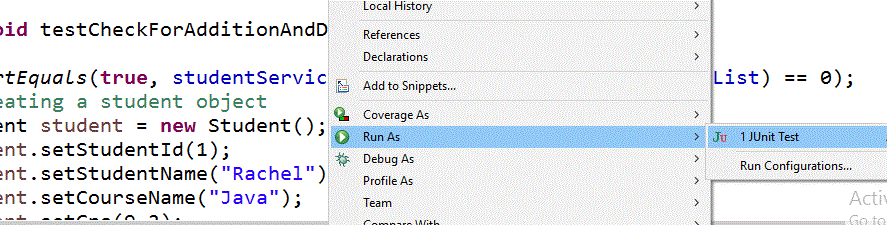
We need to create sample test data and at each and every point in time, the business logic file outcome should be validated and it should satisfy the asserts. In this way, we can conclude that the written part of the code is fine and satisfies different scenarios. Let us run the JUNIT file
Output of Testcases:
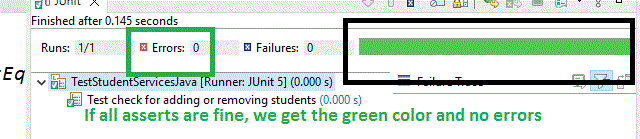
With this, we can check them and in case of any errors, we can modify the business logic and rectify the same to achieve in green color.