
Test Driven Development (TDD) is a software development approach where tests are written before the actual code implementation. Using JUnit 5 and Mockito, developers can create reliable and maintainable applications by validating behavior early. This approach improves code quality, reduces bugs, and ensures better design through continuous testing.
- Promotes writing tests first, followed by minimal code to pass those tests.
- Uses Mockito to mock dependencies and isolate units for accurate testing.
- Encourages refactoring while maintaining correctness through automated tests.
Step-by-Step Implementation of JUnit5 and Mockito
This section demonstrates how to set up a Maven-based Java project and systematically write unit tests using JUnit 5 along with Mockito to mock dependencies and verify application behavior effectively.
Step 1: Create a Maven Project
Create a Maven project using your IDE or command line.
- Ensure Java version is properly configured (Java 11 in your case).
- Use standard Maven directory structure.
Step 2: Add Required Dependencies (pom.xml)
Include dependencies for JUnit 5, assertions, and testing tools.
- JUnit Jupiter (API + Engine)
- AssertJ / Hamcrest for assertions
- Maven Surefire Plugin for running tests
pom.xml
<?xml version="1.0" encoding="UTF-8"?>
<project xmlns="https://maven.apache.org/POM/4.0.0"
         xmlns:xsi="https://www.w3.org/2001/XMLSchema-instance"
         xsi:schemaLocation="https://maven.apache.org/POM/4.0.0
                             https://maven.apache.org/xsd/maven-4.0.0.xsd">
    <modelVersion>4.0.0</modelVersion>

    <groupId>gfg.springframework</groupId>
    <artifactId>sampletest-junit5-mockito</artifactId>
    <version>1.0-SNAPSHOT</version>

    <name>sampletest-junit5-mockito</name>
    <description>Testing Java with JUnit 5</description>

    <properties>
        <project.build.sourceEncoding>UTF-8</project.build.sourceEncoding>
        <project.reporting.outputEncoding>UTF-8</project.reporting.outputEncoding>
        <java.version>11</java.version>
        <maven.compiler.source>${java.version}</maven.compiler.source>
        <maven.compiler.target>${java.version}</maven.compiler.target>
        <junit-platform.version>5.3.1</junit-platform.version>
    </properties>

    <dependencies>
        <dependency>
            <groupId>javax.validation</groupId>
            <artifactId>validation-api</artifactId>
            <version>2.0.1.Final</version>
        </dependency>
        <dependency>
            <groupId>org.apache.commons</groupId>
            <artifactId>commons-lang3</artifactId>
            <version>3.8.1</version>
        </dependency>
        <dependency>
            <groupId>org.junit.jupiter</groupId>
            <artifactId>junit-jupiter-api</artifactId>
            <version>${junit-platform.version}</version>
            <scope>test</scope>
        </dependency>
        <dependency>
            <groupId>org.junit.jupiter</groupId>
            <artifactId>junit-jupiter-params</artifactId>
            <version>${junit-platform.version}</version>
        </dependency>
        <dependency>
            <groupId>org.junit.jupiter</groupId>
            <artifactId>junit-jupiter-engine</artifactId>
            <version>${junit-platform.version}</version>
            <scope>test</scope>
        </dependency>

        <dependency>
            <groupId>org.assertj</groupId>
            <artifactId>assertj-core</artifactId>
            <version>3.11.1</version>
            <scope>test</scope>
        </dependency>

        <dependency>
            <groupId>org.hamcrest</groupId>
            <artifactId>hamcrest-library</artifactId>
            <version>1.3</version>
            <scope>test</scope>
        </dependency>
    </dependencies>

    <build>
        <plugins>
            <plugin>
                <groupId>org.apache.maven.plugins</groupId>
                <artifactId>maven-compiler-plugin</artifactId>
                <version>3.8.0</version>
            </plugin>
            <plugin>
                <groupId>org.apache.maven.plugins</groupId>
                <artifactId>maven-surefire-plugin</artifactId>
                <version>2.22.0</version>
                <configuration>
                    <argLine>
                        --illegal-access=permit
                    </argLine>
                </configuration>
            </plugin>
            <plugin>
                <groupId>org.apache.maven.plugins</groupId>
                <artifactId>maven-failsafe-plugin</artifactId>
                <version>2.22.0</version>
                <configuration>
                    <argLine>
                        --illegal-access=permit
                    </argLine>
                </configuration>
                <executions>
                    <execution>
                        <goals>
                            <goal>integration-test</goal>
                            <goal>verify</goal>
                        </goals>
                    </execution>
                </executions>
            </plugin>
            <plugin>
                <groupId>org.apache.maven.plugins</groupId>
                <artifactId>maven-site-plugin</artifactId>
                <version>3.7.1</version>
            </plugin>
        </plugins>
    </build>
    <reporting>
        <plugins>
            <plugin>
                <groupId>org.apache.maven.plugins</groupId>
                <artifactId>maven-surefire-report-plugin</artifactId>
                <version>2.22.0</version>
            </plugin>
        </plugins>
    </reporting>
</project>
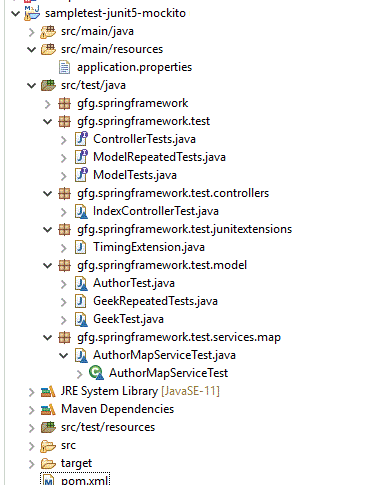
Project Structure:
Step 3: Create Base Model Classe
Create basic POJO classes:
- BaseEntity
- Geek
- Author
- AuthorType (enum)
BaseEntity.java
import java.io.Serializable;

public class BaseEntity implements Serializable {

    private Long id;

    public boolean isNew() {
        return this.id == null;
    }

    public BaseEntity() {
    }

    public BaseEntity(Long id) {
        this.id = id;
    }

    public Long getId() {
        return id;
    }

    public void setId(Long id) {
        this.id = id;
    }
}
Step 4: Create Domain Models
- Extends
BaseEntity - Contains
firstName,lastName
Geek.java
public class Geek extends BaseEntity {

    public Geek(Long id, String firstName, String lastName) {
        super(id);
        this.firstName = firstName;
        this.lastName = lastName;
    }

    private String firstName;
    private String lastName;

    public String getFirstName() {
        return firstName;
    }

    public void setFirstName(String firstName) {
        this.firstName = firstName;
    }

    public String getLastName() {
        return lastName;
    }

    public void setLastName(String lastName) {
        this.lastName = lastName;
    }
}
Author.java
- Extends
Geek - Adds
address,city,telephone
public class Author extends Geek {

    private String address;
    private String city;
    private String telephone;

    public Author(Long id, String firstName, String lastName) {
        super(id, firstName, lastName);
    }

    public String getAddress() {
        return address;
    }

    public void setAddress(String address) {
        this.address = address;
    }

    public String getCity() {
        return city;
    }

    public void setCity(String city) {
        this.city = city;
    }

    public String getTelephone() {
        return telephone;
    }

    public void setTelephone(String telephone) {
        this.telephone = telephone;
    }

}
AuthorType.java
- Enum with values FREELANCING, COMPANY
public enum AuthorType {
    FREELANCING, COMPANY
}
Step 5: Create Controller Layer
- Handles user requests
- Uses
AuthorService
AuthorController.java
import javax.validation.Valid;

import gfg.springframework.model.Author;
import gfg.springframework.services.AuthorService;
import gfg.springframework.spring.BindingResult;
import gfg.springframework.spring.Model;
import gfg.springframework.spring.ModelAndView;
import gfg.springframework.spring.WebDataBinder;

import java.util.List;

public class AuthorController {
    private static final String VIEWS_AUTHOR_CREATE_OR_UPDATE_FORM = "authors/createOrUpdateAuthorForm";

    private final AuthorService authorService;

    public AuthorController(AuthorService authorService) {
        this.authorService = authorService;
    }

    public void setAllowedFields(WebDataBinder dataBinder) {
        dataBinder.setDisallowedFields("id");
    }

    public String findAuthors(Model model){
        model.addAttribute("author", new Author(null, null, null));
        return "authors/findAuthors";
    }

    public String processFindForm(Author author, BindingResult result, Model model){
        // allow parameterless GET request for
          // authors to return all records
        if (author.getLastName() == null) {
            // empty string signifies
              // broadest possible search
            author.setLastName("");
        }

        // find authors by last name
        List<Author> results = authorService.findAllByLastNameLike("%"+ author.getLastName() + "%");

        if (results.isEmpty()) {
            // no authors found
            result.rejectValue("lastName", "notFound", "not found");
            return "authors/findAuthors";
        } else if (results.size() == 1) {
            // 1 author found
            author = results.get(0);
            return "redirect:/authors/" + author.getId();
        } else {
            // multiple authors found
            model.addAttribute("selections", results);
            return "authors/authorsList";
        }
    }

    public ModelAndView showAuthor(Long authorId) {
        ModelAndView mav = new ModelAndView("authors/authorDetails");
        mav.addObject(authorService.findById(authorId));
        return mav;
    }

    public String initCreationForm(Model model) {
        model.addAttribute("author", new Author(null, null, null));
        return VIEWS_AUTHOR_CREATE_OR_UPDATE_FORM;
    }

    public String processCreationForm(@Valid Author author, BindingResult result) {
        if (result.hasErrors()) {
            return VIEWS_AUTHOR_CREATE_OR_UPDATE_FORM;
        } else {
            Author savedAuthor =  authorService.save(author);
            return "redirect:/authors/" + savedAuthor.getId();
        }
    }

    public String initUpdateAuthorForm(Long authorId, Model model) {
        model.addAttribute(authorService.findById(authorId));
        return VIEWS_AUTHOR_CREATE_OR_UPDATE_FORM;
    }

    public String processUpdateAuthorForm(@Valid Author author, BindingResult result, Long authorId) {
        if (result.hasErrors()) {
            return VIEWS_AUTHOR_CREATE_OR_UPDATE_FORM;
        } else {
            author.setId(authorId);
            Author savedAuthor = authorService.save(author);
            return "redirect:/authors/" + savedAuthor.getId();
        }
    }

}
Step 6: Create Repository Layer
Define repository interface:
AuthorRepository.java
import java.util.List;
import gfg.springframework.model.Author;

public interface AuthorRepository extends CrudRepository<Author, Long> {
    Author findByLastName(String lastName);
    List<Author> findAllByLastNameLike(String lastName);
}
Step 7: Create Service Layer
Define service interface and implementation.
AuthorService.java: Defines business methods
import java.util.List;
import gfg.springframework.model.Author;

public interface AuthorService extends CrudService<Author, Long> {
    Author findByLastName(String lastName);
    List<Author> findAllByLastNameLike(String lastName);
 }
AuthorMapService.java: Implements service using in-memory storage
import java.util.List;
import java.util.Set;
import gfg.springframework.model.Author;
import gfg.springframework.services.AuthorService;

public class AuthorMapService extends AbstractMapService<Author, Long> implements AuthorService {

    @Override
    public Set<Author> findAll() {
        return super.findAll();
    }

    @Override
    public Author findById(Long id) {
        return super.findById(id);
    }

    @Override
    public Author save(Author object) {

        if(object != null){
            return super.save(object);

        } else {
            return null;
        }
    }

    @Override
    public void delete(Author object) {
        super.delete(object);
    }

    @Override
    public void deleteById(Long id) {
        super.deleteById(id);
    }

    @Override
    public Author findByLastName(String lastName) {
        return this.findAll()
                .stream()
                .filter(author -> author.getLastName().equalsIgnoreCase(lastName))
                .findFirst()
                .orElse(null);
    }

}
Step 8: Create Base Test Interfaces
ControllerTests.java: Runs once before all tests
import org.junit.jupiter.api.BeforeAll;
import org.junit.jupiter.api.Tag;
import org.junit.jupiter.api.TestInstance;

@TestInstance(TestInstance.Lifecycle.PER_CLASS)
@Tag("controllers")
public interface ControllerTests {
    @BeforeAll
    default void beforeAll(){
        System.out.println("beforeAll-Initialization can be done here");
    }
}
ModelRepeatedTests.java: Supports repeated test execution
import org.junit.jupiter.api.BeforeEach;
import org.junit.jupiter.api.RepetitionInfo;
import org.junit.jupiter.api.Tag;
import org.junit.jupiter.api.TestInfo;

@Tag("repeated")
public interface ModelRepeatedTests {
    @BeforeEach
    default void beforeEachConsoleOutputer(TestInfo testInfo, RepetitionInfo repetitionInfo){
        System.out.println("Running Test - " + testInfo.getDisplayName() + " - "
                + repetitionInfo.getCurrentRepetition() + " | " + repetitionInfo.getTotalRepetitions());
    }
}
ModelTests.java:Runs before each test
import org.junit.jupiter.api.BeforeEach;
import org.junit.jupiter.api.Tag;
import org.junit.jupiter.api.TestInfo;

@Tag("model")
public interface ModelTests {
    @BeforeEach
    default void beforeEachConsoleOutputer(TestInfo testInfo){
        System.out.println("Running Test - " + testInfo.getDisplayName());
    }
}
Step 9: Write Model Test Cases
AuthorTest.java:
import static org.hamcrest.MatcherAssert.assertThat;
import static org.hamcrest.Matchers.is;
import static org.junit.jupiter.api.Assertions.assertAll;
import static org.junit.jupiter.api.Assertions.assertEquals;

import org.junit.jupiter.api.DisplayName;
import org.junit.jupiter.api.Test;
import org.junit.jupiter.params.ParameterizedTest;
import org.junit.jupiter.params.provider.EnumSource;
import org.junit.jupiter.params.provider.ValueSource;

import gfg.springframework.model.Author;
import gfg.springframework.model.AuthorType;
import gfg.springframework.test.ModelTests;

class AuthorTest implements ModelTests {

    @Test
    void assertionsTest() {

        Author author = new Author(1l, "Rachel", "Green");
        author.setCity("Seatle");
        author.setTelephone("1002003001");

        assertAll("Properties Test",
                () -> assertAll("Geek Properties",
                        () -> assertEquals("Rachel", author.getFirstName(), "First Name Did not Match"),
                        () -> assertEquals("Green", author.getLastName())),
                () -> assertAll("Author Properties",
                        () -> assertEquals("Seatle", author.getCity(), "City Did Not Match"),
                        () -> assertEquals("1002003001", author.getTelephone())
                ));

        assertThat(author.getCity(), is("Seatle"));
    }

    @DisplayName("Value Source Test")
    @ParameterizedTest(name = "{displayName} - [{index}] {arguments}")
    @ValueSource(strings = {"Spring", "Framework", "GFG"})
    void valueSourceTest(String val) {
        System.out.println(val);
    }

    @DisplayName("Enum Source Test")
    @ParameterizedTest(name = "{displayName} - [{index}] {arguments}")
    @EnumSource(AuthorType.class)
    void enumTest(AuthorType authorType) {
        System.out.println(authorType);
    }

}
Here we can see that can include more than one annotations
- @DisplayName: Purpose of the test and categorization can be done easily
- @Parameterized Tests: They are built in and adopt the best features from JUnit4Parameterized and JUnitParams of Junit4
It helps to go with @ValueSource. @EmptySource and @NullSource represent a single parameter. On running the above code, we can able to get the below output

Step 10: Write Geek Test
GeekTest.java
- Uses grouped assertions
- Shows both success and failure cases
import static org.junit.jupiter.api.Assertions.assertAll;
import static org.junit.jupiter.api.Assertions.assertEquals;
import org.junit.jupiter.api.Test;

import gfg.springframework.model.Geek;
import gfg.springframework.test.ModelTests;

class GeekTest implements ModelTests {

    @Test
    void groupedAssertions() {
        // given
        Geek person = new Geek(1l, "Ross", "Geller");

        // then
        assertAll("Test Props Set",
                () -> assertEquals(person.getFirstName(), "Ross"),
                () -> assertEquals(person.getLastName(), "Geller"));
    }

    @Test
    void groupedAssertionMsgs() {
        // given
        Geek person = new Geek(1l, "Chandler", "Bing");

        // then
        assertAll("Test Props Set",
                () -> assertEquals(person.getFirstName(), "Ross", "Input First Name is wrong"),
                () -> assertEquals(person.getLastName(), "Geller", "Input Last Name is wrong"));
    }
}
On running the above, the first test is ok and second one fails as expected and the actual one does not match

Step 11: Write Service Layer Tests
AuthorMapServiceTest.java
@BeforeEach-> setup before every test@Nested-> group related tests@DisplayName-> readable test names
import static org.assertj.core.api.Assertions.assertThat;

import org.junit.jupiter.api.BeforeEach;
import org.junit.jupiter.api.DisplayName;
import org.junit.jupiter.api.Nested;
import org.junit.jupiter.api.Test;

import gfg.springframework.model.Author;
import gfg.springframework.services.map.AuthorMapService;

@DisplayName("Author Map Service Test - ")
class AuthorMapServiceTest {

    AuthorMapService authorMapService;

    @BeforeEach
    void setUp() {
        authorMapService = new AuthorMapService();
    }

    @DisplayName("Verifying that there are Zero Authors")
    @Test
    void authorsAreZero() {
        int authorCount = authorMapService.findAll().size();

        assertThat(authorCount).isZero();
    }

    @DisplayName("Saving Authors Tests - ")
    @Nested
    class SaveAuthorsTests {

        @BeforeEach
        void setUp() {
            authorMapService.save(new Author(1L, "Before", "Each"));
        }

        @DisplayName("Saving Author")
        @Test
        void saveAuthor() {
            Author author = new Author(2L, "Joe", "Tribbiani");
            Author savedAuthor = authorMapService.save(author);
            assertThat(savedAuthor).isNotNull();
        }

        @DisplayName("Save Authors Tests - ")
        @Nested
        class FindAuthorsTests {

            @DisplayName("Find Author")
            @Test
            void findAuthor() {
                Author foundAuthor = authorMapService.findById(1L);
                assertThat(foundAuthor).isNotNull();
            }

            @DisplayName("Find Author Not Found")
            @Test
            void findAuthorNotFound() {
                Author foundAuthor = authorMapService.findById(2L);
                assertThat(foundAuthor).isNull();
            }
        }
    }

    @DisplayName("Verify Still Zero Authors")
    @Test
    void authorsAreStillZero() {
        int authorCount = authorMapService.findAll().size();
        assertThat(authorCount).isZero();
    }
}
Step 12: Run Tests Using Maven
- Automatically detects test classes
- Executes using Surefire plugin
mvn test
