
Spring Boot Integration with PostgreSQL as a Maven Project involves developing a Spring Boot application that connects to a PostgreSQL database while using Maven to manage project dependencies and build configuration. This integration enables efficient backend development and reliable data storage.
- Maven Dependency Management: Handles required libraries like Spring Data JPA and the PostgreSQL driver.
- Database Connectivity: Spring Boot connects to PostgreSQL and performs CRUD operations using JPA/Hibernate.
Steps for Implementation
Follow the below steps to integrate Spring Boot with PostgreSQL using a Maven project:
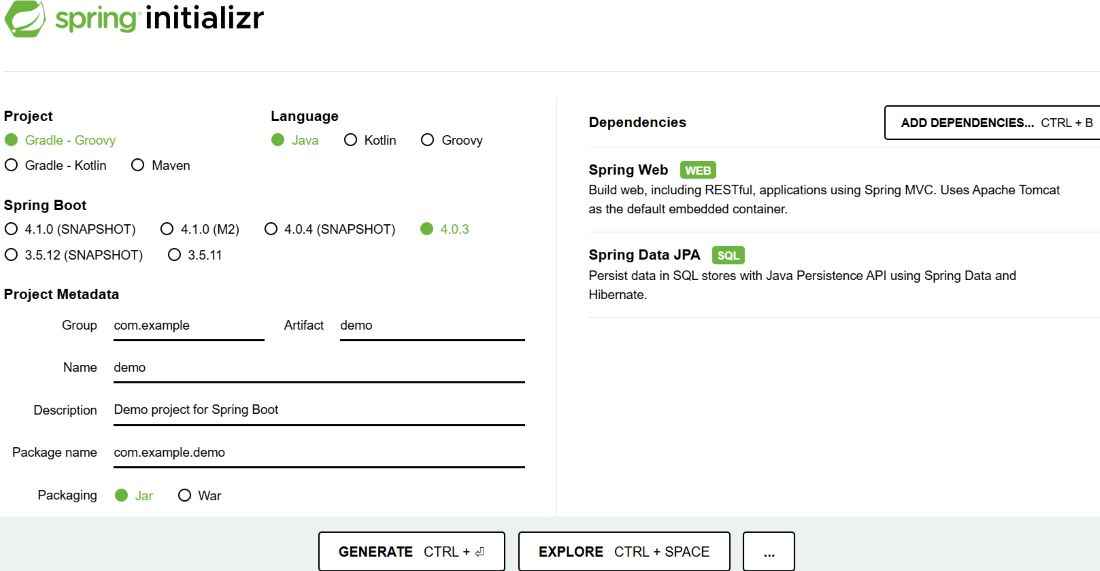
Step 1: Create a Spring Boot Project
Generate a project using Spring Initializr and fill in the details as per the requirements.
For this application:
- Project: Maven
- Language: Java
- Spring Boot Version: Latest stable version
- Group: com.example
- Artifact: springboot-postgresql-project
- Packaging: Jar
- Java Version: 17 (or higher)
- Dependencies: Spring Web, Spring Data JPA
Click Generate to download the starter project.
Project Structure:

Add the PostgreSQL dependency to connect the application with PostgreSQL database.
pom.xml
<properties>
    <java.version>17</java.version>
</properties>

<dependencies>
    <!-- Spring Data JPA -->
    <dependency>
        <groupId>org.springframework.boot</groupId>
        <artifactId>spring-boot-starter-data-jpa</artifactId>
    </dependency>

    <!-- PostgreSQL Driver -->
    <dependency>
        <groupId>org.postgresql</groupId>
        <artifactId>postgresql</artifactId>
        <scope>runtime</scope>
    </dependency>

    <!-- Spring Web -->
    <dependency>
        <groupId>org.springframework.boot</groupId>
        <artifactId>spring-boot-starter-web</artifactId>
    </dependency>
</dependencies>
Step 2: Configure PostgreSQL Connection
Add PostgreSQL configuration in application.properties.
spring.datasource.url=jdbc:postgresql://localhost:5432/testdb
spring.datasource.username=postgres
spring.datasource.password=your_password
spring.jpa.hibernate.ddl-auto=update
spring.jpa.show-sql=true
spring.jpa.properties.hibernate.dialect=org.hibernate.dialect.PostgreSQLDialect
Step 3: Create the Entity Class
Let us write the entity class now:
geek_author.java
package com.example.model;

import jakarta.persistence.*;

@Entity
@Table(name = "authors")
public class Author {

    @Id
    @GeneratedValue(strategy = GenerationType.IDENTITY)
    private Integer id;

    private String name;
    private String email;

    // Getters & Setters
}
Step 4: Create Repository Interface
Create AuthorRepository.java to handle database operations using Spring Data JPA.
AuthorRepository.java
package com.example.repository;

import org.springframework.data.jpa.repository.JpaRepository;
import com.example.model.Author;

public interface AuthorRepository extends JpaRepository<Author, Integer> {
}
Step 5: Create Controller Class
Create AuthorController.java and define API endpoints.
AuthorController.java
package com.example.controller;

import org.springframework.web.bind.annotation.*;
import java.util.List;
import com.example.model.Author;
import com.example.repository.AuthorRepository;

@RestController
@RequestMapping("/authors")
public class AuthorController {

    private final AuthorRepository repository;

    public AuthorController(AuthorRepository repository) {
        this.repository = repository;
    }

    // CREATE (POST)
    @PostMapping
    public Author addAuthor(@RequestBody Author author) {
        return repository.save(author);
    }

    // READ (GET ALL)
    @GetMapping
    public List<Author> getAllAuthors() {
        return repository.findAll();
    }
}
Step 6: Create Main class
Create AuthorApplication class.
AuthorApplication.java
package com.example;

import org.springframework.boot.SpringApplication;
import org.springframework.boot.autoconfigure.SpringBootApplication;

@SpringBootApplication
public class SpringbootPostgresqlApplication {

    public static void main(String[] args) {
        SpringApplication.run(SpringbootPostgresqlApplication.class, args);
    }
}
Step 7: Run the Application
- Run as Spring Boot App
- Server starts on:
http://localhost:8080
Console Output:

Step 8: Test API
Test the api's using Postman .
POST API
URL: http://localhost:8080/authors
JSON
{
"name": "John",
"email": "john@example.com"
}
Response (JSON)
{
"id": 1,
"name": "John",
"email": "john@example.com"
}
GET API (Fetch All)
http://localhost:8080/authors
Response
[
{
"id": 1,
"name": "John",
"email": "john@example.com"
}
]