The SQL DELETE statement is used to remove specific rows from a table while keeping the table structure intact. It is different from DROP, which deletes the entire table.
- It removes rows based on conditions.
- Retains table schema, constraints, and indexes.
- Can delete a single row or all rows.
Example: First, we create a demo SQL database and table, on which we will use the SQL DELETE command.

Query:
DELETE FROM Employees
WHERE EmployeeID = 5;
Output:

- This query deletes the row from the Employees table where the EmployeeID is 5.
- Only that specific record is removed; all other rows remain unchanged.
Syntax:
DELETE FROM table_name
WHERE some_condition;
- Some_condition: A condition used to filter the rows you want to delete.
- table_name: The name of the table from which you want to delete the rows.
Note: We can delete single or multiple records using the WHERE clause; if it’s omitted, all records in the table are removed.
Examples of SQL DELETE Statement
Assume we have created a table named GFG_Employee in SQL, which contains the personal details of the Employee including their id, name, email and department etc. as shown below.
CREATE TABLE GFG_Employees (
id INT PRIMARY KEY,
name VARCHAR (20) ,
email VARCHAR (25),
department VARCHAR(20)
);
INSERT INTO GFG_Employees (id, name, email, department) VALUES
(1, 'Jessie', '[email protected]', 'Development'),
(2, 'Praveen', '[email protected]', 'HR'),
(3, 'Bisa', '[email protected]', 'Sales'),
(4, 'Rithvik', '[email protected]', 'IT'),
(5, 'Suraj', '[email protected]', 'Quality Assurance'),
(6, 'Om', '[email protected]', 'IT'),
(7, 'Naruto', '[email protected]', 'Development');
Select * From GFG_Employees
Output:
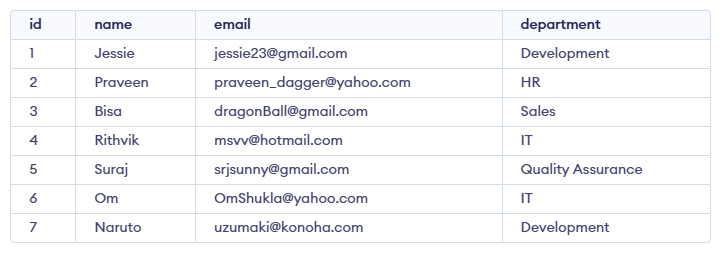
Example 1: Deleting Single Record
We can use the DELETE statement with a condition to delete a specific row from a table. The WHERE clause ensures only the intended record is removed. We can delete the records named Rithvik by using the below query:
Query:
DELETE FROM GFG_Employees
WHERE NAME = 'Rithvik';
Output:
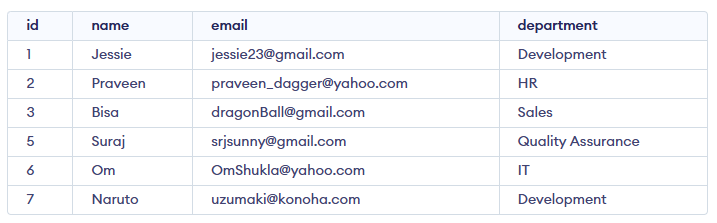
Example 2: Deleting Multiple Records
To delete multiple records, you can specify a condition that matches several rows. Let's delete the rows from the table GFG_Employees where the department is "Development". This will delete 2 rows (the first row and the seventh row).
Query:
DELETE FROM GFG_Employees
WHERE department = 'Development';
Output
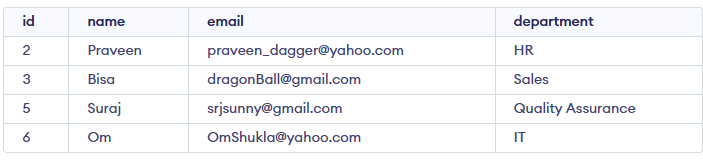
Example 3: Delete All Records from a Table
If we need to delete all records from the table, we can omit the WHERE clause, or alternatively use the DELETE statement with an asterisk (*) to denote all rows.
Query:
DELETE FROM GFG_Employees;
Or
DELETE * FROM GFG_Employees;
Output:

All of the records in the table will be deleted, there are no records left to display. The table GFG_Employees will become empty.
Rolling Back DELETE Operations
Since the DELETE statement is a DML operation, it can be rolled back when executed in a statement. If you accidentally delete records or need to repeat the process, you can use the ROLLBACK command.
Query:
BEGIN TRANSACTION;
DELETE FROM GFG_Employees;
WHERE department = 'Development';

-- If needed, you can rollback the deletion
ROLLBACK;
Explanation: The ROLLBACK command will undo the changes made by the DELETE statement, effectively restoring the records that were deleted during the transaction.
What does the DELETE statement remove?
Explanation:
DELETE removes selected rows while keeping the table structure intact.
What happens if the WHERE clause is omitted in a DELETE statement?
-
-
Only NULL rows get deleted
-
All rows in the table are deleted
-
Explanation:
Without WHERE, DELETE clears all records, leaving the table empty but still existing.
Which query deletes all employees in the 'Development' department?
-
DELETE GFG_Employees WHERE dept = 'Development';
-
REMOVE FROM GFG_Employees WHERE department = 'Development';
-
DROP FROM GFG_Employees WHERE department = 'Development';
-
DELETE FROM GFG_Employees WHERE department = 'Development';
Explanation:
DELETE FROM table WHERE condition removes multiple matching rows, as shown in Example.
Which operation can be rolled back when executed inside a transaction?
Explanation:
DELETE is a DML operation, so it supports ROLLBACK when executed inside a transaction.
What is the effect of this query?
DELETE FROM GFG_Employees WHERE name = 'Alice';
-
-
Deletes only the row where name = 'Alice'
-
-
Explanation:
The WHERE clause ensures only the matching record (name = 'Alice') is removed.
Quiz Completed Successfully
Your Score : 2/5
Accuracy : 0%
Login to View Explanation
1/5
1/5
< Previous
Next >
Explore
Basics
Queries & Operations
SQL Joins & Functions
Data Constraints & Aggregate Functions
Advanced SQL Topics
Database Design & Security