In SQL, the LEFT JOIN (also called LEFT OUTER JOIN) retrieves all records from the left table and only the matching records from the right table. If no match is found in the right table, the query will return NULL values for its columns.
- Returns all rows from the left table.
- Includes only matching rows from the right table.
- Non-matching rows in the right table are represented as NULL.
SQL LEFT JOIN Venn Diagram
This VENN diagram shows how a LEFT JOIN works in SQL.
 LEFT JOIN
Syntax:
SELECT column_name(s)
FROM tableA
LEFT JOIN tableB ON tableA.column_name = tableB.column_name;
Examples of SQL LEFT JOIN
Let's look at an example of LEFT JOIN in SQL to understand it better. Consider two tables: Emp (employees) and department (departments). The Emp table contains employee details, while the department table holds department details.
Employee Table
CREATE TABLE Emp (
    EmpID INT PRIMARY KEY,
    Name VARCHAR(50),
    Country VARCHAR(50),
    Age INT,
    Salary INT,
    department_id INT
);

INSERT INTO Emp (EmpID, Name, Country, Age, Salary, department_id)
VALUES (1, 'Shubham', 'India', 23, 30000, 101),
       (2, 'Aman', 'Australia', 21, 45000, 102),
       (3, 'Naveen', 'Sri Lanka', 24, 40000, 103),
       (4, 'Aditya', 'Austria', 21, 35000, 104),
       (5, 'Nishant', 'Spain', 22, 25000, 101);
Output:
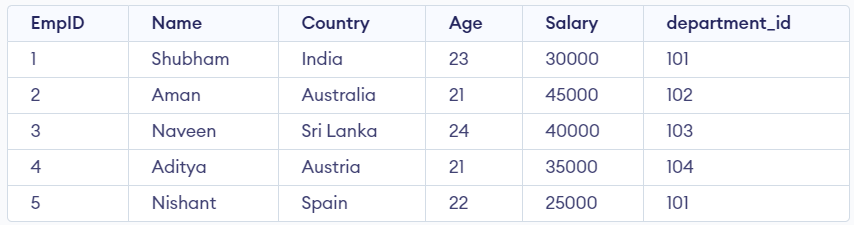 Employee Table
Department Table
 CREATE TABLE department (
    department_id INT PRIMARY KEY,
    department_name VARCHAR(50),
    department_head VARCHAR(50),
    location VARCHAR(50)
);

INSERT INTO department (department_id, department_name, department_head, location)
VALUES (101, 'Sales', 'Sarah', 'New York'),
       (102, 'Marketing', 'Jay', 'London'),
       (103, 'Finance', 'Lavish', 'San Francisco'),
       (104, 'Engineering', 'Kabir', 'Bangalore');
SELECT * FROM department;
Output:
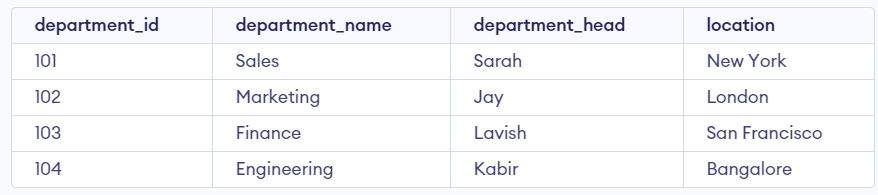 Department Table
To perform left-join on Employee and Department Tables we will use the following SQL query:
Query:
SELECT Emp.EmpID, Emp.Name, department.
department_name, department.department_head,
department.location
FROM Emp
LEFT JOIN department ON Emp.department_id = department.department_id;
Output:
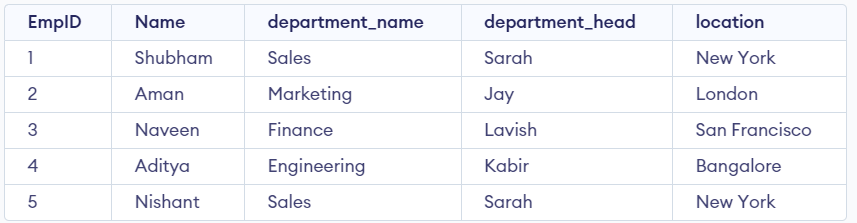 LEFT JOIN in SQL Example Output
Explanation:
- All employees (left table) are included.
- Since each employee is assigned a department, we see matching details from the right table.
- If an employee had no department assigned, the department columns would show NULL
Example 2: SQL LEFT JOIN with WHERE Clause
In this example, we will add a WHERE clause that specifies to only return results where the "location" column in the department table equals 'Bangalore'. This will filter the results to only show employees who belong to a department located in Bangalore, and departments that have no employees will not be returned in the results.
Query:
SELECT e.EmpID, e.Name, d.department_name, d.department_head, d.location
FROM Emp e
LEFT JOIN department d ON e.department_id = d.department_id
WHERE d.location = 'Bangalore';
Output:
 SQL LEFT JOIN with WHERE Clause Example
Explanation:
- Only employees working in departments located in Bangalore are included.
- If no department matched Bangalore, the result would be empty.
Example 3: SQL LEFT JOIN as Aliases
In this query, we'll use aliases "e" for the Emp table and "d" for the department table. The SELECT statement references these aliases for each column, making the query easier to read and type. Aliases simplify code and improve readability, especially with long or complex table names.
Query:
SELECT e.EmpID, e.Name, d.department_name,
d.department_head, d.location
FROM Emp e
LEFT JOIN department d ON
e.department_id = d.department_id;
Output:
SQL LEFT JOIN as Aliases Example OutputExplanation:
- e is used as an alias for Emp, and d is used for department.
- This improves query readability and makes referencing columns simpler.
Explore
Basics
Queries & Operations
SQL Joins & Functions
Data Constraints & Aggregate Functions
Advanced SQL Topics
Database Design & Security