A SQL Unique Index enforces uniqueness by ensuring that no duplicate values exist in specified column(s), helping maintain data integrity. It is widely used to prevent duplicate entries and keep database data consistent and reliable.
- A unique index on a single column ensures all values in that column are different.
- A unique index on multiple columns enforces uniqueness on the combined values.
- It cannot be created if duplicate values already exist in the column(s).
- It improves query performance by speeding up data retrieval.
Syntax:
CREATE UNIQUE INDEX index_name
ON table_name (column1, column2, ..., columnN);
- index_name: The name of the unique index.
- table_name: The name of the table where the index will be created.
- column1, column2, ..., columnN: The columns on which the unique index is being applied.
Examples of SQL Unique Index
A sample CUSTOMERS table is created with fields such as ID, NAME, AGE, ADDRESS, and SALARY to demonstrate how unique indexes work. Each row represents a customer, and unique constraints are applied to specific columns to illustrate their behavior.
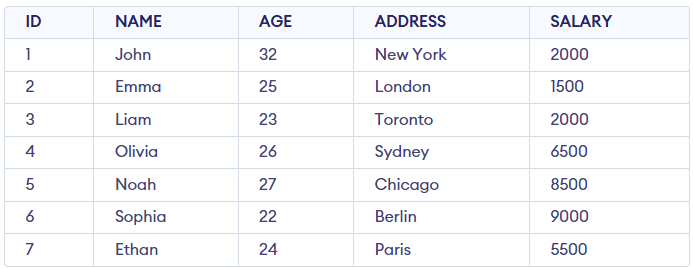 CUSTOMERS Table
Example 1: Creating a Unique Index on a Single Column
This example creates a unique index on the NAME column to prevent duplicate names in the CUSTOMERS table. It ensures that every entry in the NAME column is distinct, enforcing data integrity.
Query:
CREATE UNIQUE INDEX UNIQUE_NAME ON CUSTOMERS(NAME);
Output:

- Confirms the successful creation of the unique index on the NAME column.
- No existing rows are changed because the index applies to current data.
- Future duplicate inserts are blocked with an error.
Example 2: Creating a Unique Index on Multiple Columns
This example demonstrates how to enforce uniqueness across a combination of two columns by creating a unique index on NAME and AGE.
Query:
CREATE UNIQUE INDEX MUL_UNIQUE_INDEX ON CUSTOMERS(NAME, AGE);
Output:
- Ensures the combination of NAME and AGE values is unique in the CUSTOMERS table.
- Prevents inserting duplicate NAME and AGE combinations by throwing an error.
- Enforces data integrity by disallowing duplicate value pairs.
Example 3: Attempting to Create a Unique Index on a Column with Duplicate Values
This example illustrates the behavior of the database when trying to create a unique index on a column that already contains duplicate values.
Query:
CREATE UNIQUE INDEX UNIQUE_SALARY ON CUSTOMERS(SALARY);
Error:

- The unique index cannot be created on the SALARY column due to duplicate values.
- Duplicate entries (e.g., 2000.00) cause the database to block index creation.
- Removing or updating duplicate values resolves the issue.
Example 4: Verifying Indexes in a Table
This example demonstrates how to verify the unique indexes created on the CUSTOMERS table using the SHOW INDEX command.
Query:
SHOW INDEX FROM CUSTOMERS;
Output:

- Displays all indexes on the table along with their names, columns, and properties.
- Helps verify that indexes are correctly created and structured.
Example 5: Handling Duplicate Entries in Indexed Columns
This example demonstrates what happens when an UPDATE operation attempts to assign a duplicate value to a column with a unique index.
Query:
--Firstly, create a UNIQUE INDEX on ADDRESS column
CREATE UNIQUE INDEX ADD_UNIQUE_INDEX ON CUSTOMERS(ADDRESS);

-- Attempts to assign a duplicate value to a column that has a UNIQUE index
UPDATE CUSTOMERS SET ADDRESS = 'London' WHERE ADDRESS = 'Sydney';
Error:

- A UNIQUE index is created on the ADDRESS column to prevent duplicate values.
- The UPDATE query tries to change an address to a value that already exists.
- The database blocks the update to maintain uniqueness of the column.
Explore
Basics
Queries & Operations
SQL Joins & Functions
Data Constraints & Aggregate Functions
Advanced SQL Topics
Database Design & Security